LabVIEW
- Inscrever-se no RSS Feed
- Marcar tópico como novo
- Marcar tópico como lido
- Flutuar este Tópico do usuário atual
- Favorito
- Inscrever-se
- Emudecer
- Página amigável para impressora
hiding excel
Resolvido!
 rlemoine002
em 07-05-2015 12:17 PM
- Marcar como novo
- Favorito
- Inscrever-se
- Emudecer
- Inscrever-se no RSS Feed
- Realçar
- Imprimir
- Relatar conteúdo como inapropriado
Hi,
I created this VI in Labview 2014 with the Report Generator toolkit.
So far, all is working OK except that I am not able to keep Excel hiddin. I don't want Excel to show at all. just the data from it on the front panel.
I looked into the posted examples and tried to incorporate them, but it still doesn't work (hide).
Please keep in mind that this is a work in progress as I have not closed Excel yet which is another thing I'm not sure how to do with the Report Generator Toolkit.
Could somebody please take a look and possibly let me know what I'm doing wrong?
Thank you.
Solucionado! Ir para Solução.

 Bob_Schor

em 07-05-2015 03:07 PM
- Marcar como novo
- Favorito
- Inscrever-se
- Emudecer
- Inscrever-se no RSS Feed
- Realçar
- Imprimir
- Relatar conteúdo como inapropriado
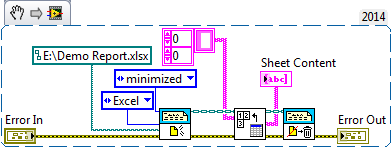
Well, keeping Excel hidden is as simple as wiring "Minimized" to the Window State input of New Report. However, looking at the rest of your code, I'm entirely confused about what you are doing and why. My guess is that is you said clearly what you wanted to do, you could accomplish this much more simply than what you are showing. Give me a hint ...
Bob Schor
em 07-06-2015 06:45 PM
- Marcar como novo
- Favorito
- Inscrever-se
- Emudecer
- Inscrever-se no RSS Feed
- Realçar
- Imprimir
- Relatar conteúdo como inapropriado
I am gathering information from a csv file downloaded from the internet and plugging this information into into specific cells in an Excel spreadsheet. Then through the magic of macros, formulas are applied and the remainder of the fields are filled in. I want to do this with Excel hidden, or minimized, or whatever. I don't want to see Excel, just my front panel with the information filled in. I have done this years ago before I had a Report Generator Toolkit, but over time my vi's got lost. I tried what you mentioned with the minimized state, but for some reason it didn't work.
Bob_Schor
em 07-06-2015 08:40 PM
- Marcar como novo
- Favorito
- Inscrever-se
- Emudecer
- Inscrever-se no RSS Feed
- Realçar
- Imprimir
- Relatar conteúdo como inapropriado
rlemoine002 wrote:
I am gathering information from a csv file downloaded from the internet and plugging this information into into specific cells in an Excel spreadsheet. Then through the magic of macros, formulas are applied and the remainder of the fields are filled in. I want to do this with Excel hidden, or minimized, or whatever. I don't want to see Excel, just my front panel with the information filled in. I have done this years ago before I had a Report Generator Toolkit, but over time my vi's got lost. I tried what you mentioned with the minimized state, but for some reason it didn't work.
Well, it seems to me that if you already have an Excel Workbook that has the formulas in place, waiting only for some data (obtained from a .csv file to be inserted into specified cells. I can't guarantee anything, but I'll bet a dime I could use the RGT more-or-less as I outlined and make this work. Are you willing to risk a dime?
Bob Schor
em 07-07-2015 11:39 AM
- Marcar como novo
- Favorito
- Inscrever-se
- Emudecer
- Inscrever-se no RSS Feed
- Realçar
- Imprimir
- Relatar conteúdo como inapropriado
Hey, hey. You're so helpful that I'll go 2 dimes. Maybe even throw in another nickle if it works out.
That is my ultimate goal.
Thank you so much.
Bob_Schor
em 07-07-2015 03:53 PM
- Marcar como novo
- Favorito
- Inscrever-se
- Emudecer
- Inscrever-se no RSS Feed
- Realçar
- Imprimir
- Relatar conteúdo como inapropriado
Check your Private Messages in the Forum.
BS
em 07-10-2015 08:35 PM
- Marcar como novo
- Favorito
- Inscrever-se
- Emudecer
- Inscrever-se no RSS Feed
- Realçar
- Imprimir
- Relatar conteúdo como inapropriado
Thank you so much for your effort. It was quite a learning experience for me.
Bob_Schor
em 07-11-2015 01:46 PM
- Marcar como novo
- Favorito
- Inscrever-se
- Emudecer
- Inscrever-se no RSS Feed
- Realçar
- Imprimir
- Relatar conteúdo como inapropriado
If anyone is curious as to the solution, it was, in fact, the step mentioned in my first reply. Here, for example, is a routine that reads in an entire Worksheet as a 2-D array of strings, running Excel minimized (which takes much less time) ... Note, also, that this also shows that the RGT works with the new(er) .xlsx Excel format (which I recommend over .xls).
Bob Schor
