- Subscribe to RSS Feed
- Mark Topic as New
- Mark Topic as Read
- Float this Topic for Current User
- Bookmark
- Subscribe
- Mute
- Printer Friendly Page
green arrow on loop timer
Solved!
 alex8624
04-29-2021 05:19 AM
- Mark as New
- Bookmark
- Subscribe
- Mute
- Subscribe to RSS Feed
- Permalink
- Report to a Moderator
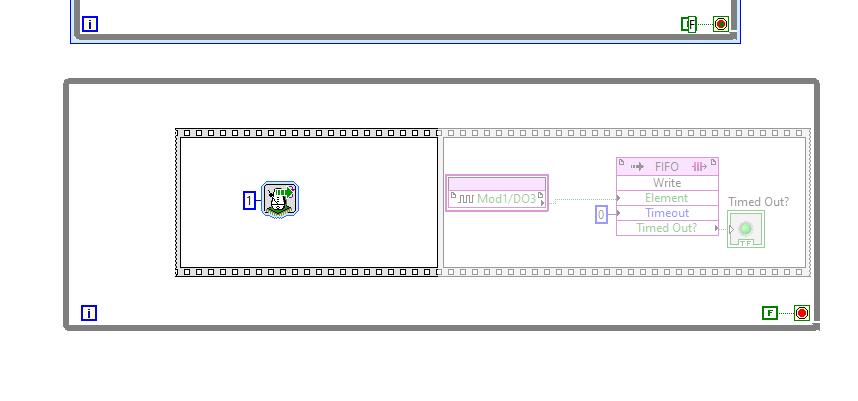
Hi! when I try to do an "highlight execution" to try to debug the vi, I find that a green arrow shows up in the loop timer.. I was reading in the forum, and from what I understood it is because there is an error, it's stacked there.. is there a way to solve it? I attach the vi, and the image of the arrow.
Solved! Go to Solution.

 paul_cardinale
04-29-2021 05:58 AM
- Mark as New
- Bookmark
- Subscribe
- Mute
- Subscribe to RSS Feed
- Permalink
- Report to a Moderator
The green arrow just means that it's running (i.e. has been called, but hasn't finished yet).
05-01-2021 05:54 AM
- Mark as New
- Bookmark
- Subscribe
- Mute
- Subscribe to RSS Feed
- Permalink
- Report to a Moderator
but it should only take 1ms to complete and it stay so forever; and it stay stacked even if I run it without highlight execution.. I cant understand why

 RavensFan

05-01-2021 10:43 AM
- Mark as New
- Bookmark
- Subscribe
- Mute
- Subscribe to RSS Feed
- Permalink
- Report to a Moderator
"Stacked"? Do you mean "stuck"?
Did you delete it and try to add it again?

 Yamaeda
05-03-2021 03:44 AM
- Mark as New
- Bookmark
- Subscribe
- Mute
- Subscribe to RSS Feed
- Permalink
- Report to a Moderator
I can imagine it's some "wait on ms" and with highlight it's actually too slow so it gets tricked into waiting forever? But it's a guess. Does it work in normal mode?

