- Subscribe to RSS Feed
- Mark Topic as New
- Mark Topic as Read
- Float this Topic for Current User
- Bookmark
- Subscribe
- Mute
- Printer Friendly Page
file diallog pattern
Solved!
 pawhan11
02-28-2012 05:25 PM
- Mark as New
- Bookmark
- Subscribe
- Mute
- Subscribe to RSS Feed
- Permalink
- Report to a Moderator
Hello
I have filenames in format: y%m%d%H%M%S.jpg like 121102223344.jpg
I want to write pattern that will allow me to see only files writen only this format when I set path
I tried in that way

but I don't see resultats....
Is there a way to do that??
Any suggestions appreciated
Solved! Go to Solution.
 hecmar.arreola
02-28-2012 06:02 PM
- Mark as New
- Bookmark
- Subscribe
- Mute
- Subscribe to RSS Feed
- Permalink
- Report to a Moderator
You are expecting more than what you will get. The only wildcard characters you can use are "?" and "*". For more information, see the help file for the File Dialog.
The best you can do with the file name you have choosen to go with is *.jpg to just show jpg files. If your files were something like 12345664324-pawhan11.jpg you could do something like *-pawhan11.jpg and then the file dialog box would only show files with that "-pawhan11.jpg" suffix.
02-28-2012 06:32 PM - edited 02-28-2012 06:33 PM
- Mark as New
- Bookmark
- Subscribe
- Mute
- Subscribe to RSS Feed
- Permalink
- Report to a Moderator
Yes, I know that
so maybe there is way to view files only with xxx.jpg where x is random number??
filename length is for example 3 and all strings are numbers.
02-29-2012 03:04 AM
- Mark as New
- Bookmark
- Subscribe
- Mute
- Subscribe to RSS Feed
- Permalink
- Report to a Moderator
Seems that I made that, but in "brutal" way:
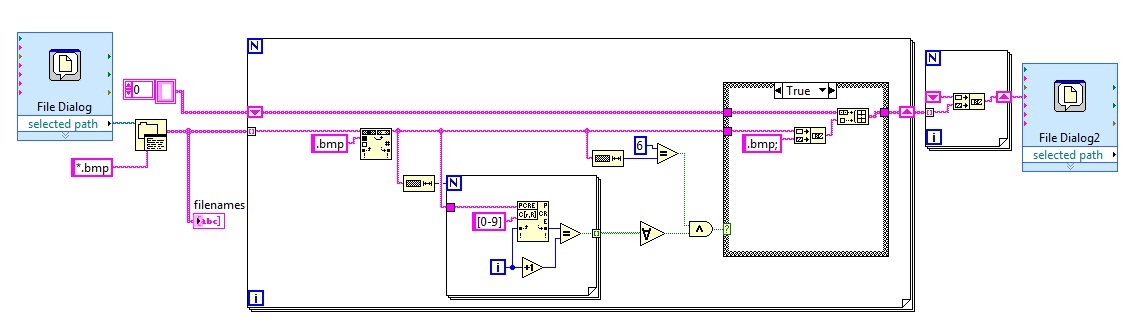
But is there a elegant way to do that?
hecmar.arreola
02-29-2012 09:35 AM
- Mark as New
- Bookmark
- Subscribe
- Mute
- Subscribe to RSS Feed
- Permalink
- Report to a Moderator
I think that may be your only way because LabVIEW ultimatly relys on the OS API for the file dialog and that is where the limitation exists. You would need to add every filename you want to the pattern seperated by ";" in order to only show those files. I think your solution is elegant. If you wanted to take it a step further, I think you would have to re-create the file dialog box in LabVIEW and not rely on the API (but I'm not sure I would call that elegant).
