ni.com is currently undergoing scheduled maintenance.
Some services may be unavailable at this time. Please contact us for help or try again later.
- Subscribe to RSS Feed
- Mark Topic as New
- Mark Topic as Read
- Float this Topic for Current User
- Bookmark
- Subscribe
- Mute
- Printer Friendly Page
drag simultaneously multiple waveform chart scroll bar
Solved!
 vinagres
03-07-2014 01:09 PM
- Mark as New
- Bookmark
- Subscribe
- Mute
- Subscribe to RSS Feed
- Permalink
- Report to a Moderator
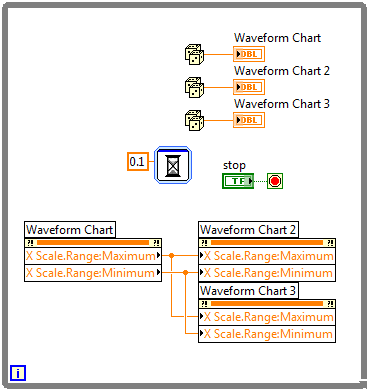
I have multiple signal that come from the same source and I want to plot on separated waveform charts as on the example that i attached, So far all good, but I would like to be able to use a single scroll bar to scroll all the charts simultaneously in order to compare the values, I have been searching the forums but cant find the way of doing it. Any suggestions? thanks
Solved! Go to Solution.

 kbbersch
03-07-2014 01:33 PM
- Mark as New
- Bookmark
- Subscribe
- Mute
- Subscribe to RSS Feed
- Permalink
- Report to a Moderator
This does the job I think.
Certified LabVIEW Developer
Kudos are always welcome
03-07-2014 01:49 PM
- Mark as New
- Bookmark
- Subscribe
- Mute
- Subscribe to RSS Feed
- Permalink
- Report to a Moderator
The information on the other graphs are a bit flickery, not so smooth as is on the waveform chart that controls the others, but for what i need it more than enough, Thanks
kbbersch
03-07-2014 02:02 PM
- Mark as New
- Bookmark
- Subscribe
- Mute
- Subscribe to RSS Feed
- Permalink
- Report to a Moderator
Try wiring the X Scale.Range.Start property as well and see if that helps.
Certified LabVIEW Developer
Kudos are always welcome
