ni.com is currently undergoing scheduled maintenance.
Some services may be unavailable at this time. Please contact us for help or try again later.
- Subscribe to RSS Feed
- Mark Topic as New
- Mark Topic as Read
- Float this Topic for Current User
- Bookmark
- Subscribe
- Mute
- Printer Friendly Page
daqmx simulated digital input
Solved!
 DennisW
06-08-2015 05:11 PM
- Mark as New
- Bookmark
- Subscribe
- Mute
- Subscribe to RSS Feed
- Permalink
- Report to a Moderator
I'm having trouble using the simulated digital input feature.
I create a simulated digital input in MAX - a simulated NI PCI-6534, single channel, port 0/line 0, acquisition mode is 1 Sample (On Demand)
When I click the "run" button I see the indicator flash on and off as I would expect.
However, when I bring this task in to LbView, I can't get the indicator to flash no matter what I've tried.
No doubt I've missed some basic concept. Can anyone tell me what I'm doing wrong?
(VI attached).
Solved! Go to Solution.

 fromm8
06-09-2015
11:03 AM
- last edited on
10-17-2025
03:49 PM
by
 Content Cleaner
- Mark as New
- Bookmark
- Subscribe
- Mute
- Subscribe to RSS Feed
- Permalink
- Report to a Moderator
Hello DennisW
We cannot reproduce the issue since you are referecing a task configured in MAX and you just sent a VI.
However, if your task is working in MAX, you could use a DAQ assistant in LabVIEW using the same configuration as in MAX.
Using the DAQ Assistant to Automatically Generate LabVIEW Code
Regards
Frank R.
06-09-2015 01:16 PM
- Mark as New
- Bookmark
- Subscribe
- Mute
- Subscribe to RSS Feed
- Permalink
- Report to a Moderator
But I did give the steps I took to create the simulated digitial input - NI PCI-6534, single channel, port 0/line 0, acquisition mode is 1 Sample (On Demand)
It should take just a few clicks in MAX to create it.
I don't understand why it would work differently than using the DAQmx assistant, since the set-up is the same.
Using LabView 2014 32-bit, DAQmx 14.0 on Windows 7 64-bit.

 crossrulz

06-09-2015 01:57 PM - edited 06-09-2015 01:57 PM
- Mark as New
- Bookmark
- Subscribe
- Mute
- Subscribe to RSS Feed
- Permalink
- Report to a Moderator
You do not have N channels, you have 1 channel. Use the appropriate DAQmx Read version.

There are only two ways to tell somebody thanks: Kudos and Marked Solutions
Unofficial Forum Rules and Guidelines
"Not that we are sufficient in ourselves to claim anything as coming from us, but our sufficiency is from God" - 2 Corinthians 3:5
06-09-2015 03:33 PM
- Mark as New
- Bookmark
- Subscribe
- Mute
- Subscribe to RSS Feed
- Permalink
- Report to a Moderator
OK, tried that, no difference

 John_P1
06-09-2015 03:39 PM
- Mark as New
- Bookmark
- Subscribe
- Mute
- Subscribe to RSS Feed
- Permalink
- Report to a Moderator
Try starting the task explicitly before the loop (and clearing the task after the loop):
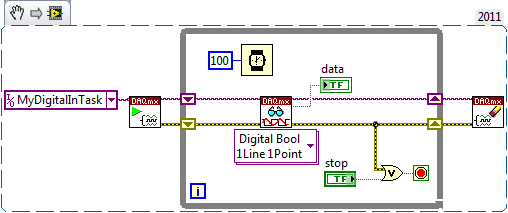
Best Regards,

 Bob_Schor
06-09-2015 03:46 PM
- Mark as New
- Bookmark
- Subscribe
- Mute
- Subscribe to RSS Feed
- Permalink
- Report to a Moderator
This worked for me ...
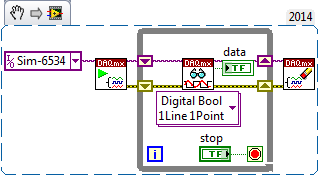
Bob Schor
06-09-2015 03:48 PM
- Mark as New
- Bookmark
- Subscribe
- Mute
- Subscribe to RSS Feed
- Permalink
- Report to a Moderator
Makes sense! Works too.
Thanx!
