- Subscribe to RSS Feed
- Mark Topic as New
- Mark Topic as Read
- Float this Topic for Current User
- Bookmark
- Subscribe
- Mute
- Printer Friendly Page
custom shortcut menu via a remote panel

 baldrik
02-26-2007 11:14 AM
- Mark as New
- Bookmark
- Subscribe
- Mute
- Subscribe to RSS Feed
- Permalink
- Report to a Moderator

02-27-2007 06:32 PM
- Mark as New
- Bookmark
- Subscribe
- Mute
- Subscribe to RSS Feed
- Permalink
- Report to a Moderator
Hi baldrik,
Here is a message from edmund blackadder:
"Please attach a sample VI that demonstrates the problem and specify what version of LabVIEW and OS you are using."
Best regards,
02-28-2007 09:25 AM
- Mark as New
- Bookmark
- Subscribe
- Mute
- Subscribe to RSS Feed
- Permalink
- Report to a Moderator
Thank you for the kind reply, I fear you are not the real BlackAdder, as he is not so kind to me.
He is my boss and refuses to have PC's in the Lab.
I had a cunning plan and snuck one in, in the guise of a brand new intel Mac Pro.
This trojan PC is the server and runs windows XP under bootcamp, The client is a ppc PowerBook running OSX 10.4.8.
LabVIEW version 8.2 is installed on both machines.
In wiring the demonstration VI I noticed the same behaviour remotely connecting from the server so it is not an OS dependant thing.
To add the remote conection submenu it appears LabView has killed my menu.
In the application my menu is generated dynamicly and the selection is entered into the listbox, it varies depending one the entry the user clicks.
baldrik.
02-28-2007 09:27 AM
- Mark as New
- Bookmark
- Subscribe
- Mute
- Subscribe to RSS Feed
- Permalink
- Report to a Moderator
03-05-2007 10:23 PM
- Mark as New
- Bookmark
- Subscribe
- Mute
- Subscribe to RSS Feed
- Permalink
- Report to a Moderator
So am I to assume there is no solution, or that I am impatient?
03-06-2007 07:13 PM
- Mark as New
- Bookmark
- Subscribe
- Mute
- Subscribe to RSS Feed
- Permalink
- Report to a Moderator
Hey Baldrik,
Blackadder was busy with his cunning schemes against Lord Percy Percy. However, he promises to look into the matter ASAP and get back to you.
03-06-2007 08:10 PM - edited 03-06-2007 08:10 PM
- Mark as New
- Bookmark
- Subscribe
- Mute
- Subscribe to RSS Feed
- Permalink
- Report to a Moderator
Hello Baldrik,
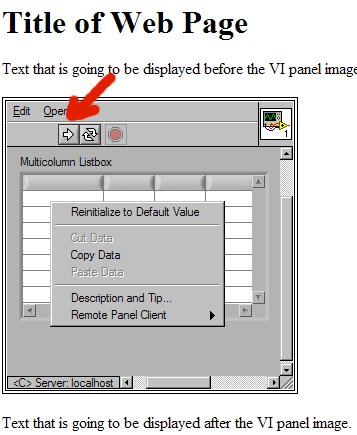
Blackadder used the big thing between his ears (his nose) to demistify your problem. Everything worked great on his end. Just make sure you first take control over the application from the browser and that the application is still running. You can add a while loop around your Event Structure to keep the application running. The only time Blackadder saw the default shortcut menu was when the application was not running. Check out the attached screenshots.

Message Edited by Kalin T on 03-06-2007 08:13 PM


03-07-2007 04:33 AM - edited 03-07-2007 04:33 AM
- Mark as New
- Bookmark
- Subscribe
- Mute
- Subscribe to RSS Feed
- Permalink
- Report to a Moderator
Now the thing is turnip does seem to work from a Browser. And this maybe be a work around. But what I would like to do is run it as a remote panel without a browser. As in Operate->Connect to Remote Panel. can you get turnip to run like that?
I am starting to hope that it is a server config thing.

baldrik
Message Edited by baldrik on 03-07-2007 04:36 AM

03-08-2007 11:49 AM - edited 03-08-2007 11:49 AM
- Mark as New
- Bookmark
- Subscribe
- Mute
- Subscribe to RSS Feed
- Permalink
- Report to a Moderator
Hello Baldrik,
Please forgive Blackadder for misunderstanding you. Blackadder was able place the VI on another PC. Then he connected to it by using Operate»Remote Panel. And the user-defined shortcut menu showed up again. Blackadder is using Windows XP machines as both the server and the client. He will try to test on a MAC and/or a linux machine.

Message Edited by Kalin T on 03-08-2007 11:51 AM

03-08-2007 04:42 PM
- Mark as New
- Bookmark
- Subscribe
- Mute
- Subscribe to RSS Feed
- Permalink
- Report to a Moderator
I have not been able to test it with a PC as client. I hope that it is just some strange configuration I have and not the fact that the client is a MAC.
Thanks again.
baldrik.
