- Subscribe to RSS Feed
- Mark Topic as New
- Mark Topic as Read
- Float this Topic for Current User
- Bookmark
- Subscribe
- Mute
- Printer Friendly Page
custom camera angle for 3D graph

 julienAu
09-25-2014 03:57 AM
- Mark as New
- Bookmark
- Subscribe
- Mute
- Subscribe to RSS Feed
- Permalink
- Report to a Moderator
Hello everybody,
I'm currently using 3D Surface to plot data points. In 3D Plot Properties (from right clic on the graph / Front Panel), I can create a User Defined View. But I can't succeed in creating the view I want... there are three cursors:
- Latitude
- Longitude
- Distance
For my application, I need one more... like cursors X, Y, Z, and distance.
I tried this:
- Right-clic on the Surface Object (in diagram)
- create Invoke Node / Get Picture Control Ref
- wire invoke nodes & property nodes to this reference
But I don't know how to use these properties and methods. I tried many things but I don't achieve anything.
Does someone already use these properties and method ?
Julien

09-26-2014 09:31 AM
- Mark as New
- Bookmark
- Subscribe
- Mute
- Subscribe to RSS Feed
- Permalink
- Report to a Moderator
Hello,
In my point of view, you have two ways to create more cursors, the first one is to click rignt in the 3D graph, select CWGraph3D, select properties
This window appears and you can add or delete cursors as you want :
This m
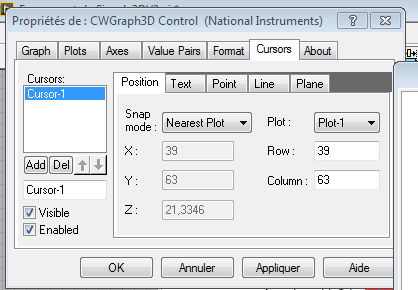
The other option is to use a mehode node to create custom cursor like the VI bellow.
If you have some question, ask me.
Best Regards,
10-01-2014 03:38 AM
- Mark as New
- Bookmark
- Subscribe
- Mute
- Subscribe to RSS Feed
- Permalink
- Report to a Moderator
thanks for your reply !
However, you explain how to use CWGraph3D Control. I wanted to use another control:
I saw 3 different controls for plotting 3D data:
- ActiveX 3D Surface Graph (in Classic / Classic Graph in controls palette )
- 3D Surface Graph (in Modern/Graph/3D Graph in controls palette )
- Surface (in Modern/Graph/3D Graph in controls palette )
The one I wanted to control was the third. But maybe the best way for my application is to use the first or the second one.
Does anyone know where I can find documentation about differences between these controls ? I know there is a documentation in which you can find functionnalities of each control. But in terms of performance, memory use or things like that, is there some informations ?
PS: sorry to deviate a little from the subject. If it's a real problem, i'll create a new post...
10-01-2014 11:26 AM
- Mark as New
- Bookmark
- Subscribe
- Mute
- Subscribe to RSS Feed
- Permalink
- Report to a Moderator
Hello,
Plotting a surface and generating a cursors is not the same thing, but anayway.
I send you a new VI to show you how to plot a surface in Surface (in Modern/Graph/3D Graph in controls palette ) and 3D Surface Graph (in Modern/Graph/3D Graph in controls palette ).
In the Surface, you can directly define custom cursor : you just have to click right in Surface, select proprety of 3D draw or graph (sorry, I have a LabVIEW in french, and I don't know the exact translation in LabVIEW in english).
This windows appear :
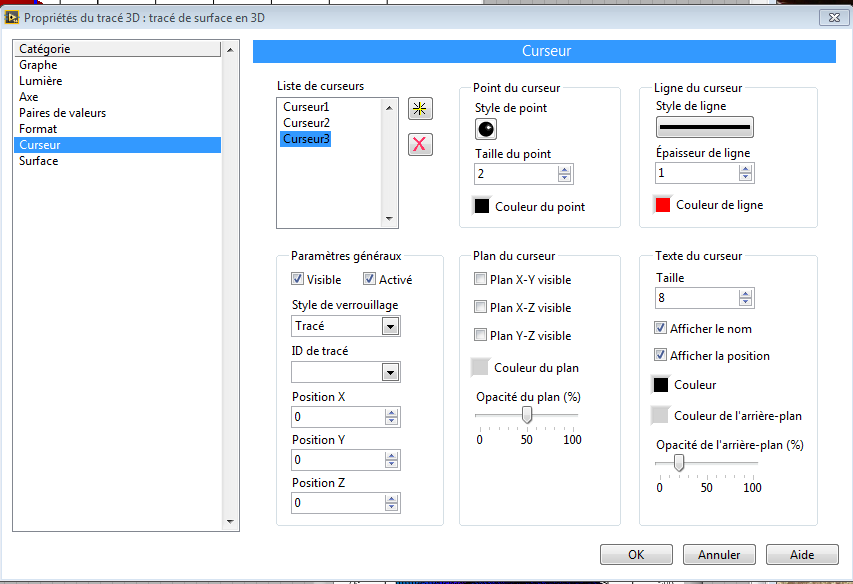
This window allow you to add, delete or configure cursor in the Surface.
Best Regards,
10-01-2014 11:28 AM
- Mark as New
- Bookmark
- Subscribe
- Mute
- Subscribe to RSS Feed
- Permalink
- Report to a Moderator
Sorry,
I have missed the VI.
Best regards,
10-02-2014 02:44 AM
- Mark as New
- Bookmark
- Subscribe
- Mute
- Subscribe to RSS Feed
- Permalink
- Report to a Moderator
Ooops... Maybe there is a little misunderstood. I don't want to create cursors on the graph. I know how to do it.
What I want is to modify the angle of the camera. I can set the longitude, lattitude and distance (you can set it with cursors in the property box). What I want is to set X angle, Y angle, and Z angle.
