- Subscribe to RSS Feed
- Mark Topic as New
- Mark Topic as Read
- Float this Topic for Current User
- Bookmark
- Subscribe
- Mute
- Printer Friendly Page
csv with double quotes
Solved!
 rCassani
03-24-2010 11:14 AM
- Mark as New
- Bookmark
- Subscribe
- Mute
- Subscribe to RSS Feed
- Permalink
- Report to a Moderator
Hello,
I've had harsh time trying to figure out how to read a csv file with double quotes, I need to read a csv file in order to fill a spreadsheet.
I attach a csv file example to show the sort of file I'm working on.
Thank you
Solved! Go to Solution.

 Darin.K
03-24-2010 12:54 PM
- Mark as New
- Bookmark
- Subscribe
- Mute
- Subscribe to RSS Feed
- Permalink
- Report to a Moderator
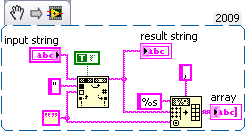
Search and Replace to ditch the quotes then Spreadsheet String to Array.
03-24-2010 05:40 PM
- Mark as New
- Bookmark
- Subscribe
- Mute
- Subscribe to RSS Feed
- Permalink
- Report to a Moderator
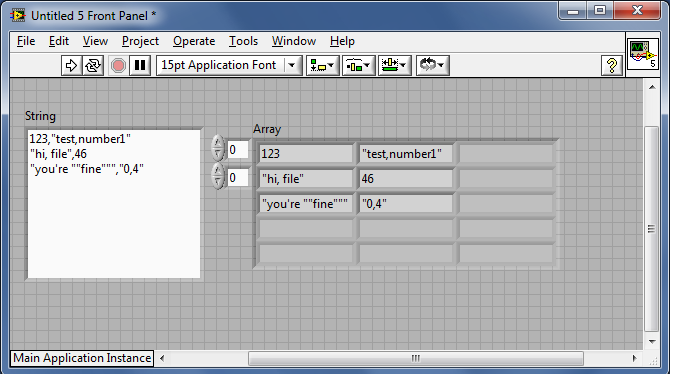
I already try that solution, but it doesn't work, because it just delete the double quoutes. If you open the csv test file with a spreadsheet application (for example Excel), you'll find that there are only two columns.

Darin.K
03-24-2010 08:55 PM
- Mark as New
- Bookmark
- Subscribe
- Mute
- Subscribe to RSS Feed
- Permalink
- Report to a Moderator
Upon closer inspection, you are right, it was a trick question. You need to look for commas that follow an even number of quotation marks for the separators. Since my previous snippet was not converted, I assume you have an earlier LV version so I have attached an example in 8.6. You can get rid of the quotes if you like (exercise for the reader).
03-26-2010 02:10 PM
- Mark as New
- Bookmark
- Subscribe
- Mute
- Subscribe to RSS Feed
- Permalink
- Report to a Moderator
By the time I read your reply I had a solution, but my vi is very involved; yours is simplier and easier to understand.
Thank you.

 NimbleThink
09-17-2010 06:01 PM
- Mark as New
- Bookmark
- Subscribe
- Mute
- Subscribe to RSS Feed
- Permalink
- Report to a Moderator
Could you possible post either the block diagram or the VI in version 7.1?
Thank you.
When I started programming in 1979 there weren't CSV files, however my recollection is that CSV files existed in the late 80's, which would have been around LabVIEW version 2.0, and I don't recall when Spreadsheet String to Array was introduced. It would be nice after 20 years of development and 10+ versions for CSV to be properly parsed...
Regards,
Leif Kirschenbaum
