- Subscribe to RSS Feed
- Mark Topic as New
- Mark Topic as Read
- Float this Topic for Current User
- Bookmark
- Subscribe
- Mute
- Printer Friendly Page
creating polynomial
Solved!
 jhatf008
02-04-2012 03:27 PM
- Mark as New
- Bookmark
- Subscribe
- Mute
- Subscribe to RSS Feed
- Permalink
- Report to a Moderator
Hello all,
I am working on a VI, and am stuck. How can I create a second order polynomial in general Ax^2+Bx+C, being able to use A,B and C as controls on the front panel. Sorry this may seem simple to most, as I am a newbie. I have tried using Mathscript as the simplist way, but it is not plotting correctly.
Please help
Solved! Go to Solution.

 johnsold
02-04-2012 03:42 PM
- Mark as New
- Bookmark
- Subscribe
- Mute
- Subscribe to RSS Feed
- Permalink
- Report to a Moderator
Mathscript is only simple for programmers more experienced with text-based languages than with LabVIEW.
For a quadratic I would probably just use the Add and Multiply primitives in the Numeric palette. For higher order polynomials or if you have an array of irregularly spaced x values use the Polynomial Evaluation.vi from Mathematics >> Polynomial (of all places!).
Lynn
02-04-2012 04:16 PM
- Mark as New
- Bookmark
- Subscribe
- Mute
- Subscribe to RSS Feed
- Permalink
- Report to a Moderator
I had looked through the polynomial functions in labview, but could not find much help with them. The problem with adding and multiplying is how can you set x as a constant to follow the graph? Maybe I am just over thinking this, or am missing something simple.
johnsold
02-04-2012 04:31 PM
- Mark as New
- Bookmark
- Subscribe
- Mute
- Subscribe to RSS Feed
- Permalink
- Report to a Moderator
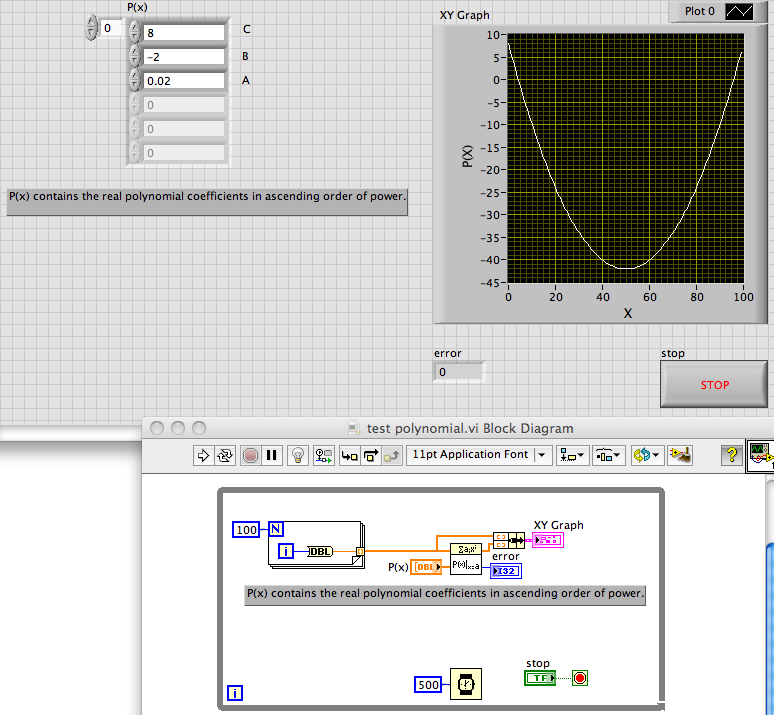
Here is a quick and dirty example.
Lynn
02-04-2012 04:34 PM
- Mark as New
- Bookmark
- Subscribe
- Mute
- Subscribe to RSS Feed
- Permalink
- Report to a Moderator
Maybe I should be a little more clear on what I want to accomplish, I want to create a second order polynomial (Ax^2+Bx+C). A,B,C and N, need to be controls on the front panel. Where N is the number of points I want it to plot of the interval of X_0 to X_N-1. Here is my block diagram so far, please offer your opinion on what to do next
02-04-2012 04:35 PM
- Mark as New
- Bookmark
- Subscribe
- Mute
- Subscribe to RSS Feed
- Permalink
- Report to a Moderator
Thank You very much, I see my mistakes
johnsold
02-04-2012 05:03 PM
- Mark as New
- Bookmark
- Subscribe
- Mute
- Subscribe to RSS Feed
- Permalink
- Report to a Moderator
Have you figured how to enter X_0 and X_N-1?
Lynn
