create shortcut folder in desktop
已解决!
 jeyanthi
Hi,
I can make installer using project explorer and i able to create a exe shortcut as destop as well. I also able to create folder automatically using the function Now i have a problem, Let say i have a folder in c:\\ called abc and i wana create a shortcut of this path at the destop . How to do this please help? PLZ URGENT thank u
已解决! 转到解答。
Hi Hu Yu,
Thanks ..but i need to create one whole folder as a shortcut in desktop..this command is workable for making exe shortcut..Please post me if u got any example of creating a folder as shortcut..please

 huyu
huyu
Well, I've tried this out:
The shortcut.exe was downloaded form here,
it maybe a little different, but you can run shortcut in CMD to get a help
the command to create a shortcut 1234.lnk under C:\, which point to folder 1234 under D:\ is as below
<Shortcut.exe Path>shortcut /F:"C:\1234.lnk" /A:c /T: D:\1234
<Shortcut.exe Path>The command completed successfully.
Hu Yu
huyu
In all versions of LabVIEW
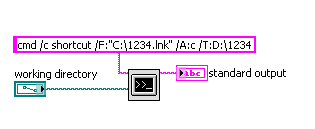
Note there is no space between /T: and D:. I placed one just to avoid the emotion icon, which may be displayed as /T:D:
Hu Yu
huyu
I do think you can solve the "how to copy to desktop" question easily by looking into Functions->Programming->File I/O->Advanced File Functions or just use a COPY command inSystem Exec.vi
Hu Yu
Dear Hu Yu,
Thanks for ur guidance. Actually i dont have .Ink file. I have a folder in c: called ABC..c:\ABC. Now i want to create a Ink for the folder automatically and to be placed in the desktop . How tis can been done? Plz help thank u
 Guruthilak
Jeyanthi,
What word you didnt understood in the message posted by "huyu"
the command to create a shortcut 1234.lnk under C:\, which point to folder 1234 under D:\ is as below
<Shortcut.exe Path>shortcut /F:"C:\1234.lnk" /A:c /T:D:\1234
<Shortcut.exe Path>The command completed successfully.
Why i say this because ,i coud run the same sucesfully see the image attached.

Just in case if you havent understood, the "C:\1234.lnk" is the "path" of the shortcut file and "1234" is the "name" of the shortcut file (this file gets generated automatically and you just have to specify the name and the path)
"D:\1234" is the "folder path" to which you would like to assign or create the shortcut. Hope you get it.
Also the <Shortcut.exe Path> is the "path" where you have downloaded and stored the "Shortcut.exe" in your local machie
In the above example i have created the shortcut for the folder "1" in "C:\" drive with the shortcut name as "4" in "c:\"
Guru (CLA)
