- Subscribe to RSS Feed
- Mark Topic as New
- Mark Topic as Read
- Float this Topic for Current User
- Bookmark
- Subscribe
- Mute
- Printer Friendly Page
- « Previous
-
- 1
- 2
- Next »
continuous real time spatial resolution
Solved!

03-06-2017 07:41 AM
- Mark as New
- Bookmark
- Subscribe
- Mute
- Subscribe to RSS Feed
- Permalink
- Report to a Moderator
sorry for frustrating you.
i did like what you said, but i can't see anything on the intensity graph, also i added 2D array to check if there's any data go through RAS but no respond.
check the attachment please.
i believe i did something wrong

 cbutcher

03-06-2017 08:43 AM
- Mark as New
- Bookmark
- Subscribe
- Mute
- Subscribe to RSS Feed
- Permalink
- Report to a Moderator
It's absolutely not a problem - sorry if I sounded frustrated!
You're pretty close but you need the 1D array wired as the input (the thinner orange line, also wired as an input to your indicator with the large, spaced out name) and the indices are a little bit wrong, but currently I don't have LabVIEW available so I can't check properly, but the documentation looks like removing the 15 constant should do the trick.
03-06-2017 08:51 AM
- Mark as New
- Bookmark
- Subscribe
- Mute
- Subscribe to RSS Feed
- Permalink
- Report to a Moderator
i do understand your words, but assuming that 1D array connected to the new elements to RAS, that will break the line, cause they are two different dimensions.
i'm trying till now.
let me assume this scenario.
if i ticked the transpose array OFF from the intensity graph, this case the Z scale will move with time. but how can i fix the plotting area in the whole graph (X and Y) to be fixed over time.
cause my array now is saving the data during time. but the intensity graph don't change after the first count (4x4) as i ticked the transpose array on (make it fixed to the plotting area).
i'm trying to find something like Node property or Invoke to find out how to make it.
Thanks for your time many times
cbutcher
03-06-2017 09:26 AM
- Mark as New
- Bookmark
- Subscribe
- Mute
- Subscribe to RSS Feed
- Permalink
- Report to a Moderator
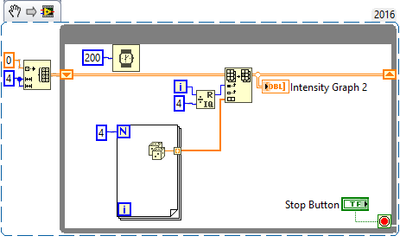
I'm adding a VI Snippet that hopefully shows what I mean - I tested it with random numbers and it seems to work.
As far as I can see, transpose array should only affect which direction it is filled in, which is probably important for you to see a graph that represents the same physical space as your sensors, but shouldn't affect the ability of the VI to run.
Let me know if this doesn't help and I'll take a better look tomorrow when I have LabVIEW on a computer that isn't TeamViewer far away!

03-07-2017 02:41 AM
- Mark as New
- Bookmark
- Subscribe
- Mute
- Subscribe to RSS Feed
- Permalink
- Report to a Moderator
1D array wired as the input
you can't do that, as they are from different dimensions.
however, the output array is saving data with time, but the intensity graph still drawing the first iteration and stop, and that what frustrating me.
check the pictures please.
when i connect the 1D array, the VI will be broken

 cbutcher
03-07-2017 02:52 AM
- Mark as New
- Bookmark
- Subscribe
- Mute
- Subscribe to RSS Feed
- Permalink
- Report to a Moderator
Hi - sorry this still isn't working for you.
Please try connecting the Replace Array Subset (RAS) node like in the VI Snippet I posted - with the 2D Array on the shift register as the top input, and the 1D array from the VISA Read and format as the 'new element/subarray' bottom input. That way, the output is a 2D array and can be wired to the indicator.
03-07-2017 03:01 AM
- Mark as New
- Bookmark
- Subscribe
- Mute
- Subscribe to RSS Feed
- Permalink
- Report to a Moderator
still breaking down

03-07-2017 03:03 AM
- Mark as New
- Bookmark
- Subscribe
- Mute
- Subscribe to RSS Feed
- Permalink
- Report to a Moderator
I deleted the index column (15)
it worked .
Thank you
cbutcher
03-07-2017 03:06 AM
- Mark as New
- Bookmark
- Subscribe
- Mute
- Subscribe to RSS Feed
- Permalink
- Report to a Moderator
Guess message 12 was the solution then!
Glad to hear it worked out in the end.
- « Previous
-
- 1
- 2
- Next »
