- Subscribe to RSS Feed
- Mark Topic as New
- Mark Topic as Read
- Float this Topic for Current User
- Bookmark
- Subscribe
- Mute
- Printer Friendly Page
conditional case

 heang
heang
04-11-2008 10:41 AM
- Mark as New
- Bookmark
- Subscribe
- Mute
- Subscribe to RSS Feed
- Permalink
- Report to a Moderator
Here i need help of making vi of conditonal case.
I have 2 input. first input A and input B(digital line),may it be represented by boolean control. it has 2 possible condition that might happen. Both A and B are normally OFF.
first case -- initially A will be ON first, then B on. The output i need is that the final output (Boolean indicator), will be set to ON as soon as A set to be ON, and OFF as long as B set to ON.
second case -- Initially A will be ON, then A off, after then B set to ON. The output i need is that the final output set to ON as soon as A set to be on, and remain on before B set to ON. Even though A set to off before B set to ON, the output remain ON.
It might be hard to be explained in text. Here i attach with the State ON-OFF state diagram. The output will follow the red-green indicator as shown in the diagram.


 TWGomez
04-11-2008 11:12 AM
- Mark as New
- Bookmark
- Subscribe
- Mute
- Subscribe to RSS Feed
- Permalink
- Report to a Moderator
Both of the diagrams really show the same thing....Output true when A comes ON until B comes ON.
In that case
if ((A==true) && (B==true)) return true; else return false;
If there is more to it I am not getting it from your explanations.
Use the rating system, otherwise its useless; and please don't forget to tip your waiters!
using LV 2010 SP 1, Windows 7
________________________________________________________

04-11-2008 11:47 AM
- Mark as New
- Bookmark
- Subscribe
- Mute
- Subscribe to RSS Feed
- Permalink
- Report to a Moderator
After doing these vi, i find that it only follow the first case, however, the 2nd case it doesnt happen to result the real output that i wish to get.
the output B will happen only A trigger is trigger to ON state.
How can i do it?
thanks
TWGomez
04-11-2008 11:53 AM - edited 04-11-2008 11:57 AM
- Mark as New
- Bookmark
- Subscribe
- Mute
- Subscribe to RSS Feed
- Permalink
- Report to a Moderator
I just dont understand what your second case is...If A and B are ON then output true? otherwise false?
You should be able to use that example of boolean logic to do what you want....
Do you need a single VI to hndle both cases???
Message Edited by TWGomez on 04-11-2008 11:57 AM
Use the rating system, otherwise its useless; and please don't forget to tip your waiters!
using LV 2010 SP 1, Windows 7
________________________________________________________
04-11-2008 12:35 PM
- Mark as New
- Bookmark
- Subscribe
- Mute
- Subscribe to RSS Feed
- Permalink
- Report to a Moderator
here the result output i wish to get
Another saying of the desire output is
If input A is set to ON, then it will trigger a timer(representation of input B). Only the timer finish running, the output will be OFF , regardless of whether the input A is ON or OFF.

 RavensFan

04-11-2008 01:07 PM - edited 04-11-2008 01:10 PM
- Mark as New
- Bookmark
- Subscribe
- Mute
- Subscribe to RSS Feed
- Permalink
- Report to a Moderator
Message Edited by Ravens Fan on 04-11-2008 02:10 PM
04-11-2008 06:53 PM
- Mark as New
- Bookmark
- Subscribe
- Mute
- Subscribe to RSS Feed
- Permalink
- Report to a Moderator
sorry can you convert it to labview 7.1?or can you pls print screen that block diagram so that i can browse it?
thanks
RavensFan
04-11-2008 09:44 PM - edited 04-11-2008 09:45 PM
- Mark as New
- Bookmark
- Subscribe
- Mute
- Subscribe to RSS Feed
- Permalink
- Report to a Moderator

Message Edited by Ravens Fan on 04-11-2008 10:45 PM
![Latching%20Trigger1[1]_BD.png 11 KB](/ni/attachments/ni/170/315773/1/Latching%2520Trigger1%5B1%5D_BD.png)
 tartan5
04-12-2008 07:32 AM - edited 04-12-2008 07:33 AM
- Mark as New
- Bookmark
- Subscribe
- Mute
- Subscribe to RSS Feed
- Permalink
- Report to a Moderator
Message Edited by tartan5 on 04-12-2008 08:33 AM
 tartan5
04-12-2008 08:02 AM
- Mark as New
- Bookmark
- Subscribe
- Mute
- Subscribe to RSS Feed
- Permalink
- Report to a Moderator
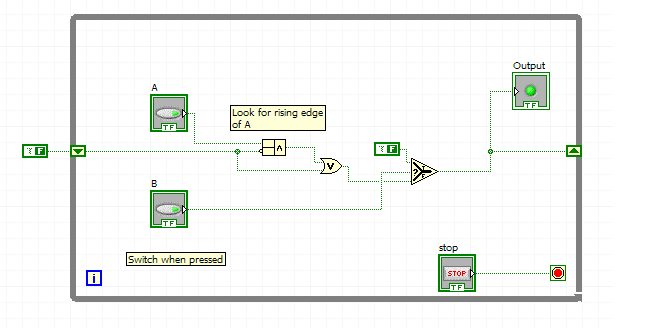
Note that if:
A and B off. A Turns On. Out turn on. B turns ON. Out turns Off. B Turns Off. Out turns ON.
This is from the sentance:
---- "first case -- initially A will be ON first, then B on. The output i need is that the final output (Boolean indicator), will be set to ON as soon as A set to be ON, and OFF as long as B set to ON."
This implies that as long as b is on the output is off, but when b turns off if A is still on then the output turns on.
Is this what you are looking for, or do you want A to stay off, or is it irrelevant?
