LabVIEW
- S'abonner au fil RSS
- Marquer le sujet comme nouveau
- Marquer le sujet comme lu
- Placer ce Sujet en tête de liste pour l'utilisateur actuel
- Ajouter cette question à mes {0}
- S'abonner
- Sourdine
- Page imprimable
combine Arduino and sound card in Labview

 iiiris...
le 03-14-2019 01:31 PM
- Marquer comme nouveau
- Ajouter ce message à mes {0}
- S'abonner
- Sourdine
- S'abonner au fil RSS
- Surligner ce Message
- Imprimer
- Signaler un contenu inapproprié
Hi,
I have a project that needs me to acquire signals by Arduino Uno and PC sound card. I have tested them and both of them work well separately. But when I want to put the two programs into one program, an error happens. It shows
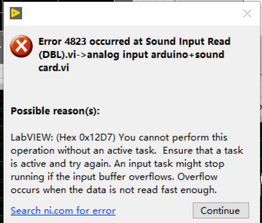
I don't know what's wrong and can't solve it. Can anybody help me?
Here is my file.

 RTSLVU
03-14-2019 04:24 PM - modifié 03-14-2019 04:30 PM
- Marquer comme nouveau
- Ajouter ce message à mes {0}
- S'abonner
- Sourdine
- S'abonner au fil RSS
- Surligner ce Message
- Imprimer
- Signaler un contenu inapproprié
LIFA has long since been deprecated and replaced with LINX
Since I do not have LIFA (or LINX) installed in LV2018 I disabled that part of your code and the ran the sound card capture section of your code by itself, and it runs fine for me.
Try replacing your LIFA code with LINX and see if it makes a difference.
=== Engineer Ambiguously ===
========================
le 03-14-2019 04:40 PM
- Marquer comme nouveau
- Ajouter ce message à mes {0}
- S'abonner
- Sourdine
- S'abonner au fil RSS
- Surligner ce Message
- Imprimer
- Signaler un contenu inapproprié
Thank you for your advice, but my supervisor asked me to use LIFA instead of LINX. So I have to do it only using LIFA.

 MichaelBalzer
le 03-15-2019 02:03 AM
- Marquer comme nouveau
- Ajouter ce message à mes {0}
- S'abonner
- Sourdine
- S'abonner au fil RSS
- Surligner ce Message
- Imprimer
- Signaler un contenu inapproprié
Try separating the Arduino code and the audio code into two separate loops. You mentioned both bits of code work on their own, so my best guess is that the sound card isn't being read fast enough, probably because the Arduino portion of code is running too slowly for the sound input read VI.
You could also try increasing the number of samples/ch when setting up the sound device (say 10k, 50k, or 100k), but I'd start with the separate loops first.

Unless otherwise stated, all code snippets and examples provided
by me are "as is", and are free to use and modify without attribution.
le 03-20-2019 05:00 AM
- Marquer comme nouveau
- Ajouter ce message à mes {0}
- S'abonner
- Sourdine
- S'abonner au fil RSS
- Surligner ce Message
- Imprimer
- Signaler un contenu inapproprié
Thank you for your advice! I have tried your method and found only if using the sampling frequency for both Arduino and sound card can work.
