- Subscribe to RSS Feed
- Mark Topic as New
- Mark Topic as Read
- Float this Topic for Current User
- Bookmark
- Subscribe
- Mute
- Printer Friendly Page
change default icon for new VI ?

 TiTou
TiTou
11-30-2006 11:18 AM - edited 11-30-2006 11:18 AM
- Mark as New
- Bookmark
- Subscribe
- Mute
- Subscribe to RSS Feed
- Permalink
- Report to a Moderator
When I open a new VI, it comes with the default icon here :

Is there a way to modify this default icon ? I assume the "untitled.vi" comes from a template, so if I can find this template and modify its icon then there I am..
But if so, where can I find this template ?
Thanks for any help 😉
Message Edité par TiTou le 11-30-2006 06:20 PM
We have two ears and one mouth so that we can listen twice as much as we speak.
Epictetus


 Jarrod_S.
11-30-2006 11:29 AM
- Mark as New
- Bookmark
- Subscribe
- Mute
- Subscribe to RSS Feed
- Permalink
- Report to a Moderator
C:\Program Files\National Instruments\LabVIEW X.X\templates
You wouldn't be able to launch it simply by navigating to File >> New VI, but it would show up in the templates dialog when you select File >> New. I have a feeling you know this already, but maybe someone will benefit from it!
National Instruments
11-30-2006 11:38 AM - edited 11-30-2006 11:38 AM
- Mark as New
- Bookmark
- Subscribe
- Mute
- Subscribe to RSS Feed
- Permalink
- Report to a Moderator
After all... isn't LabVIEW a product supposed to improve everyday life ?

Thanks anyway for your answer 😉
Message Edité par TiTou le 11-30-2006 06:38 PM
We have two ears and one mouth so that we can listen twice as much as we speak.
Epictetus
Jarrod_S.
11-30-2006 12:00 PM - edited 11-30-2006 12:00 PM
- Mark as New
- Bookmark
- Subscribe
- Mute
- Subscribe to RSS Feed
- Permalink
- Report to a Moderator
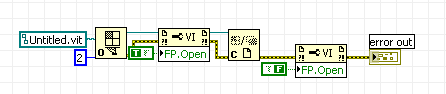
Message Edited by Jarrod S. on 11-30-2006 12:01 PM
National Instruments

 TCPlomp
11-30-2006 12:54 PM
- Mark as New
- Bookmark
- Subscribe
- Mute
- Subscribe to RSS Feed
- Permalink
- Report to a Moderator
OpenG has some documentation about this kind of stuf, it is not very clear. But it works I can tell:
LvDocEnvEventCallback
Ton
Nederlandse
 LabVIEW user groep www.lvug.nl
My LabVIEW Ideas
LabVIEW, programming like it should be!
