ni.com is currently undergoing scheduled maintenance.
Some services may be unavailable at this time. Please contact us for help or try again later.
- Subscribe to RSS Feed
- Mark Topic as New
- Mark Topic as Read
- Float this Topic for Current User
- Bookmark
- Subscribe
- Mute
- Printer Friendly Page
cRIO-9012 inconsistent IP settings
Solved!
 Daikataro
10-20-2016 01:05 PM
- Mark as New
- Bookmark
- Subscribe
- Mute
- Subscribe to RSS Feed
- Permalink
- Report to a Moderator
Greetings everyone! I have a RIO that I just can't seem to get to work. I wish to follow the getting started tutorial found in this document http://www.ni.com/pdf/manuals/372596b.pdf but can't seem to get past the mentioned error. I have already tried the solutions available in these forums including:
-Factory reset to default settings in safe mode
-Assigning static IP to the controller
-Using dynamic IP settings
-Performing a DIP switch IP reset
But yet, I cannot expand the device in MAX to select the software tab to install the required drives for communication. Any idea why I cannot do so?
Solved! Go to Solution.

10-21-2016 05:01 PM
- Mark as New
- Bookmark
- Subscribe
- Mute
- Subscribe to RSS Feed
- Permalink
- Report to a Moderator
Take a look at this document http://digital.ni.com/public.nsf/allkb/A0F6EFF8A33578948625749C006DEC3B
What version of NI-System configuration do you currently have? If it is NI System Configuration 16.0 please try installing this patch http://www.ni.com/download/ni-system-configuration-16.0.1/6412/en/
Regards.

 natasftw
10-22-2016 10:37 AM
- Mark as New
- Bookmark
- Subscribe
- Mute
- Subscribe to RSS Feed
- Permalink
- Report to a Moderator
What IP and subnet are showing on the cRIO?
What IP and subnet are you showing for your PC?
10-25-2016 08:18 AM
- Mark as New
- Bookmark
- Subscribe
- Mute
- Subscribe to RSS Feed
- Permalink
- Report to a Moderator
Thanks everyone, IP for RIO is 172.16.18.3 (static) and my own is 172.16.18.4. Subnet is 255.255.255.0 for both. Maybe some screenshots will help:

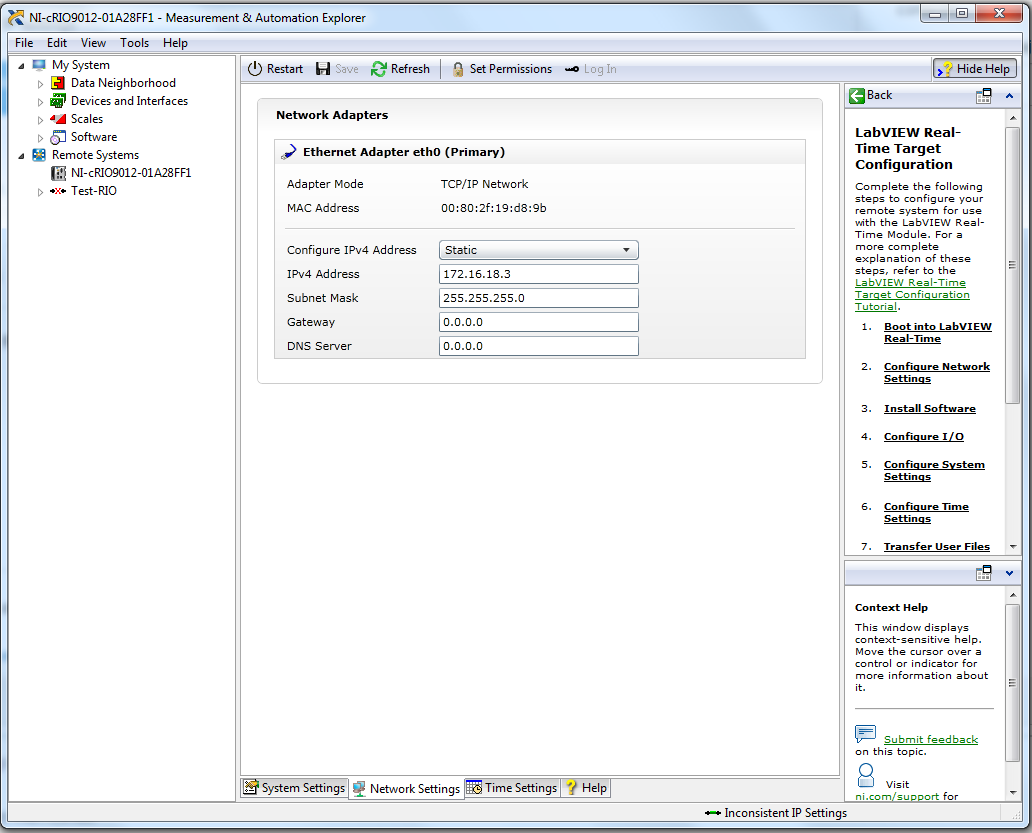
I have followed the solution steps in the whitepaper with no results whatsoever. So far I can:
-Perform a hard reset
-Format disk
-IP reset
I can ping to the RIO, access the hard drive and even enter ftp via cmd, but I still get the inconsistent IP settings error, and cannot expand the device to install the required drives for LV communication. Any more suggestions?
10-25-2016 01:48 PM
- Mark as New
- Bookmark
- Subscribe
- Mute
- Subscribe to RSS Feed
- Permalink
- Report to a Moderator
@DonhJoe wrote:Take a look at this document http://digital.ni.com/public.nsf/allkb/A0F6EFF8A33578948625749C006DEC3B
What version of NI-System configuration do you currently have? If it is NI System Configuration 16.0 please try installing this patch http://www.ni.com/download/ni-system-configuration-16.0.1/6412/en/
Regards.
Well, that seems to have done the trick! At least halfway. Here's what I did
-Installed the update
-Restarted computer
-Reset MAX data (Tools >> Reset configuration data)
-Allowed MAX to discover again with the patch, in static IP mode
Seemingly the patch and a clean start was all I needed, now I can proceed in this long path to the RIO application. Thanks a bunch again!
