- Subscribe to RSS Feed
- Mark Topic as New
- Mark Topic as Read
- Float this Topic for Current User
- Bookmark
- Subscribe
- Mute
- Printer Friendly Page
auto width in excel
Solved!
 krispiekream
06-16-2008 07:54 PM - edited 06-16-2008 07:55 PM
- Mark as New
- Bookmark
- Subscribe
- Mute
- Subscribe to RSS Feed
- Permalink
- Report to a Moderator
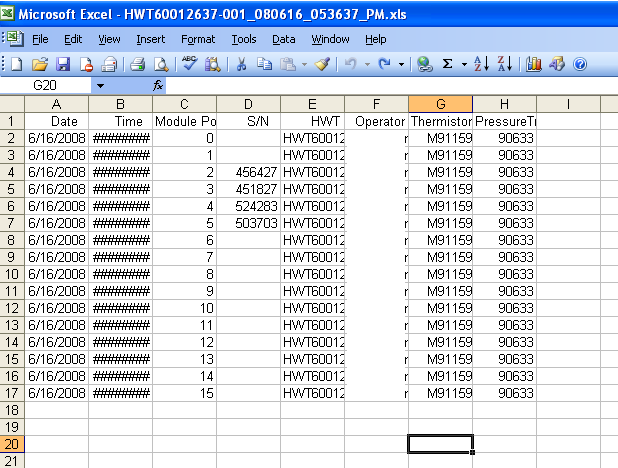
i have created this excel file.
i was wondering if someone can how me how to autosize the width.
i want it to autosize the width as i open up microsoft excel.
can someone show me how to do that.
thanks
Message Edited by krispiekream on 06-16-2008 07:55 PM
Krispiekream
Solved! Go to Solution.


 CharlyStardust
06-16-2008 08:38 PM
- Mark as New
- Bookmark
- Subscribe
- Mute
- Subscribe to RSS Feed
- Permalink
- Report to a Moderator
Hi krispiekream,
You can use the autofit method or you can write a macro in excel.
Have a look at this thread http://forums.ni.com/ni/board/message?board.id=170&message.id=24472&query.id=67391#M24472 There is an example which includes a "columns" property and a "autofit" method.
Charly
06-17-2008 11:21 AM
- Mark as New
- Bookmark
- Subscribe
- Mute
- Subscribe to RSS Feed
- Permalink
- Report to a Moderator
thanks for your help.
that worked.
but one last question,
how do i make it fit into one page?
so its easier to print.
Krispiekream

 MikeS81
06-17-2008 11:42 AM
- Mark as New
- Bookmark
- Subscribe
- Mute
- Subscribe to RSS Feed
- Permalink
- Report to a Moderator
if you want a fix width, then you can set the column width "manually" (column by column with ActiveX functions).
Mike
06-17-2008 11:58 AM - edited 06-17-2008 11:58 AM
- Mark as New
- Bookmark
- Subscribe
- Mute
- Subscribe to RSS Feed
- Permalink
- Report to a Moderator
right now, i either want to close it save it.
i am having a hard time saving it with autosize width already.
everytime it popped "save yes", "no","cancle".
when i put save. and oonce i open it up again, the file did not autosize the width for me because it save has delimiter or something.

Message Edited by krispiekream on 06-17-2008 11:58 AM
Krispiekream

06-17-2008 12:31 PM - edited 06-17-2008 12:31 PM
- Mark as New
- Bookmark
- Subscribe
- Mute
- Subscribe to RSS Feed
- Permalink
- Report to a Moderator

Message Edited by krispiekream on 06-17-2008 12:31 PM
Krispiekream

06-17-2008 01:11 PM - edited 06-17-2008 01:11 PM
- Mark as New
- Bookmark
- Subscribe
- Mute
- Subscribe to RSS Feed
- Permalink
- Report to a Moderator
yet it still print out 2 pages.


Message Edited by krispiekream on 06-17-2008 01:11 PM
Krispiekream
 MikeS81
06-17-2008 01:49 PM
- Mark as New
- Bookmark
- Subscribe
- Mute
- Subscribe to RSS Feed
- Permalink
- Report to a Moderator
could it be that your event execute two times?
Mike
06-18-2008 06:13 PM
- Mark as New
- Bookmark
- Subscribe
- Mute
- Subscribe to RSS Feed
- Permalink
- Report to a Moderator
could it be that your event execute two times?
Mike
it could have, but i have tried it so many other ways.
i think i will give up on this.
Krispiekream
MikeS81
06-18-2008 11:30 PM
- Mark as New
- Bookmark
- Subscribe
- Mute
- Subscribe to RSS Feed
- Permalink
- Report to a Moderator
maybe it helps if you change the mechanical action of your button to "latch when released". If it don´t helps, can you upload your code?
Mike
