- Subscribe to RSS Feed
- Mark Topic as New
- Mark Topic as Read
- Float this Topic for Current User
- Bookmark
- Subscribe
- Mute
- Printer Friendly Page
arrays

 prashiit
10-09-2009 02:13 AM
- Mark as New
- Bookmark
- Subscribe
- Mute
- Subscribe to RSS Feed
- Permalink
- Report to a Moderator
Hii In labview, there are datatype U8, U16, Int16, Int32 etc... I want to creat an array where each element in array is 1bit or 2bit or 3 bit....
how do this... and how to dispay an image of 2bit or 3bit...
Please let me know
Thanks
Prashh
 Andrey_Dmitriev
10-09-2009 02:40 AM
- Mark as New
- Bookmark
- Subscribe
- Mute
- Subscribe to RSS Feed
- Permalink
- Report to a Moderator
Hi, Prashh,
Theoretically you can create array of clusters with booleans (one, or two or three for different bit depth.)
But for achieving best performance, I would like to recommend to use U8 type where only 1 or 2 or 3 bits are used.
For displaying the image you can use Binary Palette, for example, for 1 bit image - with black (zero) and red (1). For two bits you may have only 4 different colors, and so on.
Andrey.
10-09-2009 04:16 AM
- Mark as New
- Bookmark
- Subscribe
- Mute
- Subscribe to RSS Feed
- Permalink
- Report to a Moderator
Hello andrey
Thanks for ur reply. How can I create 2 or 3 bit image with boolean pallete...
Can u pls send an example for creating and displaying an image of 3 bit...
Thanks
Prashh

 Broken_Arrow

10-09-2009 09:19 AM - edited 10-09-2009 09:23 AM
- Mark as New
- Bookmark
- Subscribe
- Mute
- Subscribe to RSS Feed
- Permalink
- Report to a Moderator
Seems like the most direct way of displaying the array and getting the "bits" out of it would be a 2-D array of buttons....

 Andrey_Dmitriev
10-10-2009 04:33 PM - edited 10-10-2009 04:35 PM
- Mark as New
- Bookmark
- Subscribe
- Mute
- Subscribe to RSS Feed
- Permalink
- Report to a Moderator
prashiit wrote:Hello andrey
Thanks for ur reply. How can I create 2 or 3 bit image with boolean pallete...
Can u pls send an example for creating and displaying an image of 3 bit...
Hi, Prashh,
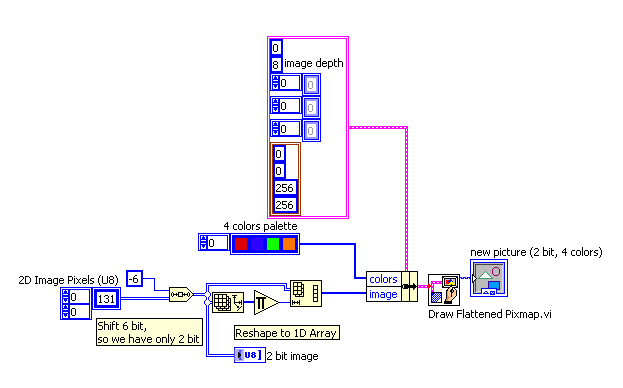
I hope, the code given below will explain something:
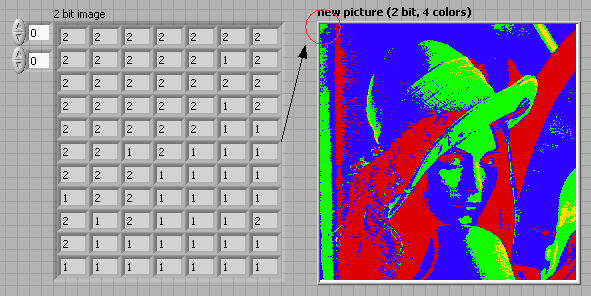
Not really Andy Warhol artwork, but something similar:
best regards,
Andrey.
- Tags:
- Image Processing
10-11-2009 04:16 AM
- Mark as New
- Bookmark
- Subscribe
- Mute
- Subscribe to RSS Feed
- Permalink
- Report to a Moderator
Hello Andrey,
I am using 8.6 version. Please send me 8.6 VI
Andrey_Dmitriev
10-11-2009 06:38 AM
- Mark as New
- Bookmark
- Subscribe
- Mute
- Subscribe to RSS Feed
- Permalink
- Report to a Moderator
The Block Diagram is so trivial, you can recreate it in 10 min by provided screenshot... 8.6 in attachment.
10-11-2009 11:39 AM
- Mark as New
- Bookmark
- Subscribe
- Mute
- Subscribe to RSS Feed
- Permalink
- Report to a Moderator
Hello Andrey
Thanks for your VI. But, I want to use it for gray scale image.
for example: If I put 0 shift, Image should be displayed with 256 different gray levels.
-1-------------------------------------- 128------------------
-2--------------------------------------- 64-------------------
-3---------------------------------------- 32-----------------
-4--------------------------------------- 16-------------------
Andrey_Dmitriev
10-11-2009 12:30 PM
- Mark as New
- Bookmark
- Subscribe
- Mute
- Subscribe to RSS Feed
- Permalink
- Report to a Moderator
As you can see in the example above - IT IS grayscale image, just displayed with pseudocolors. Just change 4 colors palette to 4 shades of gray and you will get what you wanted.
Andrey_Dmitriev
10-11-2009 01:49 PM
- Mark as New
- Bookmark
- Subscribe
- Mute
- Subscribe to RSS Feed
- Permalink
- Report to a Moderator
Broken Arrow wrote:Seems like the most direct way of displaying the array and getting the "bits" out of it would be a 2-D array of buttons....
to Broken Arrow: please read this: WARNING: Don't clean out your image gallery!
