- RSS フィードを購読する
- トピックを新着としてマーク
- トピックを既読としてマーク
- このスレッドを最上位に表示
- {0}にこのスレッドを追加する
- 購読
- ミュート
- 印刷用ページに変更
adding and deleting plot on xy graph
解決済み
 sherzaad
07-24-2018 02:55 AM
- 新着としてマーク
- {0}にこのメッセージを追加する。
- 購読
- ミュート
- RSS フィードを購読する
- このメッセージをハイライトする
- このメッセージを印刷する
- 管理者に不正使用を報告する
Hi,
I am creating a VI whereby one can add xy plots from csv files to a xy graph. the xy plots are held in a cluster array. so far so good.
Now I would like to created a drop down list of the plot names of the plots added to the xy graph. Is there any way to do that? My aim here is to be able to select a plot from the dropdown and then delete it. is that possible?
解決済! 解決策の投稿を見る。

 cbutcher

07-24-2018 03:05 AM - 編集済み 07-24-2018 03:17 AM
- 新着としてマーク
- {0}にこのメッセージを追加する。
- 購読
- ミュート
- RSS フィードを購読する
- このメッセージをハイライトする
- このメッセージを印刷する
- 管理者に不正使用を報告する
You could consider using a Listbox and either setting the Visible property of a specific plot, or just using Delete From Array to remove the specific cluster from your array collection (make sure to also remove it from the Listbox in that case).
If you want to show and hide the Listbox, you can have a boolean button who's value change triggers a change on the Listbox's Visible property.
If you're familiar or comfortable looking at Actor Framework projects, I can send you a project I have for displaying graph data. It's quite a bit more in-depth than what you're looking for, because it has handling for a "Measurement Result" type that I've used to group different outputs from different measurements, but the actual graph being used is still an XY-Graph and the overlay is a Multicolumn Listbox.
You might also like these VIs for transparency: Transparency VIs. I use some modified version of these for my overlay.

 GerdW
GerdW
07-24-2018 03:06 AM - 編集済み 07-24-2018 03:07 AM
- 新着としてマーク
- {0}にこのメッセージを追加する。
- 購読
- ミュート
- RSS フィードを購読する
- このメッセージをハイライトする
- このメッセージを印刷する
- 管理者に不正使用を報告する
Hi sherzaad,
Now I would like to created a drop down list of the plot names of the plots added to the xy graph. Is there any way to do that?
Yes: create a dropdown list to let the user select the plots…
My aim here is to be able to select a plot from the dropdown and then delete it. is that possible?
Yes sure! You need to program the logic behind those operations in LabVIEW…
I prefer listboxes: much easier to handle, for both the programmer and the user:
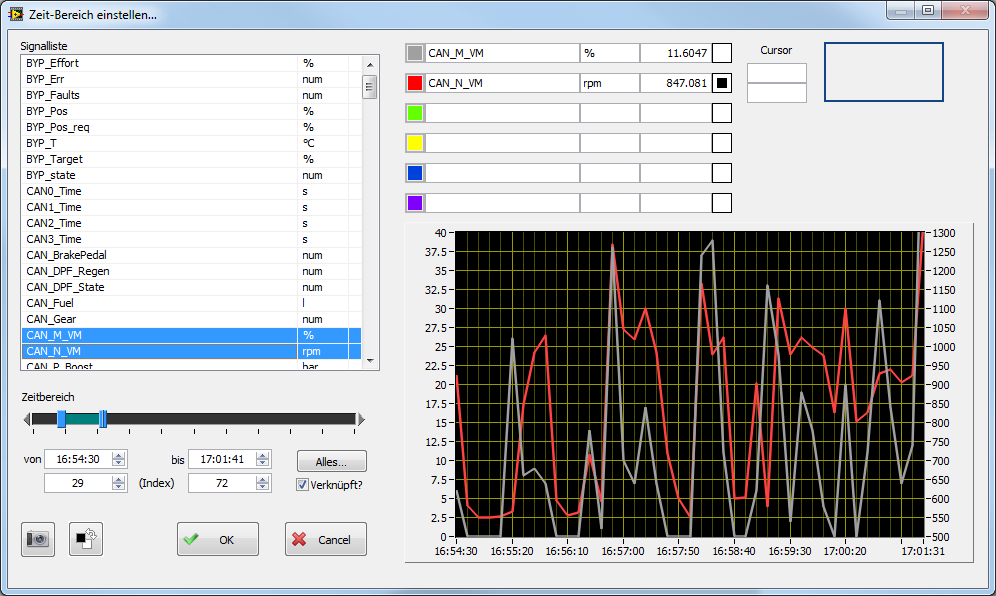
In the listbox on the upper left the user can select signals to view them in the graph…
GerdW
using LV2016/2019/2021 on Win10/11+cRIO, TestStand2016/2019
07-24-2018 03:12 AM
- 新着としてマーク
- {0}にこのメッセージを追加する。
- 購読
- ミュート
- RSS フィードを購読する
- このメッセージをハイライトする
- このメッセージを印刷する
- 管理者に不正使用を報告する
Ok. I get that. but how do I get plot names into the list box? listbox is I32...
GerdW
07-24-2018 03:14 AM
- 新着としてマーク
- {0}にこのメッセージを追加する。
- 購読
- ミュート
- RSS フィードを購読する
- このメッセージをハイライトする
- このメッセージを印刷する
- 管理者に不正使用を報告する
Hi sherzaad,
you set the listbox item names by using a property node of the listbox named "item names"…
GerdW
using LV2016/2019/2021 on Win10/11+cRIO, TestStand2016/2019
07-24-2018 03:43 AM
- 新着としてマーク
- {0}にこのメッセージを追加する。
- 購読
- ミュート
- RSS フィードを購読する
- このメッセージをハイライトする
- このメッセージを印刷する
- 管理者に不正使用を報告する
ok thank you... one more thing what property name should I use to list them in the list box? I tried using "plot name" but I do not think it's the right one to use to get all the plot names...
 jwscs
jwscs
07-24-2018 03:57 AM
- 新着としてマーク
- {0}にこのメッセージを追加する。
- 購読
- ミュート
- RSS フィードを購読する
- このメッセージをハイライトする
- このメッセージを印刷する
- 管理者に不正使用を報告する
you have to iterate through all plots to get each plot name.
if the number of plots is static or known, you can use a for-loop,
otherwise, just iterate until the property node errors.
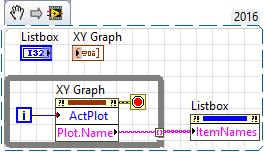
hope that helps
If Tetris has taught me anything, it's errors pile up and accomplishments disappear.

07-24-2018 04:00 AM
- 新着としてマーク
- {0}にこのメッセージを追加する。
- 購読
- ミュート
- RSS フィードを購読する
- このメッセージをハイライトする
- このメッセージを印刷する
- 管理者に不正使用を報告する
Thanks! that works for me!
