- Subscribe to RSS Feed
- Mark Topic as New
- Mark Topic as Read
- Float this Topic for Current User
- Bookmark
- Subscribe
- Mute
- Printer Friendly Page
absolute path
Solved!
 Nick_F
08-21-2006 11:50 PM - edited 08-21-2006 11:50 PM
- Mark as New
- Bookmark
- Subscribe
- Mute
- Subscribe to RSS Feed
- Permalink
- Report to a Moderator
---
NI-488: Command requires GPIB Controller to be Controller in Charge.
Message Edited by Nick_F on 08-22-2006 12:03 AM
Solved! Go to Solution.
08-22-2006 12:13 AM
- Mark as New
- Bookmark
- Subscribe
- Mute
- Subscribe to RSS Feed
- Permalink
- Report to a Moderator
lawr
07-08-2009 12:42 PM
- Mark as New
- Bookmark
- Subscribe
- Mute
- Subscribe to RSS Feed
- Permalink
- Report to a Moderator
Hi,
I was wondering where you attached the default directory to? Base path?
Lawrence

07-09-2009 09:03 AM
- Mark as New
- Bookmark
- Subscribe
- Mute
- Subscribe to RSS Feed
- Permalink
- Report to a Moderator

 livermor
07-26-2011 02:08 AM
- Mark as New
- Bookmark
- Subscribe
- Mute
- Subscribe to RSS Feed
- Permalink
- Report to a Moderator
How exactly do you do this? I am getting the same error message when trying to open a file in my default case, writing to it in the next two cases, and then closing it in the last case. (And I'm having problems closing my AWG, but that's fine).

 _Ian_
_Ian_
07-26-2011 03:28 AM
- Mark as New
- Bookmark
- Subscribe
- Mute
- Subscribe to RSS Feed
- Permalink
- Report to a Moderator
If you place the attached as a sub-vi, it will provide the folder that the calling vi is stored in. This will work in both the development environment and in an exe.
Is that what you need?
livermor
07-26-2011 06:13 AM
- Mark as New
- Bookmark
- Subscribe
- Mute
- Subscribe to RSS Feed
- Permalink
- Report to a Moderator
Hehe 🙂 It didn't quite solve my problem, but it solved another problem I've had! I'm not sure how I should have used it to extract the absolute file path and use it further.
I solved the problem with my current structure by using local variables instead of global. I hope that wasn't a bad fix?
_Ian_
07-26-2011 06:35 AM
- Mark as New
- Bookmark
- Subscribe
- Mute
- Subscribe to RSS Feed
- Permalink
- Report to a Moderator
Try putting changing the case statement so that the case for 'Run Time System' only has one strip path, and the default case just wires the path straight through without changing it. This should give you the path of the file rather than the folder it is in.
Apologies if this still isn't what you're after... I'm guessing a bit as I can't open your code as I'm on an old version of LabVIEW (8.5)
Ian
Alex.T
07-26-2011 08:44 AM - edited 07-26-2011 08:47 AM
- Mark as New
- Bookmark
- Subscribe
- Mute
- Subscribe to RSS Feed
- Permalink
- Report to a Moderator
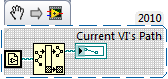
Here's the simplest way to return the folder directory path of the current VI; just open the snippet up in LabVIEW to view the code.
 _Ian_
_Ian_
07-26-2011 08:57 AM
- Mark as New
- Bookmark
- Subscribe
- Mute
- Subscribe to RSS Feed
- Permalink
- Report to a Moderator
This would seem relevant at this point, in case anyone gets any surprises:
Why Does My Executable Not Work When Using the Current VI's Path Constant?
