ni.com is currently undergoing scheduled maintenance.
Some services may be unavailable at this time. Please contact us for help or try again later.
- Subscribe to RSS Feed
- Mark Topic as New
- Mark Topic as Read
- Float this Topic for Current User
- Bookmark
- Subscribe
- Mute
- Printer Friendly Page
Write string to ini file problem
Solved!
 adobefree@gmail
12-03-2009 03:09 AM
- Mark as New
- Bookmark
- Subscribe
- Mute
- Subscribe to RSS Feed
- Permalink
- Report to a Moderator
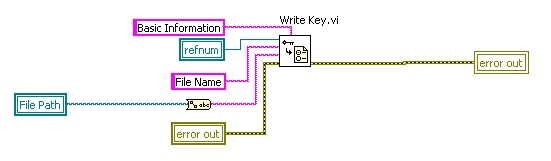
i was tring to write a string to a ini file , that should be :
[Basic Information]
File Name=C:\\11111.doc
but the result is :
[Basic Information]
File Name="C:\\11111.doc"
where did the double quotation came from?
Solved! Go to Solution.

 GerdW
GerdW

12-03-2009 03:49 AM
- Mark as New
- Bookmark
- Subscribe
- Mute
- Subscribe to RSS Feed
- Permalink
- Report to a Moderator
Hi adobe,
please switch on the context help. Then you would recognize the additional input of "WriteKey" when writing strings...
Other topics:
- Why do you convert the path to a string? Why not write the path directly?
- Why do you use locals here?
- Why do you complain about the quotation marks? When reading the key they will be filtered by LabView anyway...
GerdW
using LV2016/2019/2021 on Win10/11+cRIO, TestStand2016/2019
12-03-2009 04:11 AM - edited 12-03-2009 04:17 AM
- Mark as New
- Bookmark
- Subscribe
- Mute
- Subscribe to RSS Feed
- Permalink
- Report to a Moderator
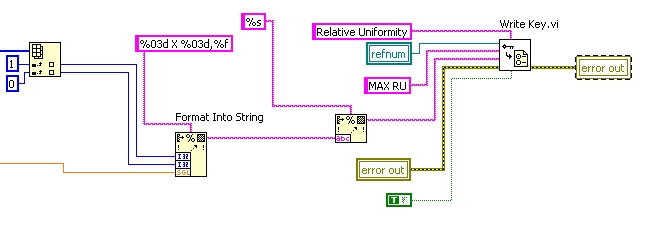
i don't think there is any connection with converting path to string, becaus i met the same question in following block diagram , and i have tried to switch "wirte vi" type from automatic to string , also can't work
 GerdW
GerdW
12-03-2009 04:23 AM
- Mark as New
- Bookmark
- Subscribe
- Mute
- Subscribe to RSS Feed
- Permalink
- Report to a Moderator
Hi adobe,
the quotes are written because NI programmed the WriteKey/ReadKey-functions that way. (Hint: just look at those function's block diagram...)
You didn't answer why you don't want them...
GerdW
using LV2016/2019/2021 on Win10/11+cRIO, TestStand2016/2019
12-03-2009 04:39 AM
- Mark as New
- Bookmark
- Subscribe
- Mute
- Subscribe to RSS Feed
- Permalink
- Report to a Moderator
- Why do you convert the path to a string? Why not write the path directly?
i have show the same problem without converting path to string , mostly this problem happended after i use string format function
- Why do you use locals here?
i was using a stacked sequence strcuture , while there was so much frame, and i don't want to use to much
sequence local ,so i use local variable ,for example if i want to swith the following block to stacked sequence strcuture, each vi per frame ,
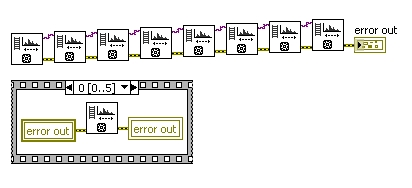
how much sequence local do i need to use? , my solution is to feed the same Local variable in each frame ,or do you have any good idea?
- Why do you complain about the quotation marks? When reading the key they will be filtered by LabView anyway...
it was specified format by customer
GerdW
12-03-2009 04:44 AM - edited 12-03-2009 04:45 AM
- Mark as New
- Bookmark
- Subscribe
- Mute
- Subscribe to RSS Feed
- Permalink
- Report to a Moderator
Hi adobe,
either:
- Filter the ini-file after writing to remove the quotes
- Change and use a copy of the WriteKeyString function
The config file functions are nice to use, but they have their quirks NI-specific implementations...
GerdW
using LV2016/2019/2021 on Win10/11+cRIO, TestStand2016/2019
12-03-2009 06:28 AM - edited 12-03-2009 06:29 AM
- Mark as New
- Bookmark
- Subscribe
- Mute
- Subscribe to RSS Feed
- Permalink
- Report to a Moderator
got it ,thanks

 LabBEAN
12-30-2014 09:41 PM
- Mark as New
- Bookmark
- Subscribe
- Mute
- Subscribe to RSS Feed
- Permalink
- Report to a Moderator
Ran into the same issue with quotes being added to the value in LV 2009 forward. fwiw, I've attached a drop in replacement for Write Key (String).vi that doesn't write quotes or escape characters to the file. I just tore out all of the privately scoped subVIs from Add Key.vi so there's one monolithic diagram with no library dependency.
Certified LabVIEW Architect
TestScript: Free Python/LabVIEW Connector
One global to rule them all,
One double-click to find them,
One interface to bring them all
and in the panel bind them.

 viteo
viteo
02-19-2015 03:45 PM
- Mark as New
- Bookmark
- Subscribe
- Mute
- Subscribe to RSS Feed
- Permalink
- Report to a Moderator
save it please for previous version if possible (2009), not (2013). thank you.
 crossrulz
02-20-2015 06:55 AM
- Mark as New
- Bookmark
- Subscribe
- Mute
- Subscribe to RSS Feed
- Permalink
- Report to a Moderator
Conversion was done here: http://forums.ni.com/t5/Version-Conversion/from-2013-to-2009/m-p/3092368#U3092368
There are only two ways to tell somebody thanks: Kudos and Marked Solutions
Unofficial Forum Rules and Guidelines
"Not that we are sufficient in ourselves to claim anything as coming from us, but our sufficiency is from God" - 2 Corinthians 3:5
