ni.com is currently undergoing scheduled maintenance.
Some services may be unavailable at this time. Please contact us for help or try again later.
- Subscribe to RSS Feed
- Mark Topic as New
- Mark Topic as Read
- Float this Topic for Current User
- Bookmark
- Subscribe
- Mute
- Printer Friendly Page
Waveform Graph AutoScale Issue

 JordanLam
03-10-2019 08:26 AM
- Mark as New
- Bookmark
- Subscribe
- Mute
- Subscribe to RSS Feed
- Permalink
- Report to a Moderator
Firstly, to give some context, my waveform graph plots a large line reading data from a spreadsheet. A FOR loop then runs and draws a new line taking in user input starting at 0 seconds. The user must adjust their input to follow that original large line plotted. However, since the dataset is very large and lasts 10 minutes, I need a way to zoom in to make it easier to follow. Turning AutoScale X off and manually reducing the maximum time value doesn't work because the graph doesn't move along once exceeding that manually set value. So is there a way to move along the X scale?

 GerdW
GerdW

03-10-2019 10:58 AM
- Mark as New
- Bookmark
- Subscribe
- Mute
- Subscribe to RSS Feed
- Permalink
- Report to a Moderator
You can set X scale min and max...
GerdW
using LV2016/2019/2021 on Win10/11+cRIO, TestStand2016/2019

03-11-2019 04:56 AM
- Mark as New
- Bookmark
- Subscribe
- Mute
- Subscribe to RSS Feed
- Permalink
- Report to a Moderator
Or:
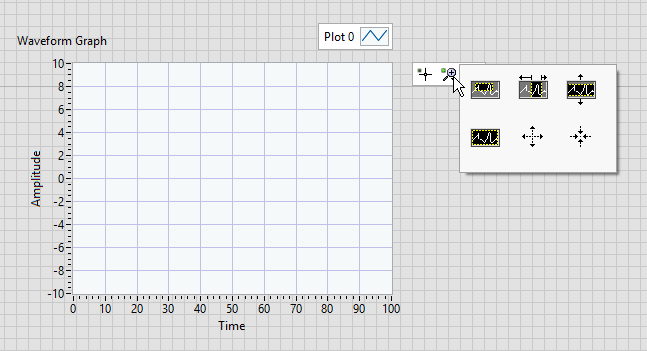
- Enable the Graph Palette to have tools to zoom and pan the graph live.
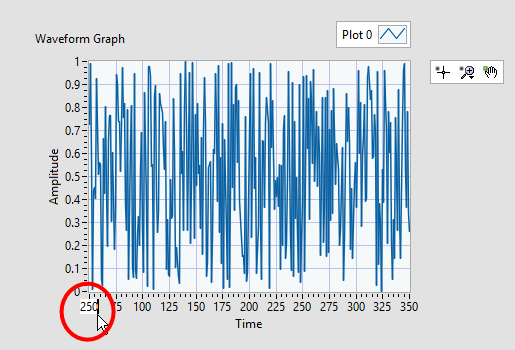
Also: Graph Palette Is Too Small or Display Graph Palette - Double-click the axis' min or max value while the program is running and type a new value you want to have. Press Enter at the end.
Ingo – LabVIEW 2013, 2014, 2015, 2016, 2017, 2018, NXG 2.0, 2.1, 3.0
03-11-2019 08:05 AM
- Mark as New
- Bookmark
- Subscribe
- Mute
- Subscribe to RSS Feed
- Permalink
- Report to a Moderator
Thanks for the answers guys. I discovered that you can programmatically change the range using XScale.Maximum and XScale.Minimum which is what I need. I'll throw it in my for loop to make a check for when the iteration exceeds the maximum to transition it to the next range.
