VirtualBench with LabVIEW
已解决!
 S.Tsutsumi
Member
I am currently trying to control VirtualBench with LabVIEW.
I have downloaded and installed VirtualBench Software (Ver. 19.0).
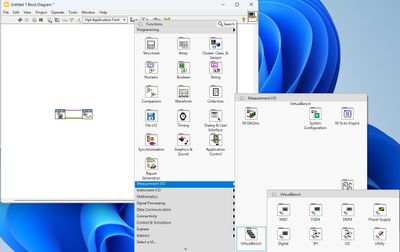
The documentation states that LabVIEW is supported by this software, but I cannot find where the VIs are located within LabVIEW.
How can I find them?
Are there any additional drivers or software that I need to install?
OS: Windows 11
LabVIEW: 2023 Q3
VirtualBench: VB8012-31067DC
已解决! 转到解答。
解答
已被主题作者 S.Tsutsumi 接受

 crossrulz

Knight of NI
NI has pretty much stopped supporting the VirtualBench since 2019. But I created a NI Package just for this exact reason. You can find it here: VirtualBench LabVIEW Drivers. It uses the LVAddons folder, so it will automagically work for any LabVIEW version starting with 2022Q3.
Alternatively, you can use Digilent Waveforms. There is a VIPM package that creates a LabVIEW palette for the Waveforms driver.
There are only two ways to tell somebody thanks: Kudos and Marked Solutions
Unofficial Forum Rules and Guidelines
"Not that we are sufficient in ourselves to claim anything as coming from us, but our sufficiency is from God" - 2 Corinthians 3:5
Thank you for your quick reply. After installing the attached software, I was able to check VirtualBench's vi. Now it looks like I can control VirtualBench with LabVIEW. Thank you very much.