VPN connection


Hello everybody, I'm developping the monitoring system of water turbines. There is CompactRIO and PC at the powerplant. I want to open VPN connection, run the application in my office and read shared variables from the powerplant. Labview have any function to open VPN. But it could be done via Windows command line. Do you know how I could send command from Labview to command line and open VPN? And after close the application to leave VPN?


Do you mean open the VPN connection to access the Office network from home?
The best solution is the one you find it by yourself
Well, I've done it already.
I've used System exec.vi and I've connected to command line input the string: rasdial "VPN name" user password. To disconnect I've used string: rasdial "VPN name" /disconnect.
It works very well 🙂


Having a VPN user name and password in plain text as source in an application would make any IT professional a little nervious. I'm hoping for their sake that passwords expire every 6 months or so.
Unofficial Forum Rules and Guidelines
Get going with G! - LabVIEW Wiki.
17 Part Blog on Automotive CAN bus. - Hooovahh - LabVIEW Overlord

@mmarrtinn wrote:
Well, I've done it already.
I've used System exec.vi and I've connected to command line input the string: rasdial "VPN name" user password. To disconnect I've used string: rasdial "VPN name" /disconnect.
It works very well 🙂
I did the same thing using rasdial.
Is there a way to enumerate VPN name?
Thanks for reply.
But I don't know the VPN name on users computer.
I want to find a list of VPN connections configured on the users computer.
Thanks.
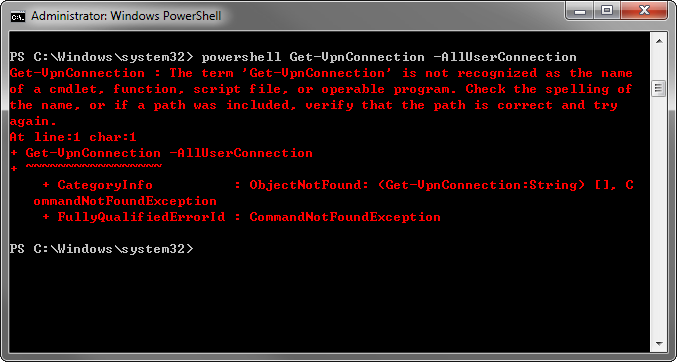
It seem the command is not recognized by powershell:

09-03-2020 09:02 PM - 편집 09-03-2020 09:03 PM
- 신규로 표시
- 북마크
- 구독
- 소거
- RSS 피드 구독
- 강조
- 인쇄
- 부적절한 컨텐트 신고
Hi,
Maybe your powershell is of older version or is missing the vpnclient module. Did you try using the latest version powershell? I'm not really familiar with powershell so I'm not sure. I think this question can be asked at the microsoft forum.
Here is the information on this command.
