- Subscribe to RSS Feed
- Mark Topic as New
- Mark Topic as Read
- Float this Topic for Current User
- Bookmark
- Subscribe
- Mute
- Printer Friendly Page
VI Scripting: Setting Dirty Dot
Solved!
 CL_eisenwr
05-18-2020 04:33 PM
- Mark as New
- Bookmark
- Subscribe
- Mute
- Subscribe to RSS Feed
- Permalink
- Report to a Moderator
I have a VI scripting VI that generates a new VI, but does not save it to disc. I noticed that the newly VI created VI does not have dirty dot set. So if you close the new VI, the user does not get prompted about saving the VI. Is there a way to have the new VI made "dirty"/enable the save prompt? I had looked in the Modifications properties, but those are read only.
Bill Eisenhower
Certified LabVIEW & TestStand Developer
Solved! Go to Solution.
- Tags:
- VI Scripting

 Michael_Munroe
05-18-2020 05:22 PM
- Mark as New
- Bookmark
- Subscribe
- Mute
- Subscribe to RSS Feed
- Permalink
- Report to a Moderator
What version of LabVIEW are you using?
Can you share your script?
If you type control-N in LabVIEW you get an Untitled VI. That Untitled VI does not have the dirty dot. This seems like the expected behavior because there is nothing to save.
You could also be creating a clone of an existing VI. This would also not have the dirty dot.
You could also be opening a template (.vit) without making a new VI from the template.
Automate 1M+ VI Search, Sort and Edit operations with Property Inspector 5.1, now with a new Interactive Window Manager!
Now supports full project automation using one-click custom macros or CLI.

 paul_cardinale
05-18-2020 06:45 PM
- Mark as New
- Bookmark
- Subscribe
- Mute
- Subscribe to RSS Feed
- Permalink
- Report to a Moderator
05-18-2020 07:27 PM
- Mark as New
- Bookmark
- Subscribe
- Mute
- Subscribe to RSS Feed
- Permalink
- Report to a Moderator
Paul,
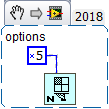
Thanks that did the trick.
Michael,
Not that I think it matters much now, but this is in LabVIEW 2019 that I had inherited from a former employee in LabVIEW 2017. (Both had this same issue.) It is creating a clone from an existing VI (not sure why not a .vit) and the modify the template to insert the specified VI into it.
Bill Eisenhower
Certified LabVIEW & TestStand Developer
