LabVIEW
- Iscriversi a feed RSS
- Contrassegnare la discussione come nuova
- Contrassegnare la discussione come letta
- Sposta questo Discussione per l'utente corrente
- Preferito
- Iscriversi
- Disattiva notifiche
- Pagina in versione di stampa
Using a table as a control for increasing, holding and decreasing values
Risolto!
 InfamousHobo
in data 05-24-2022 05:10 AM
- Contrassegnare come Nuovo
- Preferito
- Iscriversi
- Disattiva notifiche
- Iscriversi a feed RSS
- Evidenziare
- Stampare
- Segnalare contenuto inappropriato
Hello, I am looking for advice on how to create a system by using a table as a control. I made a VI that starts from a value of zero and increments up to a maximum value in a user-defined steps, then decrements back to zero.
I need to create a similar system that uses a table to hold its inputs. Basically there are 3 columns: column 1 holds a value from which to start incrementing, column 2 holds the goal value and column 3 holds the time in which the goal value must be reached.
I have attached my VI as well as screenshots of the system I want to recreate. Can anyone give me input on where I can start and how I can make the table-controlled system?
Risolto Andare alla soluzione.

 GerdW
GerdW

in data 05-24-2022 05:20 AM
- Contrassegnare come Nuovo
- Preferito
- Iscriversi
- Disattiva notifiche
- Iscriversi a feed RSS
- Evidenziare
- Stampare
- Segnalare contenuto inappropriato
Hi Hobo,
I recommend a MCLB (multicolumn listbox) to present your data to the user instead of a table.
The user can easily select rows by clicking them…
GerdW
using LV2016/2019/2021 on Win10/11+cRIO, TestStand2016/2019

 altenbach
05-24-2022 10:39 AM - modificato 05-24-2022 10:41 AM
- Contrassegnare come Nuovo
- Preferito
- Iscriversi
- Disattiva notifiche
- Iscriversi a feed RSS
- Evidenziare
- Stampare
- Segnalare contenuto inappropriato
A table is just a 2D array of strings cosmetically suitable to preset to the user. You are dealing with numeric entries and I assume all the user does is select one of the rows (i.e. NOT modifying any of the values directly). As has been suggested, a multicolumn listbox is all you need. Keep the data in a numeric 2D array and use the listbox (in a listbox, the selected row is the "value!) to undex into your 2D array to get the relevant values for the run. (you can trigger just by selecting or you could trigger when a row is double-clicked, for example. The possibilities are endless.
Your snippet deals with one row, I assume, so none of the orange values are supposed to change during the run and their terminals belong before the loop.
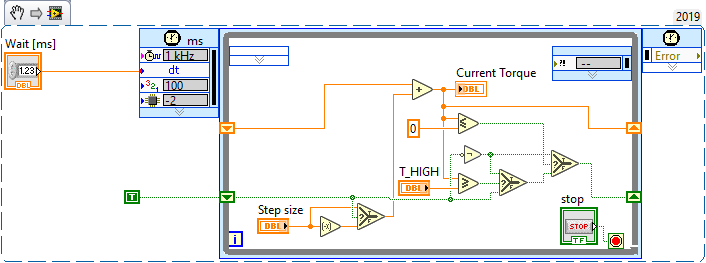
I have the nagging feeling that your "boolean gymnastics" could be dramatically simplified. Have you tried? 😄 (There is also a primitive for <=0). Shouldn't that shift register be initialized?
 altenbach
in data 05-24-2022 11:11 AM
- Contrassegnare come Nuovo
- Preferito
- Iscriversi
- Disattiva notifiche
- Iscriversi a feed RSS
- Evidenziare
- Stampare
- Segnalare contenuto inappropriato
@altenbach wrote:
I have the nagging feeling that your "boolean gymnastics" could be dramatically simplified.
I think this is equivalent (but much easier to read and debug!)

Or even:
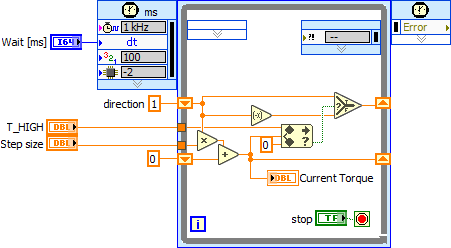


Please verify correct operation and tweak as needed. 😄
in data 05-25-2022 04:39 AM
- Contrassegnare come Nuovo
- Preferito
- Iscriversi
- Disattiva notifiche
- Iscriversi a feed RSS
- Evidenziare
- Stampare
- Segnalare contenuto inappropriato
Thanks for the tip. I read up everything I could on multicolumn listboxes, but could not figure out one thing - can I use individual cells as controls? Or is the listbox only for displaying data?
in data 05-25-2022 04:41 AM
- Contrassegnare come Nuovo
- Preferito
- Iscriversi
- Disattiva notifiche
- Iscriversi a feed RSS
- Evidenziare
- Stampare
- Segnalare contenuto inappropriato
Thanks for the tip altenbach, it is indeed easier to debug with your solution. Do you happen to also know if I can use a multicolumn listbox as a control? What I want to do is use each individual cell in the listbox as an input for a calculation.
GerdW
in data 05-25-2022 05:10 AM
- Contrassegnare come Nuovo
- Preferito
- Iscriversi
- Disattiva notifiche
- Iscriversi a feed RSS
- Evidenziare
- Stampare
- Segnalare contenuto inappropriato
Hi Hobo,
@InfamousHobo wrote:
Do you happen to also know if I can use a multicolumn listbox as a control? What I want to do is use each individual cell in the listbox as an input for a calculation.
You can use the MCLB as a control - but it's value is the row [number] selected by the user!
The "individual cells" are values you keep in a 2D array "in the background" (aka wire/shift register). THe user selects a row and you can use the row number to index your elements from that 2D array…
GerdW
using LV2016/2019/2021 on Win10/11+cRIO, TestStand2016/2019
in data 05-25-2022 08:45 AM
- Contrassegnare come Nuovo
- Preferito
- Iscriversi
- Disattiva notifiche
- Iscriversi a feed RSS
- Evidenziare
- Stampare
- Segnalare contenuto inappropriato
Thank you for the input. I don't quite understand what you mean though hahah. Could you please show me an example of your explanation?
GerdW
05-25-2022 12:43 PM - modificato 05-25-2022 12:43 PM
- Contrassegnare come Nuovo
- Preferito
- Iscriversi
- Disattiva notifiche
- Iscriversi a feed RSS
- Evidenziare
- Stampare
- Segnalare contenuto inappropriato
Hi Hobo,
@InfamousHobo wrote:
Could you please show me an example of your explanation?
See this:

GerdW
using LV2016/2019/2021 on Win10/11+cRIO, TestStand2016/2019

