- Subscribe to RSS Feed
- Mark Topic as New
- Mark Topic as Read
- Float this Topic for Current User
- Bookmark
- Subscribe
- Mute
- Printer Friendly Page
Using Word Insert Field VI to load a bookmark
Solved!
 ScottDobbins1
04-17-2014 12:39 PM
- Mark as New
- Bookmark
- Subscribe
- Mute
- Subscribe to RSS Feed
- Permalink
- Report to a Moderator
I'm using a VI from the MS Word/Excel Report Generation toolkit called Word Insert Field. I have an MS Word document with a named bookmark. I want to replace the bookmark text programmatically from LabVIEW. I believe WordInsert Field is the right VI, but I can't find the proper input for type- there are something like 100 choices. I just want to replace the bookmark text with the text I have provided in the text input. Should be simple...
In the example in the attached file, I'm trying to insert the text "XXX1234" at the bookmark named LotNum in the Word file BookTest.docx. I don't know what to choose for the type constant. There are many choices, and none I've tried work correctly.
Solved! Go to Solution.

 MarcDub
04-17-2014 01:04 PM - edited 04-17-2014 01:21 PM
- Mark as New
- Bookmark
- Subscribe
- Mute
- Subscribe to RSS Feed
- Permalink
- Report to a Moderator
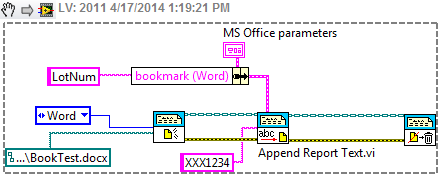
I use the VI "Append Report Text.vi" instead of "WordInsert Field.vi" to do what you want and it works as intended (see code below).
04-17-2014 01:25 PM
- Mark as New
- Bookmark
- Subscribe
- Mute
- Subscribe to RSS Feed
- Permalink
- Report to a Moderator
MD:
Thanks for the suggestion. Append Report Text does indeed insert the desired text at the bookmark location, but it doesn't replace the existing text that I've defined as the bookmark. It just appends. I want to programmatically update the contents of the bookmark (lot number, in this case) and then save the document with the updated text. So I think (hope) Word Insert Field is the right VI.
MarcDub
04-29-2014 09:16 AM
- Mark as New
- Bookmark
- Subscribe
- Mute
- Subscribe to RSS Feed
- Permalink
- Report to a Moderator
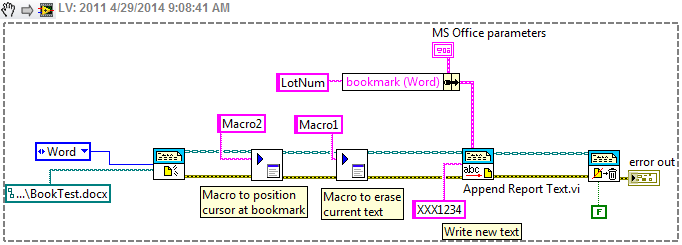
I have been able to replace existing text at a bookmark using Labview. My solution uses Word macros. In the Word template you use for your document, you create a Word macro that locates the bookmark you want. It is easier to create a macro for each bookmark but I think that you can pass the bookmark name as a parameter but it is not my area of expertise. Then, you create another macro that just deletes the number of characters you want to erase (once again, you can probably pass the number of characters as a parameter if you are a passable Word macro programmer). Then, you insert the new text at the bookmark. See code below.
There might be another way to do it using the various sub-VIs within the Append Report Text.vi but I have not been able to figure out so far.

04-30-2014 08:33 AM
- Mark as New
- Bookmark
- Subscribe
- Mute
- Subscribe to RSS Feed
- Permalink
- Report to a Moderator
md:
Thanks for the suggestion. Great idea, using macros to replace the text. I hadn't thought of that. I will give it a try. I really appreciate your help.
Scott
04-30-2014 08:59 AM
- Mark as New
- Bookmark
- Subscribe
- Mute
- Subscribe to RSS Feed
- Permalink
- Report to a Moderator
md:
Oops, I marked my reply as a solution, when I intended to mark your reply as the solution. Sorry about that. I do appreciate your help, and you certainly deserve credit for the help you've given me. Chalk it up to me being a beginner user of the formus... thanks again.
Scott
