- Subscribe to RSS Feed
- Mark Topic as New
- Mark Topic as Read
- Float this Topic for Current User
- Bookmark
- Subscribe
- Mute
- Printer Friendly Page
Update cursor value programatically after graph's data change
Solved!
 Quiztus2
06-05-2023 05:58 AM
- Mark as New
- Bookmark
- Subscribe
- Mute
- Subscribe to RSS Feed
- Permalink
- Report to a Moderator
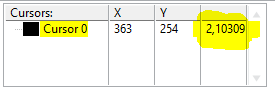
After changing the Intensity Graph's value the old cursor value gets displayed.
How can I update the displayed value under the cursor programatically?
I dont want to move the cursor manually after graph's data update in order to display the value under the cursor.
Solved! Go to Solution.
 LVNinja
06-05-2023 08:45 AM
- Mark as New
- Bookmark
- Subscribe
- Mute
- Subscribe to RSS Feed
- Permalink
- Report to a Moderator
Play around with Property Node for the Intensity Graphy / Cursor.
06-05-2023 10:03 AM
- Mark as New
- Bookmark
- Subscribe
- Mute
- Subscribe to RSS Feed
- Permalink
- Report to a Moderator

This is the solution I came up with. Was there something more elegant ?

 altenbach

06-05-2023 10:09 AM
- Mark as New
- Bookmark
- Subscribe
- Mute
- Subscribe to RSS Feed
- Permalink
- Report to a Moderator
It would work correctly if you use a cursor that is locked to a plot instead of a free cursor. (See attached example)
(If you really want to use a free cursor, you probably need to tweak things with some property nodes whenever the value changes, not shown)
 altenbach
06-05-2023 10:47 AM
- Mark as New
- Bookmark
- Subscribe
- Mute
- Subscribe to RSS Feed
- Permalink
- Report to a Moderator
@altenbach wrote:
(If you really want to use a free cursor, you probably need to tweak things with some property nodes whenever the value changes, not shown)
Here's that third possibility.

06-06-2023 03:24 AM
- Mark as New
- Bookmark
- Subscribe
- Mute
- Subscribe to RSS Feed
- Permalink
- Report to a Moderator
I didn't know that one can write consecutively in the same property node to the same value, interesting.
What is this block with the arrow before the unequal comparison?

 daveTW
06-06-2023 07:53 AM - edited 06-06-2023 07:53 AM
- Mark as New
- Bookmark
- Subscribe
- Mute
- Subscribe to RSS Feed
- Permalink
- Report to a Moderator
It's the "feedback node" from the "Structures" palette.
