- Subscribe to RSS Feed
- Mark Topic as New
- Mark Topic as Read
- Float this Topic for Current User
- Bookmark
- Subscribe
- Mute
- Printer Friendly Page
Unit test framework enum input?

 1984
1984
04-26-2022 04:04 AM
- Mark as New
- Bookmark
- Subscribe
- Mute
- Subscribe to RSS Feed
- Permalink
- Report to a Moderator
Hi,
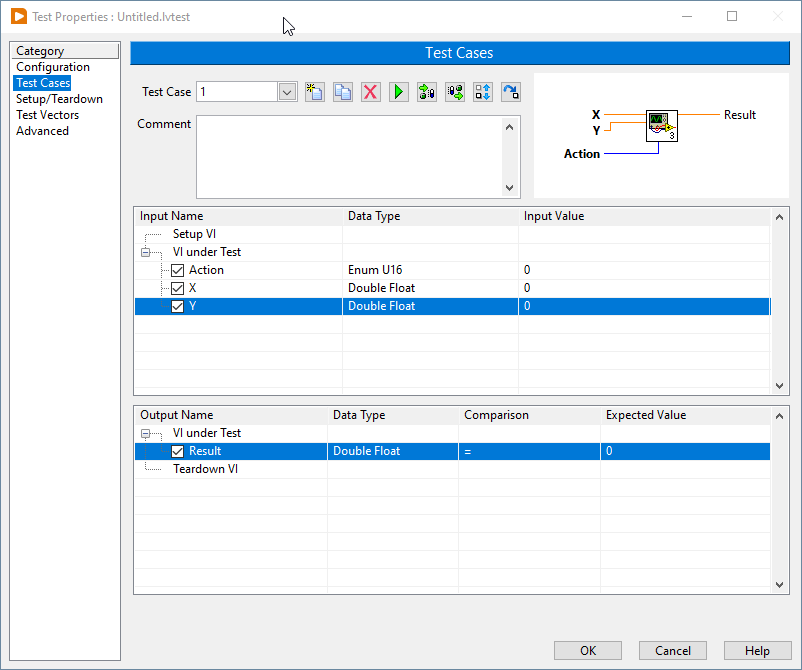
I have just decided to play around with the Unit Test Framework just to see if thats something I'd like to utilize in the future, but right after 5 minutes I have faced a problem I couldnt solve: enum inputs are displayed as U16 instead of the their readable format. See the screenshot below. The Action input is an enum with "Add", "Subtract", "Divide", but I only see it as a number. That makes it quite useless cause then I need to remember with Action has which number. I'm pretty sure that there is a workaround, or maybe my first approach to unit test is wrong, so pls advise.
Thx!

 JÞB
JÞB
04-26-2022 12:08 PM
- Mark as New
- Bookmark
- Subscribe
- Mute
- Subscribe to RSS Feed
- Permalink
- Report to a Moderator
Is the enum a typedef?
"Should be" isn't "Is" -Jay
04-27-2022 04:43 AM
- Mark as New
- Bookmark
- Subscribe
- Mute
- Subscribe to RSS Feed
- Permalink
- Report to a Moderator
No it was not a typedef, but making it a typedef doesn't make a difference. Its still a U16 in the UTF.
JÞB
04-27-2022 12:24 PM
- Mark as New
- Bookmark
- Subscribe
- Mute
- Subscribe to RSS Feed
- Permalink
- Report to a Moderator
Did you relink the vi after saving the typedef and vi?
"Should be" isn't "Is" -Jay
04-28-2022 03:13 AM
- Mark as New
- Bookmark
- Subscribe
- Mute
- Subscribe to RSS Feed
- Permalink
- Report to a Moderator
There is nothing to relink. The UTF loads the VI connector pane everytime I doubleclick on the lvtest file.
But just to be 131% sure I have created a new test based on the VI now having a typedef'd input. No change, enum still shows up as a number.
05-03-2022 05:13 AM
- Mark as New
- Bookmark
- Subscribe
- Mute
- Subscribe to RSS Feed
- Permalink
- Report to a Moderator
I have opened the "Code coverage.lvproj" from the find examples window. It shows exactly the same, enums show up only as numbers and not in a readable format.
Now I understand why nobody I know uses the unit test framework.
