- Subscribe to RSS Feed
- Mark Topic as New
- Mark Topic as Read
- Float this Topic for Current User
- Bookmark
- Subscribe
- Mute
- Printer Friendly Page
Two vectors

 Sml2010
08-28-2021 06:00 AM
- Mark as New
- Bookmark
- Subscribe
- Mute
- Subscribe to RSS Feed
- Permalink
- Report to a Moderator
Hello everyone
I have a problem with dividing two vectors by matrix.
I have two vectors, I am using math script node to multiply and divide these two vectors. for multiply it is ok and the answer is correct but for division it is not.
I did that with linear algebra module but I had the same problem.
In " math script.vi " I don't know why the "Aal" amount is a DBL while it is a vector and we have to have an array nut a DBL
Would you please help me to find out my error.

 GerdW
GerdW

08-28-2021 06:15 AM - edited 08-28-2021 06:16 AM
- Mark as New
- Bookmark
- Subscribe
- Mute
- Subscribe to RSS Feed
- Permalink
- Report to a Moderator
Hi Sml,
when you get unexpected results then you should not forget to mention which result you expected!
This is what I get by comparing Mathscript node and linear algebra:

Btw. it also would help when you attach all needed subVIs and control definitions when you attach VIs like "math script"! It also would help to use better names for your VIs: why does the "matrix" VI also contain just a Mathscript node?
GerdW
using LV2016/2019/2021 on Win10/11+cRIO, TestStand2016/2019
08-28-2021 08:49 PM
- Mark as New
- Bookmark
- Subscribe
- Mute
- Subscribe to RSS Feed
- Permalink
- Report to a Moderator
Hello GerdW
thank you for your reply.
Please look at attached .vi (it is with out sub vi ).
The formula is this :

The " Aal " answer is not a vector and this is my problem. How can I have a vector answer?
I changed the data type and select 2D array or Matrix but it didn't change
Would you please help me to find my error in this program?
Thank you

 altenbach
08-29-2021 11:00 AM - edited 08-29-2021 11:39 AM
- Mark as New
- Bookmark
- Subscribe
- Mute
- Subscribe to RSS Feed
- Permalink
- Report to a Moderator
@Sml2010 wrote:
The formula is this :
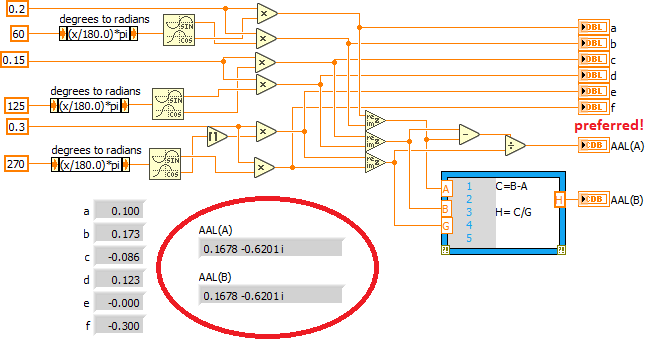
(While a 1D array is sometimes called a "vector", nothing says that a 1D array with two elements should represent a vector in the XY (or complex) plane with the first element representing x and the second y )
You have complex numbers, so do complex math using complex data!!!
(and no, you don't need Mathscript for any of that!)
 altenbach
08-29-2021 12:14 PM
- Mark as New
- Bookmark
- Subscribe
- Mute
- Subscribe to RSS Feed
- Permalink
- Report to a Moderator
Not sure why you have that "round to inf" for you "e" variable. But if you don't really need that, you can eliminate a lot of explicit trigonometry because you can form a complex number from r and theta directly.
(if you really need that rounding, you need to form G more explicitly, but can still simplify A and B).
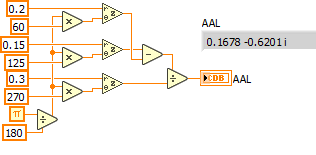
Or even use array operations to reduce duplicate code (and potentially take advantage of e.g. SIMD instructions) same result!.


