- Subscribe to RSS Feed
- Mark Topic as New
- Mark Topic as Read
- Float this Topic for Current User
- Bookmark
- Subscribe
- Mute
- Printer Friendly Page
Top Left Empty Tree Control
Solved!
 mcduff
10-01-2019 03:28 PM
- Mark as New
- Bookmark
- Subscribe
- Mute
- Subscribe to RSS Feed
- Permalink
- Report to a Moderator
There must be an easy way to do this, but I cannot find the answer.
Assume I have a Tree Control that needs a horizontal scroll bar, ie, it is not expanded such that you can see all columns. See Below:
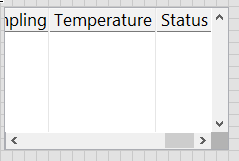
When the program start ups, the tree is EMPTY and the top left cell is not 0,0. I want to set the top left cell to 0,0, but I can not as the Top Left Visible Cell Property returns an error if the tree is empty. (This is expected behavior according to help)
- Am I missing something else? Or ...
- Do I need to make a "dummy" value for the tree to set the Top Left Cell? Or ...
- Is there a property node I am missing for the scroll bar value, that is, can I change it directly?
Thanks
mcduff
Solved! Go to Solution.

 aputman
10-01-2019 03:52 PM
- Mark as New
- Bookmark
- Subscribe
- Mute
- Subscribe to RSS Feed
- Permalink
- Report to a Moderator
Use a Key Focus True, Edit Position (0,0), Key Focus False all in the same property node. It seems like a hack but it does work.
10-01-2019 04:09 PM
- Mark as New
- Bookmark
- Subscribe
- Mute
- Subscribe to RSS Feed
- Permalink
- Report to a Moderator
@aputman wrote:
Use a Key Focus True, Edit Position (0,0), Key Focus False all in the same property node. It seems like a hack but it does work.
Thanks!!
It is a much better hack than mine! I inserted an empty item into the tree, set the Left Corner Position, then erased the tree.
Cheers,
mcduff

 Blue_Perfect
08-28-2020 05:48 AM
- Mark as New
- Bookmark
- Subscribe
- Mute
- Subscribe to RSS Feed
- Permalink
- Report to a Moderator
I can confirm that in normal running vi the KeyFocus trick works.
Seems however there's a caveat with it.
If you're running your tree control instance in a vi that runs in a subpanel, it fails to do anything.
There is no error either, it just doesn't do anything.
Add item - set visible item - remove item cycle seems like the only way here.
- Tags:
- tree
