- Subscribe to RSS Feed
- Mark Topic as New
- Mark Topic as Read
- Float this Topic for Current User
- Bookmark
- Subscribe
- Mute
- Printer Friendly Page
Thorlabs .Net Gain Setting
Solved!
 Shredderofmass2
12-04-2019 10:17 AM
- Mark as New
- Bookmark
- Subscribe
- Mute
- Subscribe to RSS Feed
- Permalink
- Report to a Moderator
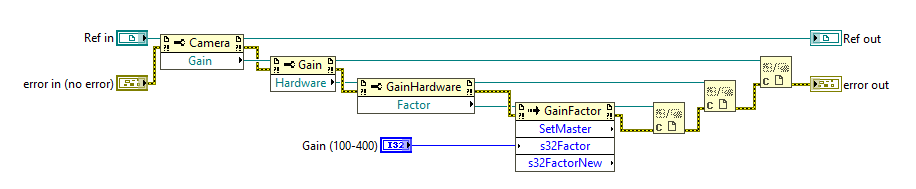
I am using a Thorlabs DCC3260M Monochrome Camera. I admit I am not great with .net . I am trying to figure out how to set the gain. I can get a property node to show a "gain" property. But it gives (or wants the input of) a reference. I am not finding the way to connect this to a front panel object. I included a screen shot of a portion of their "simple live.vi" which as it suggests is a simple quick start for acquisition. It does everything else like frame rate etc...
How do I get a front panel slider connected to the .net functions so i can set the gain?
Thanks
Solved! Go to Solution.

 Gregory
12-04-2019 11:07 AM
- Mark as New
- Bookmark
- Subscribe
- Mute
- Subscribe to RSS Feed
- Permalink
- Report to a Moderator
If it's like the UC480, you have to drop a couple more property nodes to get at the actual gain setting. Like this:

12-04-2019 11:18 AM
- Mark as New
- Bookmark
- Subscribe
- Mute
- Subscribe to RSS Feed
- Permalink
- Report to a Moderator
Yes, this is exactly it. For posterity, do this after the camera is initialized, put the code he shows here into the live acquisition loop. Works great.
12-04-2019 03:29 PM
- Mark as New
- Bookmark
- Subscribe
- Mute
- Subscribe to RSS Feed
- Permalink
- Report to a Moderator
Ok, I am lost again. I don't suppose you have a quick and dirty way to convert the image to an imaq image or an array so I can use it with the rest of our imaq code?
Gregory
12-04-2019 03:33 PM
- Mark as New
- Bookmark
- Subscribe
- Mute
- Subscribe to RSS Feed
- Permalink
- Report to a Moderator
It's been a while since I have worked with a Thorlabs camera, but I believe they display everything with LabVIEW picture controls. If that's what you're using, you can try this one to convert the picture into an array of data.
