ni.com is currently undergoing scheduled maintenance.
Some services may be unavailable at this time. Please contact us for help or try again later.
- Subscribe to RSS Feed
- Mark Topic as New
- Mark Topic as Read
- Float this Topic for Current User
- Bookmark
- Subscribe
- Mute
- Printer Friendly Page
Temperature Control with Only a Heater
Solved!
 adeperro
12-08-2016 02:07 PM
- Mark as New
- Bookmark
- Subscribe
- Mute
- Subscribe to RSS Feed
- Permalink
- Report to a Moderator
I am a student and relatively new to LabVIEW. I am working on a project that controls the temperature of soil in a box full of worms. My goal is to have the temperature move freely between a range of 2 numbers, Tlow and Thigh. I have a temperature sensor that reads the temperature of the soil. When the temperature of the soil, Tsoil, is below Tlow, I have the heater turn on using a DCU. When Tsoil is above Thigh, I have the heater turn off. The hard part is dealing with what happens when Tsoil is between Tlow and Thigh. I need to find a way to make the heater stay on up until Tsoil=Thigh and then have it turned off until Tsoil goes under Tlow again. Basically I need to use relaxation in place of a cooling mechanism becasue I dont have one. Any help is apprecated! Thank You!
Solved! Go to Solution.

 GerdW
GerdW

12-08-2016 02:14 PM
- Mark as New
- Bookmark
- Subscribe
- Mute
- Subscribe to RSS Feed
- Permalink
- Report to a Moderator
Hi adeperro,
you have two conditions:
1. Turn heater OFF when T>T_high
2. Turn heater ON when T<T_low
What exactly is your problem?
GerdW
using LV2016/2019/2021 on Win10/11+cRIO, TestStand2016/2019
12-08-2016 02:25 PM
- Mark as New
- Bookmark
- Subscribe
- Mute
- Subscribe to RSS Feed
- Permalink
- Report to a Moderator
Thanks for the fast response! So with those two conditions there is no command for T_low<T<T_high. In this case the temperature of the soil will rise to T_low and then the heater will turn off. This will cause the temperature of the soil to hover around T_low and that is not want I am looking for. I want the temperature of the soil to rise past T_low, all the way to T_high, then for the heater to turn off and not turn back on until the termperature of the soil is below T_low again. I want the temperature to fluctuate between the T_low - T_high range. Is there any way to do this in LabVIEW?
GerdW
12-08-2016 02:28 PM - edited 12-08-2016 02:38 PM
- Mark as New
- Bookmark
- Subscribe
- Mute
- Subscribe to RSS Feed
- Permalink
- Report to a Moderator
Hi adeperro,
So with those two conditions there is no command for T_low<T<T_high.
Why is there "no" command?
In case of T_low<=T<=T_high the output stays unchanged…
All you need is a shift register - a (very) basic LabVIEW element you need to know!
That's an example of what I'm talking about:

GerdW
using LV2016/2019/2021 on Win10/11+cRIO, TestStand2016/2019
12-08-2016 04:32 PM
- Mark as New
- Bookmark
- Subscribe
- Mute
- Subscribe to RSS Feed
- Permalink
- Report to a Moderator
Hi GerdW,
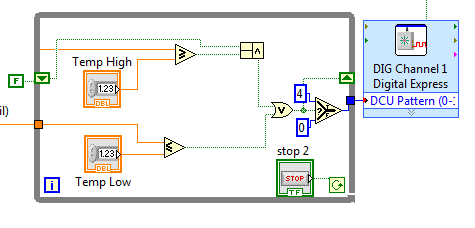
So I was able to follow the example you sent and apply that to my program. This is what I have. What is happening is when T<T_low the heater is ON but for T>T_low the heater is always OFF. I have never used a shift register and I am now in the process of teaching myself about. I was wondering if something stood out in this picture that looks wrong for what I want to do?
Thanks for the help, I really appreciate it.
 GerdW
GerdW
12-09-2016 02:00 AM - edited 12-09-2016 02:04 AM
- Mark as New
- Bookmark
- Subscribe
- Mute
- Subscribe to RSS Feed
- Permalink
- Report to a Moderator
Hi adeperro,
compare your CompoundArithmetic node with mine - and you will spot a (small) difference.
Small difference, big issue… 😄
Why don't you put this ExpressVI into the loop? Don't you want to control the heater all the time? (THINK DATAFLOW!)
Btw. cleaning up a block diagram before posting is highly appreciated!
I have never used a shift register and I am now in the process of teaching myself about.
Why don't you take those FREE ONLINE resources offered by NI for LabVIEW beginners?
GerdW
using LV2016/2019/2021 on Win10/11+cRIO, TestStand2016/2019
