ni.com is currently undergoing scheduled maintenance.
Some services may be unavailable at this time. Please contact us for help or try again later.
- Subscribe to RSS Feed
- Mark Topic as New
- Mark Topic as Read
- Float this Topic for Current User
- Bookmark
- Subscribe
- Mute
- Printer Friendly Page
Table control not responding properly...!!
Solved!
 mnx
mnx
03-18-2013 03:08 AM
- Mark as New
- Bookmark
- Subscribe
- Mute
- Subscribe to RSS Feed
- Permalink
- Report to a Moderator
Hi,
I have put a table control on the front panel of my application. The problem is whenever I load file containing some data onto it, the data gets overlapped with the one which was present in table control earlier. This problem stays with "reinitialize to default" invoke node as well.I have noticed that this problem persists in some PCs while on others it works well.Is there any permanent solution for this?
Solved! Go to Solution.

 GerdW
GerdW

03-18-2013 03:17 AM - edited 03-18-2013 03:18 AM
- Mark as New
- Bookmark
- Subscribe
- Mute
- Subscribe to RSS Feed
- Permalink
- Report to a Moderator
Hi mnx,
- How do you "load data onto a tab control"? Usually you need some other indicators to display those data...
- Why is it a problem of the tab control, when some other indicator show "overlapping data"?
- What are "overlapping data"? Can you show pictures? Or the whole VI?
GerdW
using LV2016/2019/2021 on Win10/11+cRIO, TestStand2016/2019
03-18-2013 03:32 AM
- Mark as New
- Bookmark
- Subscribe
- Mute
- Subscribe to RSS Feed
- Permalink
- Report to a Moderator
Hi GerdW,
- I am actually using a property node "value" to route the data from input file to the table control.
- I'm first loading an input file onto the table.Once that is done, I am loading another data from some other input file onto the same table. But while doing this, both the files are getting overlapped on the table as shown in the attached image. This overlapping persists until I click on some cell of the table
.
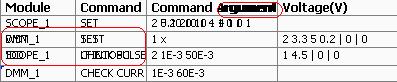
- This problem doesnt occur in some of the PCs...while in others it persists.
GerdW
03-18-2013 03:36 AM
- Mark as New
- Bookmark
- Subscribe
- Mute
- Subscribe to RSS Feed
- Permalink
- Report to a Moderator
Sorry,
I mixed table control with tab control...
It seems to be some problem with either font settings (or UniCode problems) or it's the way you use that value property. Maybe a race condition?
Can you show your VI too?
GerdW
using LV2016/2019/2021 on Win10/11+cRIO, TestStand2016/2019
03-18-2013 03:47 AM
- Mark as New
- Bookmark
- Subscribe
- Mute
- Subscribe to RSS Feed
- Permalink
- Report to a Moderator
Hi GerdW,

Hope this will give you some idea .The thing is it might not give you a problem coz it is PC dependent (i guess!).That sounds weird, but I have seen it to happen..
03-18-2013 03:56 AM
- Mark as New
- Bookmark
- Subscribe
- Mute
- Subscribe to RSS Feed
- Permalink
- Report to a Moderator
Even if I put just the "Reint to default" node, the data doesnt get cleared until I click on some cell of the table control.
GerdW
03-18-2013 04:44 AM
- Mark as New
- Bookmark
- Subscribe
- Mute
- Subscribe to RSS Feed
- Permalink
- Report to a Moderator
Hi mnx,
what happens when you write an empty array constant into a local of the table instead of "Reinit to default"?
GerdW
using LV2016/2019/2021 on Win10/11+cRIO, TestStand2016/2019
03-18-2013 05:05 AM
- Mark as New
- Bookmark
- Subscribe
- Mute
- Subscribe to RSS Feed
- Permalink
- Report to a Moderator
Hi GerdW,
Its working..!!!!. ..But any idea why this happens???
Thanks
GerdW
03-18-2013 06:47 AM
- Mark as New
- Bookmark
- Subscribe
- Mute
- Subscribe to RSS Feed
- Permalink
- Report to a Moderator
Hi mnx,
which data did you define as "default"?
GerdW
using LV2016/2019/2021 on Win10/11+cRIO, TestStand2016/2019
