- Subscribe to RSS Feed
- Mark Topic as New
- Mark Topic as Read
- Float this Topic for Current User
- Bookmark
- Subscribe
- Mute
- Printer Friendly Page
TCP Read timeout (error code 56)
Solved!
 Richard87
02-27-2015 05:05 PM
- Mark as New
- Bookmark
- Subscribe
- Mute
- Subscribe to RSS Feed
- Permalink
- Report to a Moderator
Hello everybody! This is my first post here, so pelase bare with me 🙂
I am trying to communicate with a Mitsubishi RV-2SDB over ethernet, and it sends CRLF as a end of text/command.
I have been trying to make that works, but everytime, I end up with the error 56, connection timeout.
I have made 2 vi's to test this issue:
This is the listener VI that justs waits for a CRLF ended text, then wait 3seconds before sending back OK.
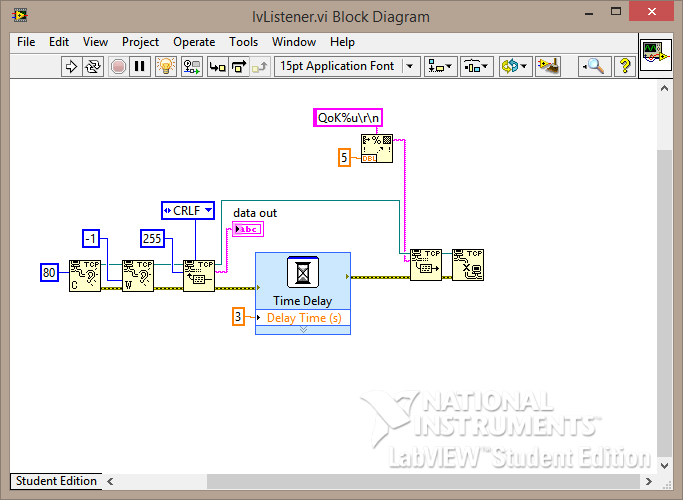
And my second VI that connects to the first, sends it command (ending with CRLF):

I have been scratching my had all night trying to figure out wat is wrong...
(Also, its always the READ that fails miserably)
Any help will be greatly appreciated 🙂
Solved! Go to Solution.

 altenbach

02-27-2015 05:22 PM
- Mark as New
- Bookmark
- Subscribe
- Mute
- Subscribe to RSS Feed
- Permalink
- Report to a Moderator
Please attach VIs instead of pictures (e.g. we cannot tell what the display format of your string diagram constant are. Are they set to \-codes or normal?).
Have you looked at the examples that ship with LabVIEW?
The current code is a one-shot deal. Do you run the VIs in the right order?

02-27-2015 05:39 PM - edited 02-27-2015 05:42 PM
- Mark as New
- Bookmark
- Subscribe
- Mute
- Subscribe to RSS Feed
- Permalink
- Report to a Moderator
Hi, thank you for your fast reply, here are my VI's:
Unfortunatly I dont have a copy of the client, because I just took my subVI sendCommand and changed to test easier and faster, I have added the sendCommand subVI, and the only thing that is changed is the connect part and the message format part. the read part is excactly the same.
[FIRST EDIT]
Hi, yes, I am starting the listener first (and use the highliter), and can see the communication starting, and can see that the client is transmitting its first message, but the listener fails on timeout, and then the client fails next when waiting for return messages.
[SECOND EDIT]
Also, setting the buffer length to shorter than the message transmitted, then it works completly fine, its just when trying to catch CRLF that it fails...
Best Regards,
Richard
altenbach
02-27-2015 08:55 PM
- Mark as New
- Bookmark
- Subscribe
- Mute
- Subscribe to RSS Feed
- Permalink
- Report to a Moderator
OK, as suspected, you are not appending two termination characters (<cr><lf> (0x0D, 0x0A in hex)), but four plain text characters "\", "r", "\", "n" (0x5C, 0x72, 0x5C, 0x6E in hex). That is completely different!
Right-click the string constants and select \-codes display. Now change the "\\" to "\" and you should be all set.
02-28-2015 10:56 AM
- Mark as New
- Bookmark
- Subscribe
- Mute
- Subscribe to RSS Feed
- Permalink
- Report to a Moderator
Thank you! That makes perferct sense! Sorry about the long respons, I have been looking for other "obvious" places where something could be wrong.
I have fixed that issue, and am now confident that I am actually sending CR+LF.
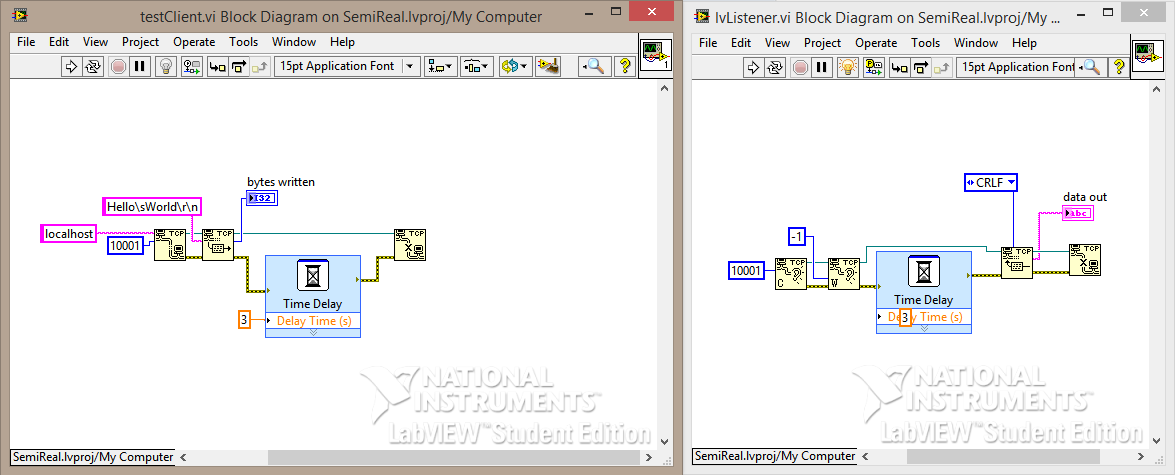
I have also simpliefied the samples to test "better", but I don't receive anything, and I don't receive any error messages anymore though.
I am running the samples with heighlighter on (thats the main reason for the delay). I have also been sure to start the listener first (If I don't, I instantly get a error message).
(Also "Bytes written" is 13 bytes).

 dkfire
02-28-2015 11:49 AM
- Mark as New
- Bookmark
- Subscribe
- Mute
- Subscribe to RSS Feed
- Permalink
- Report to a Moderator
You will need to use the Connection ID from the "TCP Wait on Listener". That is the bottom output.
Look at the examples that is shipped with LabVIEW.
02-28-2015 11:55 AM
- Mark as New
- Bookmark
- Subscribe
- Mute
- Subscribe to RSS Feed
- Permalink
- Report to a Moderator
Thank you for your attention, that also makes perfect sense, but I still dont receive any data :/
(I have been looking at the examples, but will take a closer look now 🙂 )
altenbach
02-28-2015
12:40 PM
- last edited on
03-12-2026
10:24 AM
by
 Content Cleaner
- Mark as New
- Bookmark
- Subscribe
- Mute
- Subscribe to RSS Feed
- Permalink
- Report to a Moderator
@Richard87 wrote:
Thank you for your attention, that also makes perfect sense, but I still dont receive any data
All that's left if to wire a maximum size (e.g. 128) to the "bytes to read" input of TCP read. It seems that it defaults to zero if you don't wire it. Check the help.
Quote:
"CRLF—Waits until all bytes you specify in bytes to read arrive or until the function receives a CR (carriage return) followed by a LF (linefeed) within the number of bytes you specify in bytes to read or until timeout msruns out. The function returns the bytes up to and including the CR and LF if it finds them in the string."
Since "bytes to read" is zero in your case, it won't return anything. 🙂
02-28-2015 12:59 PM
- Mark as New
- Bookmark
- Subscribe
- Mute
- Subscribe to RSS Feed
- Permalink
- Report to a Moderator
Hi!
Great, that was the issue!
I expected 0 to mean that it would timeout or collect everything 😛 (kinda stupid since LabVIEW usually use -1 for that purpose)...
Anyway, that you all for the help! its been greatly appreceiated 🙂
altenbach
02-28-2015 01:10 PM
- Mark as New
- Bookmark
- Subscribe
- Mute
- Subscribe to RSS Feed
- Permalink
- Report to a Moderator
Richard87 wrote:I expected 0 to mean that it would timeout or collect everything 😛 (kinda stupid since LabVIEW usually use -1 for that purpose)...
I agree that this is an unfortunate choice. This input should default to something reasonable or it should be a required input since a default of zero is never useful. I have reported it elsewhere.
