ni.com is currently undergoing scheduled maintenance.
Some services may be unavailable at this time. Please contact us for help or try again later.
- Subscribe to RSS Feed
- Mark Topic as New
- Mark Topic as Read
- Float this Topic for Current User
- Bookmark
- Subscribe
- Mute
- Printer Friendly Page
System Exec (Batch File) Can't run batch file

 David.Espinosa
08-16-2018 07:38 PM
- Mark as New
- Bookmark
- Subscribe
- Mute
- Subscribe to RSS Feed
- Permalink
- Report to a Moderator
Hello,
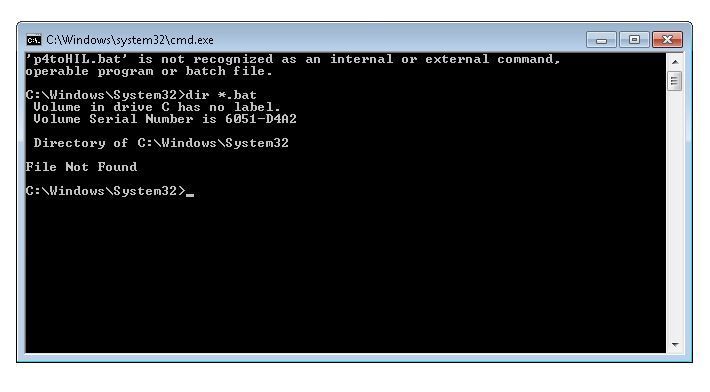
I've been trying to launch a batch file located in "C:\Windows\System32", when I run the VI the cmd display: 'p4toHIL.bat' is not recognized as an internal or external command, operable program or batch file. When I use the command "dir *.bat" says that the File Not Found, you can see this in the next image:
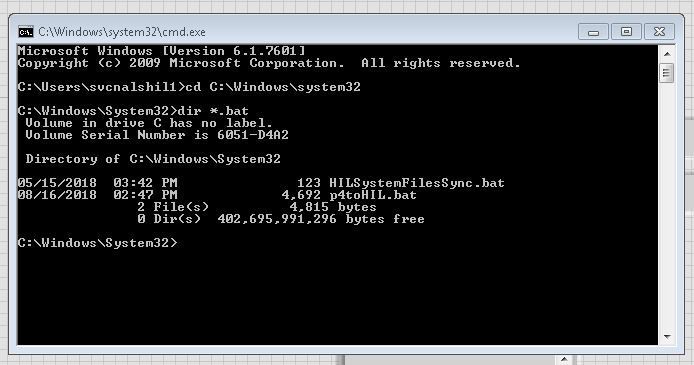
Also when I launch the batch file using the cmd from windows (windows+R) the batch file runs, also if I use the command "dir *.bat" the files are displayed as you can see in the next image:
I think that the issue is that LV launch the cmd without admin rights, Somebody Know How Can I access with the admin rights? I've tried to use the command runas but is not working.
Also if I locate the batch file in another path for example C:\ the bath works but I need that te file run from "C:\Windows\System32"
The VI that I have been using is attached.
Thank you in advance!!
David Espinosa

 GerdW
GerdW

08-17-2018 01:03 AM
- Mark as New
- Bookmark
- Subscribe
- Mute
- Subscribe to RSS Feed
- Permalink
- Report to a Moderator
Hi David,
just a wild guess:
Maybe Windows is fiddling with the folders due to the bitness of the calling task (in your case: LabVIEW)!? When using a 64bit environment you might get shown other paths/files then is shown for a 32bit process. This is especially done in the "Windows-internal" folders like "system32"…
GerdW
using LV2016/2019/2021 on Win10/11+cRIO, TestStand2016/2019

 bseguin
08-17-2018 01:05 AM
- Mark as New
- Bookmark
- Subscribe
- Mute
- Subscribe to RSS Feed
- Permalink
- Report to a Moderator
I think you are better to run everything from LabVIEW... Admin right are not cool to deal with in LabVIEW. or run LabVIEW as administrator and then call the batch file.

 Jim12345678
03-30-2020 08:37 AM
- Mark as New
- Bookmark
- Subscribe
- Mute
- Subscribe to RSS Feed
- Permalink
- Report to a Moderator
Was there ever a solution to this? I'm running LabVIEW 2018 on a Windows's 10 box and the .bat file I'm trying to run won't launch. It will run if I start it from the command prompt. I've tried several flavors of strings to launch the .bat file. The cmd window opens up but is blank. See attached.


