- Subscribe to RSS Feed
- Mark Topic as New
- Mark Topic as Read
- Float this Topic for Current User
- Bookmark
- Subscribe
- Mute
- Printer Friendly Page
String constants resized - Bug

 TCPlomp
03-29-2010 07:34 AM
- Mark as New
- Bookmark
- Subscribe
- Mute
- Subscribe to RSS Feed
- Permalink
- Report to a Moderator
I have an issue with one specific VI, it I open that with LabVIEW 2009 SP 1, a lot of the string constants get resized until only the first character is visible:
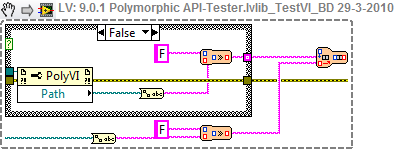
I am not sure why it happens with this specific VI, but I can tell it's quite annoying to debug this kind of code.
Ton
Nederlandse
 LabVIEW user groep www.lvug.nl
My LabVIEW Ideas
LabVIEW, programming like it should be!

 Ben
Ben

03-29-2010 07:41 AM
- Mark as New
- Bookmark
- Subscribe
- Mute
- Subscribe to RSS Feed
- Permalink
- Report to a Moderator
Is this Winodows Vista or Windows 7 ?
I have seen bad font mangling happening on my Windows 7 machine.
I ask because the size of the "path property" node looks like what I have seen on Windows 7.
Ben
 JB
JB
03-29-2010 07:45 AM
- Mark as New
- Bookmark
- Subscribe
- Mute
- Subscribe to RSS Feed
- Permalink
- Report to a Moderator
03-29-2010 03:36 PM
- Mark as New
- Bookmark
- Subscribe
- Mute
- Subscribe to RSS Feed
- Permalink
- Report to a Moderator
Windows 7, but to clarify, the font is not mangled. It looks like their is a 'Resize to text', witht the text length set to '1'.
Ton
Nederlandse
LabVIEW user groep www.lvug.nlMy LabVIEW Ideas
LabVIEW, programming like it should be!
JB
03-30-2010 01:08 AM
- Mark as New
- Bookmark
- Subscribe
- Mute
- Subscribe to RSS Feed
- Permalink
- Report to a Moderator
TCPlomp a écrit:Windows 7, but to clarify, the font is not mangled. It looks like their is a 'Resize to text', witht the text length set to '1'.
Ton
Yes, this is exactly what I have encountered with WXP. A "Size to text" was needed to resize the constant in order to see the whole string again.

03-30-2010 04:32 AM
- Mark as New
- Bookmark
- Subscribe
- Mute
- Subscribe to RSS Feed
- Permalink
- Report to a Moderator
Hi TCPlomp,
In order to file a correct CAR (Corrective Action Request) for this kind of bugs, we need to have a VI to reproduce this issue.
Can you please post your VI, so we can verify and reproduce the problem?
Thanks in advance!
Regards,
PeterS
03-30-2010 05:47 AM
- Mark as New
- Bookmark
- Subscribe
- Mute
- Subscribe to RSS Feed
- Permalink
- Report to a Moderator
Peter,
could you contact me via email?
Thanks,
Ton
Nederlandse
LabVIEW user groep www.lvug.nlMy LabVIEW Ideas
LabVIEW, programming like it should be!
05-01-2010 03:18 PM
- Mark as New
- Bookmark
- Subscribe
- Mute
- Subscribe to RSS Feed
- Permalink
- Report to a Moderator
I got a FPCPP error on lin 944 when using 'resize to text' and afterwards I could not start LabVIEW (have to try a reboot).
Initial Log in the Windows event log:
Naam van toepassing met fout: LabVIEW.exe, versie: 9.0.1.4011, tijdstempel: 0x4b47e0ad
Naam van module met fout: LabVIEW.exe, versie: 9.0.1.4011, tijdstempel: 0x4b47e0ad
Uitzonderingscode: 0xc0000005
Foutoffset: 0x0151332e
Id van proces met fout: 0x1940
Starttijd van toepassing met fout: 0x01cae969872ba726
Pad naar toepassing met fout: C:\Program Files\National Instruments\LabVIEW 2009\LabVIEW.exe
Pad naar module met fout: C:\Program Files\National Instruments\LabVIEW 2009\LabVIEW.exe
Rapport-id: 2ecaeea3-555d-11df-8f42-00235a05a8d2
Log of the crashe LabVIEW starts:
Naam van toepassing met fout: LabVIEW.exe, versie: 9.0.1.4011, tijdstempel: 0x4b47e0ad
Naam van module met fout: LabVIEW.exe, versie: 9.0.1.4011, tijdstempel: 0x4b47e0ad
Uitzonderingscode: 0xc0000005
Foutoffset: 0x0151332e
Id van proces met fout: 0xf40
Starttijd van toepassing met fout: 0x01cae969fa920d98
Pad naar toepassing met fout: C:\Program Files\National Instruments\LabVIEW 2009\LabVIEW.exe
Pad naar module met fout: C:\Program Files\National Instruments\LabVIEW 2009\LabVIEW.exe
Rapport-id: 4274f129-555d-11df-8f42-00235a05a8d2
Ton
Nederlandse
LabVIEW user groep www.lvug.nlMy LabVIEW Ideas
LabVIEW, programming like it should be!

 tst
tst
05-03-2010 04:16 AM
- Mark as New
- Bookmark
- Subscribe
- Mute
- Subscribe to RSS Feed
- Permalink
- Report to a Moderator
I've seen this occasionally too on LV 2009, win XP.
I don't use either the JKI state machine or the case selector plugin (which Ton suspected of elsewhere), so I doubt those are the cause for this.
___________________
Try to take over the world!
05-10-2010 03:12 PM
- Mark as New
- Bookmark
- Subscribe
- Mute
- Subscribe to RSS Feed
- Permalink
- Report to a Moderator
And I have seen it with a numeric constant.
Instead of showing it's value 1000, it only showed 0.
I didn't even know it was possible to resize a numeric constant.
Ton
Nederlandse
LabVIEW user groep www.lvug.nlMy LabVIEW Ideas
LabVIEW, programming like it should be!
