ni.com is currently undergoing scheduled maintenance.
Some services may be unavailable at this time. Please contact us for help or try again later.
- Subscribe to RSS Feed
- Mark Topic as New
- Mark Topic as Read
- Float this Topic for Current User
- Bookmark
- Subscribe
- Mute
- Printer Friendly Page
Significant Digits in data file
Solved!
 glskinner
06-11-2013 11:37 AM
- Mark as New
- Bookmark
- Subscribe
- Mute
- Subscribe to RSS Feed
- Permalink
- Report to a Moderator
Is there a way to change the significant digits in an LVM data file? I'm using "Write to measurements file"
Solved! Go to Solution.

 PaulG.
06-11-2013 11:53 AM
- Mark as New
- Bookmark
- Subscribe
- Mute
- Subscribe to RSS Feed
- Permalink
- Report to a Moderator
Depends. What do your "signals" data look like?
Retired
06-11-2013 12:13 PM
- Mark as New
- Bookmark
- Subscribe
- Mute
- Subscribe to RSS Feed
- Permalink
- Report to a Moderator
Signals? They're waveforms, voltages...

 ChrissyC
06-13-2013 08:01 AM
- Mark as New
- Bookmark
- Subscribe
- Mute
- Subscribe to RSS Feed
- Permalink
- Report to a Moderator
Hi,
I'd use the "Write to Sreadsheet File" VI instead. It'll write your results to a text file and you can specify the format.
-CC
"If anyone needs me, I'll be in the Angry Dome!"
06-13-2013 09:27 AM
- Mark as New
- Bookmark
- Subscribe
- Mute
- Subscribe to RSS Feed
- Permalink
- Report to a Moderator
I'm not sure I can do it with "write to spreadsheet." It doesn't have a "Saving Data" boolean. A lot of my program is dependent on that. Is there any other way to change the significant digits in a "write to measurements file"?

 RavensFan

06-13-2013 09:34 AM
- Mark as New
- Bookmark
- Subscribe
- Mute
- Subscribe to RSS Feed
- Permalink
- Report to a Moderator
Put the Write to Spreadsheet File function inside a case structure.
There is no easy way to change the number of digits using the Express VI. You'd have to convert the Express VI to a regular subVI through the Open Front Panel menu option. Then you'd have to drill down quite a few levels of subVI's and find where the format string is and change it. Then you'd have to save that entire hierarchy of subVI's under new names. I don't recommend any of this.

 JÞB
JÞB
06-13-2013 10:02 AM - edited 06-13-2013 10:02 AM
- Mark as New
- Bookmark
- Subscribe
- Mute
- Subscribe to RSS Feed
- Permalink
- Report to a Moderator
Caution! This will change files in vi.lib. I suggest you rename and move the affeted vis (do not blame me if other things break)
Convert the express vi to a vi
Drill to here in the heirarchy

Change this constant format specifier
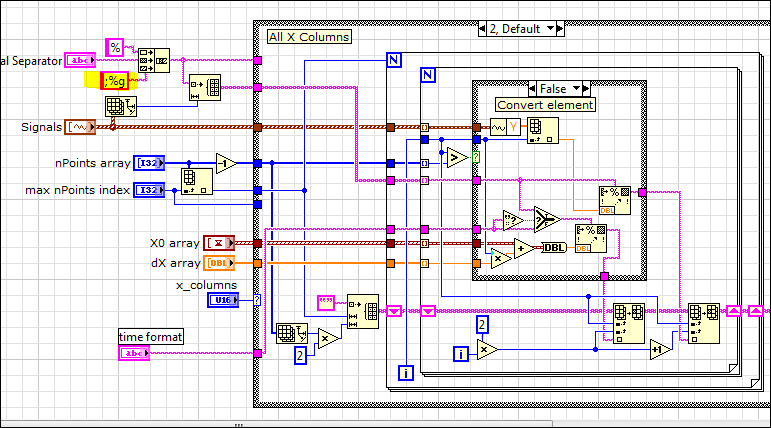
"Should be" isn't "Is" -Jay
06-13-2013 12:02 PM
- Mark as New
- Bookmark
- Subscribe
- Mute
- Subscribe to RSS Feed
- Permalink
- Report to a Moderator
Jeff, I think I tried this method before...exactly what do I put in the string to output only 3 significant digits?
JÞB
06-13-2013 12:23 PM
- Mark as New
- Bookmark
- Subscribe
- Mute
- Subscribe to RSS Feed
- Permalink
- Report to a Moderator
%.3g
"Should be" isn't "Is" -Jay
06-13-2013 12:35 PM
- Mark as New
- Bookmark
- Subscribe
- Mute
- Subscribe to RSS Feed
- Permalink
- Report to a Moderator
does the semi colon stay?
