- Subscribe to RSS Feed
- Mark Topic as New
- Mark Topic as Read
- Float this Topic for Current User
- Bookmark
- Subscribe
- Mute
- Printer Friendly Page
Scrollbar appearance

 andrej
09-01-2011 12:53 PM
- Mark as New
- Bookmark
- Subscribe
- Mute
- Subscribe to RSS Feed
- Permalink
- Report to a Moderator
Hi,
I would like to change the appearance (color of the parts) of the scrollbar in Listbox. How can I do that?
Thanks,
Andrej

 RavensFan

09-01-2011 01:04 PM
- Mark as New
- Bookmark
- Subscribe
- Mute
- Subscribe to RSS Feed
- Permalink
- Report to a Moderator
Right click the listbox. Advanced >> Customize.
You can acually use the color paintbrush directly on some parts of the scrollbar if you want to.
09-01-2011 01:09 PM
- Mark as New
- Bookmark
- Subscribe
- Mute
- Subscribe to RSS Feed
- Permalink
- Report to a Moderator
I've tried, but I can only change the color of entire scrollbar.
Could you be more specific on how to color separate parts of the scrollbar?
Thanks,
Andrej

 ben64
ben64
09-01-2011 01:14 PM
- Mark as New
- Bookmark
- Subscribe
- Mute
- Subscribe to RSS Feed
- Permalink
- Report to a Moderator
I think you can't separate the colors of the different parts of the scrollbar (e.g. the background, slider, ...) If you press the spacebar with the coloring tool you can change the color of the triangle at the top and bottom of the scroll bar.
Ben64

09-01-2011 01:24 PM
- Mark as New
- Bookmark
- Subscribe
- Mute
- Subscribe to RSS Feed
- Permalink
- Report to a Moderator
Yes. But I must also change the color of the different parts, otherwise my GUI will be ugly.
I will try to create an XControl that will use customized vertical slide instead of the scrollbar.
RavensFan
09-01-2011 01:39 PM
- Mark as New
- Bookmark
- Subscribe
- Mute
- Subscribe to RSS Feed
- Permalink
- Report to a Moderator
As Ben said, I believe there are only a couple of things you can change..
I find it funny that you say you need to modify it even more than you can to keep it from looking ugly. In my experience, the ugliest front panels are those created by people who tried to do any kind of color modification to there controls.
09-01-2011 01:46 PM
- Mark as New
- Bookmark
- Subscribe
- Mute
- Subscribe to RSS Feed
- Permalink
- Report to a Moderator
My GUI was designed by a professional designer and in accordance to that I must also change the appearance of the scrollbar 🙂
I've already customized other controls.
 aeastet
09-01-2011 01:51 PM
- Mark as New
- Bookmark
- Subscribe
- Mute
- Subscribe to RSS Feed
- Permalink
- Report to a Moderator
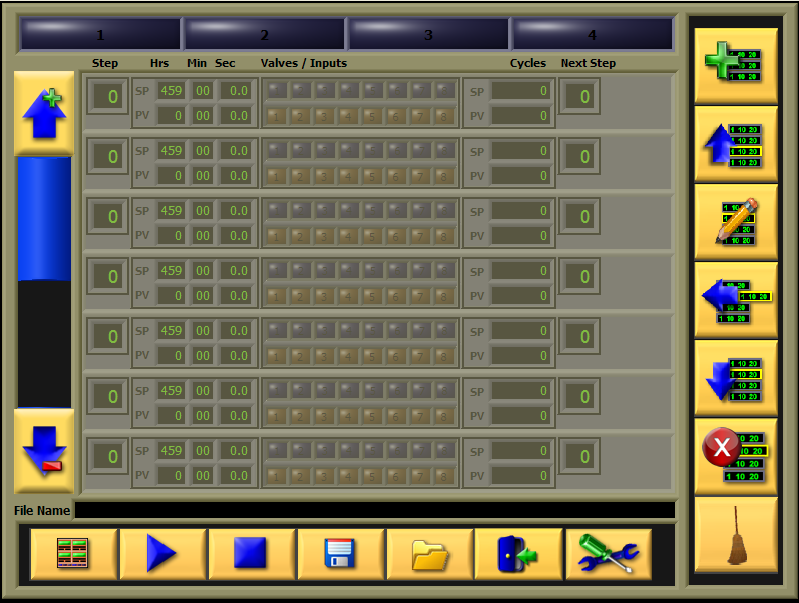
I had to make my own. It take time but it is worth it. Now I can change to what ever I want. See below:
GHSP
- Tags:
- scrollbar
 jcarmody
09-01-2011 01:58 PM
- Mark as New
- Bookmark
- Subscribe
- Mute
- Subscribe to RSS Feed
- Permalink
- Report to a Moderator
@andrej wrote:
[...] otherwise my GUI will be ugly.
Be careful what you ask for. Beauty is in the eye of the beholder.
You're entirely bonkers. But I'll tell you a secret. All the best people are. ~ Alice
For he does not know what will happen; So who can tell him when it will occur? Eccl. 8:7
