- Subscribe to RSS Feed
- Mark Topic as New
- Mark Topic as Read
- Float this Topic for Current User
- Bookmark
- Subscribe
- Mute
- Printer Friendly Page
Script a UI for interfacing with an FPGA Bitfile via Control Read/Write node

 Intaris

10-03-2022 09:04 AM
- Mark as New
- Bookmark
- Subscribe
- Mute
- Subscribe to RSS Feed
- Permalink
- Report to a Moderator
I'm looking to automate creation of a duplicate UI for a given FPGA Bitfile. I have access to the original VI, so I have an easy way to just copy and paste the entirety of the FP to a new VI. I then want to create an FPGA Open and Read/Write node which is then automatically wired to the appropriate FP elements (with read/write determined by the Control/Indicator status of the actual FP controls).
I typically use interactive mode, but we are experiencing some difficulties with this and the option to run the code via "proxy" UI would be of help. It would allow us to programmatically call other functions (such as Flex RIO config VIs) while executing the VI. Since we're in a rather fluid stage of development, the UI changes often. Manually maintaining this is not something I would like to be spending my days on..
I have found some FPGA Interface scripting methods under vi.lib/rvi/ClientSDK/Core,Scripting but it's pretty incomplete.
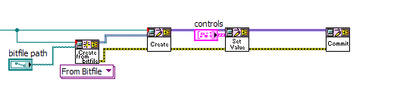
I can create the node for reading and writing, but due to the lack of actual scripting references for this node, I cannot wire it programmatically, which is kind of the point.
I am using LabVIEW 2015, are there any additions to this in newer LV versions?
10-03-2022 09:16 AM
- Mark as New
- Bookmark
- Subscribe
- Mute
- Subscribe to RSS Feed
- Permalink
- Report to a Moderator
Oh never mind, I think I found it.
In the "private" folder of the Read/Write node, there's a VI (which is set to public, not private) to return the terminals for the node. I can use this to wire it up. Nice.

 AndersSekanina
02-25-2026 05:46 AM
- Mark as New
- Bookmark
- Subscribe
- Mute
- Subscribe to RSS Feed
- Permalink
- Report to a Moderator
Hi
For info the VIs is moved to: C:\Program Files\NI\LVAddons\
I have started to work on it but got some problems.
I use a vit with all wires drawn to generate my VI, I want then just to change the terminal of the Read/Write Control. I do like:

It is also generating and the VI looks correct, but there is still a broken arrow:

I then have to press on the terminal select "Boolean" again, and then it is working. I have tried ctrl-run, no luck. Any ideas?
My vit:

02-25-2026 08:23 AM - edited 02-25-2026 08:25 AM
- Mark as New
- Bookmark
- Subscribe
- Mute
- Subscribe to RSS Feed
- Permalink
- Report to a Moderator
Looks like a typical LV problem : Incomplete type propagation.
Are you setting the "Read" node first and then the "Write node"? And which one needs to be interacted with to get it working? I've not used the tools for a while, but could it be you're setting the "Write" first, then the "read"? Type propagation is easier if you first do the "Read" node (which will cause the Variant output to be modified) and then the "Write".
AndersSekanina
02-25-2026 08:25 AM - edited 02-25-2026 08:29 AM
- Mark as New
- Bookmark
- Subscribe
- Mute
- Subscribe to RSS Feed
- Permalink
- Report to a Moderator
Thanks for your answer
I am setting the "READ" first and thereafter the "WRITE", and I have to interact with both of them before it works.
I have also tried to ass 1s between "read" commit and "write" open, nu succes.
AndersSekanina
02-26-2026 01:26 AM
- Mark as New
- Bookmark
- Subscribe
- Mute
- Subscribe to RSS Feed
- Permalink
- Report to a Moderator
From Dnatt on LabVIEW Discord:
It looks like there is a bug in the API where the error list in the internal XNode state isn't being reset by the API. I wrote this code that manually wipes the error list after the scripting, and it appears to work... the resulting VI after scripting is not broken. I've attached the scripting VI here, saved in LabVIEW 2020, since I had to copy the private "State" property of the XNode class out of one of the password-protected VIs in the API in order to get this to work.

It solved my problem
