ni.com is currently undergoing scheduled maintenance.
Some services may be unavailable at this time. Please contact us for help or try again later.
- Subscribe to RSS Feed
- Mark Topic as New
- Mark Topic as Read
- Float this Topic for Current User
- Bookmark
- Subscribe
- Mute
- Printer Friendly Page
Save waveform data to .TXT
 hlod
hlod
06-27-2012 11:16 AM - edited 06-27-2012 11:20 AM
- Mark as New
- Bookmark
- Subscribe
- Mute
- Subscribe to RSS Feed
- Permalink
- Report to a Moderator
Hi all,
I'm acquiring data from one machine. I show all data from each channel on graph, which works OK, for different sample rate. What I want is to save this data to .TXT file.
Please take a look at my picture. What I need into .TXT file is value for each channel at each iteration. I tried to save "value" Y from each "build waveform", but what I get is data on picture. It's always saving previous data(see picture at bottom), but I need just:
| 17:49:16 | 28,192885 |
| 17:49:16 | 28,193563 |
| 17:49:16 |
28,193902
|
PICTURE:

Rookie; LV 2011 on WIN 7

 Dennis_Knutson
06-27-2012 11:24 AM
- Mark as New
- Bookmark
- Subscribe
- Mute
- Subscribe to RSS Feed
- Permalink
- Report to a Moderator
Well, if you are saving the Y array then obviously you would be saving multiple points. You do not show how the actual saving is being done and I have no idea what the clfn is returning as far as different channels. If the 1D array is single reads of multiple channels than you simply index that array.
06-27-2012 11:41 AM - edited 06-27-2012 11:42 AM
- Mark as New
- Bookmark
- Subscribe
- Mute
- Subscribe to RSS Feed
- Permalink
- Report to a Moderator
I'm saving like this (I know I must put "open and close" block outside of while loop, but this is not my problem right now). How can I index then to save just value of each itteration...

Rookie; LV 2011 on WIN 7
Dennis_Knutson
06-27-2012 11:46 AM
- Mark as New
- Bookmark
- Subscribe
- Mute
- Subscribe to RSS Feed
- Permalink
- Report to a Moderator
You could actually explain what the clrn is returning. I said what to do if the 1D array was single samples of multiple channels. Apparently you did not read that part?
06-27-2012 11:55 AM - edited 06-27-2012 11:57 AM
- Mark as New
- Bookmark
- Subscribe
- Mute
- Subscribe to RSS Feed
- Permalink
- Report to a Moderator
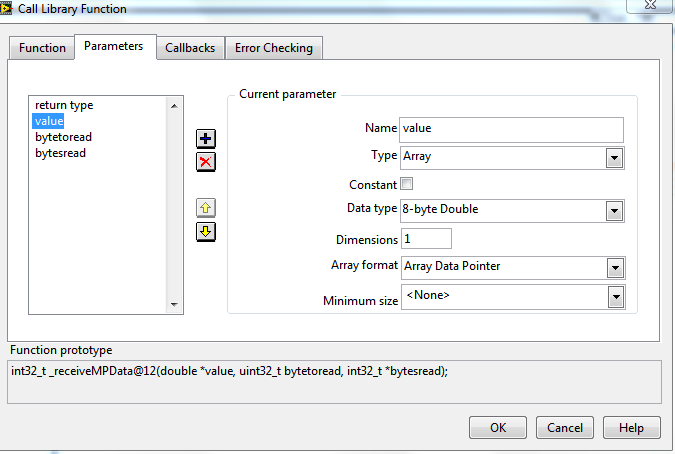
clfn (ReceiveMPData) return:
value(Y) which is output data for all channels:
Rookie; LV 2011 on WIN 7
Dennis_Knutson
06-27-2012 11:58 AM - edited 06-27-2012 11:59 AM
- Mark as New
- Bookmark
- Subscribe
- Mute
- Subscribe to RSS Feed
- Permalink
- Report to a Moderator
So, I already answered your question it would appear. You could also wire the 1D array to Array to Spreadsheet and wire that to the write file with the timestamp.
06-27-2012 12:05 PM
- Mark as New
- Bookmark
- Subscribe
- Mute
- Subscribe to RSS Feed
- Permalink
- Report to a Moderator
So if I understand you, I use "index array" block and how can I just index last value; because I need just last value of each iteration, which is "current" value.
Rookie; LV 2011 on WIN 7
06-27-2012 12:25 PM
- Mark as New
- Bookmark
- Subscribe
- Mute
- Subscribe to RSS Feed
- Permalink
- Report to a Moderator
Well I tried to add "index array" and add to "index" value "-1", but then it's saving all zeros to .txt file;
What I actually need is to get last element of array. With block "decimate 1D array" I just decimate array because channel samples are interleaved.
I hope someone actually understand what I want.
Rookie; LV 2011 on WIN 7
Dennis_Knutson
06-27-2012 12:34 PM
- Mark as New
- Bookmark
- Subscribe
- Mute
- Subscribe to RSS Feed
- Permalink
- Report to a Moderator
That does not make any sense. If, as you say, the 1D array is a single sample from each channel, then index 0 would be channel 1, index 1 would be channel 2, etc. Why do you just want the last element when you originally said you wanted all channels? I also said that you could wire the 1D array directly to the Array to Spreadsheet String. That would give you a list of channels with a separator between them. Your decimate array, etc is not relevant since you only want to record the current acquisition - not your entire plot.
06-27-2012 12:38 PM - edited 06-27-2012 12:39 PM
- Mark as New
- Bookmark
- Subscribe
- Mute
- Subscribe to RSS Feed
- Permalink
- Report to a Moderator
I have 5 channels (array that I received from clfn). With decimate to 1D array I received 5 Y values for each channel separate. I need to save for each channel data into .txt file (logging data).
Rookie; LV 2011 on WIN 7
