- Subscribe to RSS Feed
- Mark Topic as New
- Mark Topic as Read
- Float this Topic for Current User
- Bookmark
- Subscribe
- Mute
- Printer Friendly Page
Save data to spreadsheet
Solved!
 milan87
10-10-2019 12:41 AM
- Mark as New
- Bookmark
- Subscribe
- Mute
- Subscribe to RSS Feed
- Permalink
- Report to a Moderator
Hello All,
I need to write 2D array of data to spreadsheet.
Every time I press some button, new file should be created with date and time in file name.
Can someone advise how to create this?
Thank you.
Milan
Solved! Go to Solution.
- Tags:
- LabVIEW

 GerdW
GerdW

10-10-2019 12:59 AM
- Mark as New
- Bookmark
- Subscribe
- Mute
- Subscribe to RSS Feed
- Permalink
- Report to a Moderator
Hi Milan,
which of these steps is a problem to you?
What have you tried so far? Where are you stuck?
Use FormatIntoString to create a file name according to your needs. (FormatDateTimeString might work too.)
Then use BuildPath to create a valid path for your desired file.
Then use WriteDelimitedSpreadsheet to save your 2D array…
GerdW
using LV2016/2019/2021 on Win10/11+cRIO, TestStand2016/2019
10-10-2019 01:08 AM
- Mark as New
- Bookmark
- Subscribe
- Mute
- Subscribe to RSS Feed
- Permalink
- Report to a Moderator
Hello,
please check attachment.
First I have problem creating subfolder, where all files will be saved.
Best regards.
GerdW
10-10-2019 01:12 AM
- Mark as New
- Bookmark
- Subscribe
- Mute
- Subscribe to RSS Feed
- Permalink
- Report to a Moderator
Hi Milan,
please check attachment.
First I have problem creating subfolder, where all files will be saved.
I cannot check the VI as I only have LV2017 available right now. (You might attach a snippet or a downconverted version of your VI.)
To create a subfolder you can use this CreateFolder function…
GerdW
using LV2016/2019/2021 on Win10/11+cRIO, TestStand2016/2019
10-10-2019 01:20 AM
- Mark as New
- Bookmark
- Subscribe
- Mute
- Subscribe to RSS Feed
- Permalink
- Report to a Moderator
Hi Gerd,
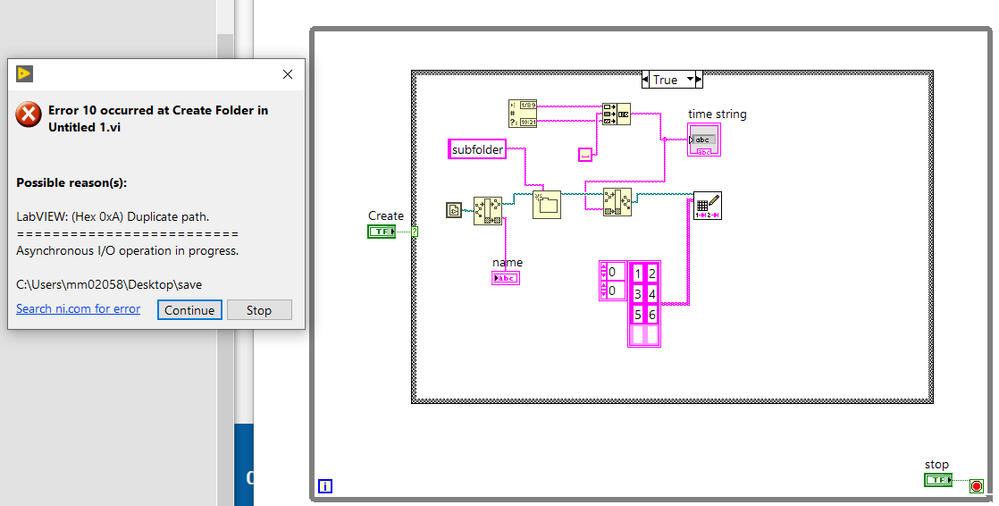
I tried with create folder first...
and with build path
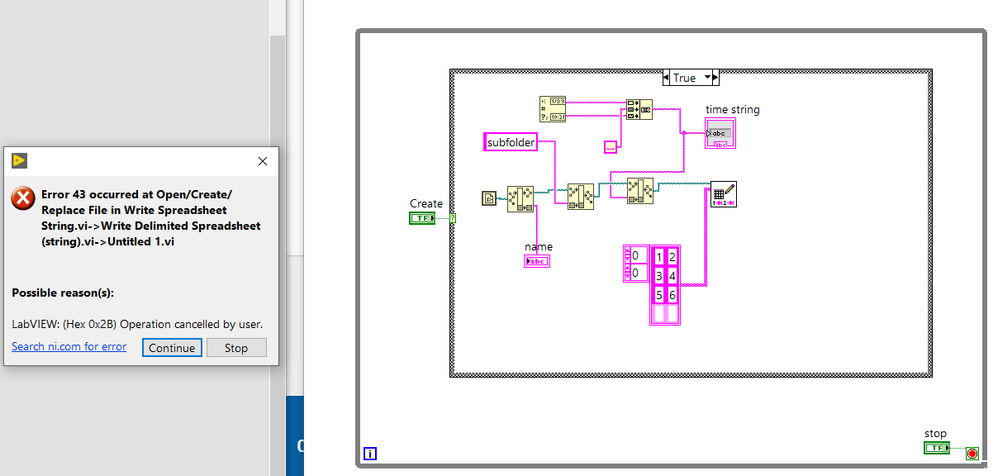
GerdW
10-10-2019 01:40 AM
- Mark as New
- Bookmark
- Subscribe
- Mute
- Subscribe to RSS Feed
- Permalink
- Report to a Moderator
Hi milan,
error 10: you should not try to create an already exisiting folder…
error 43: you cancelled an operation, so it is not the fault of BuildPath…
GerdW
using LV2016/2019/2021 on Win10/11+cRIO, TestStand2016/2019
10-10-2019 01:53 AM
- Mark as New
- Bookmark
- Subscribe
- Mute
- Subscribe to RSS Feed
- Permalink
- Report to a Moderator
Hi,
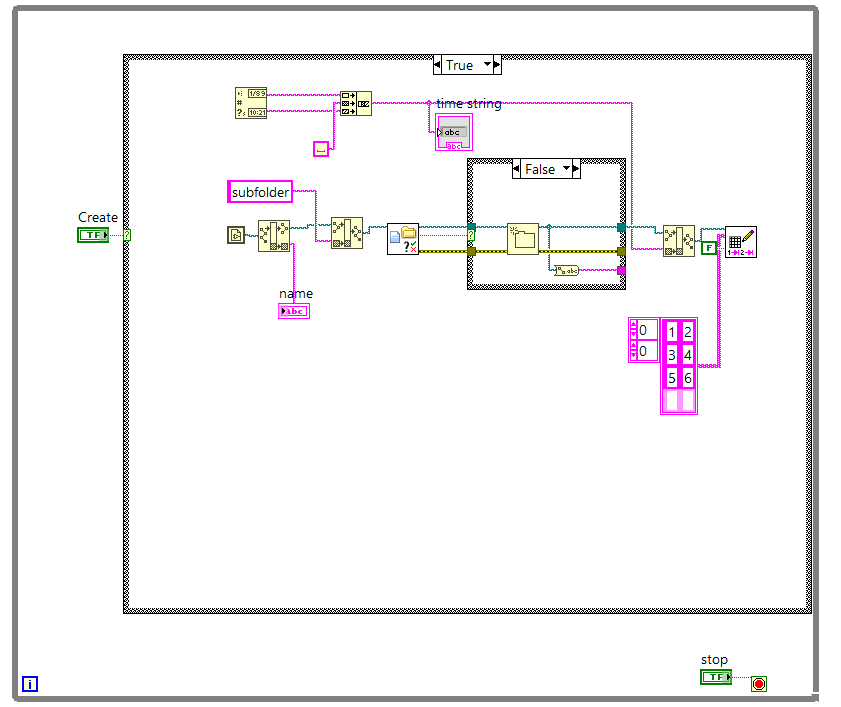
i manage to create folder, but write spreadsheet always ask to chose file to write...
I need to create file, not to open existing one...
 GerdW
GerdW
10-10-2019 02:29 AM - edited 10-10-2019 02:32 AM
- Mark as New
- Bookmark
- Subscribe
- Mute
- Subscribe to RSS Feed
- Permalink
- Report to a Moderator
Hi Milan,
what is the full path that you feed into WriteDelimitedFile?
Does it contain a valid path, with all folders already existing and a valid filename?
Edit:
Found the problem - by debugging…
Look inside WriteDelimitedFile: inside WriteSpreadsheetString a new file is opened without providing a filepath. This will trigger the FileOpen dialog…
(You should have found out that too - by debugging…)
Solution:
Create the file on your own using FileOpen. Then convert the string using ArrayToSpreadsheetString. Then write that string using WriteToTextFile. Don't forget to close the file afterwards…
GerdW
using LV2016/2019/2021 on Win10/11+cRIO, TestStand2016/2019
10-10-2019 02:56 AM
- Mark as New
- Bookmark
- Subscribe
- Mute
- Subscribe to RSS Feed
- Permalink
- Report to a Moderator
Hi Gerd,
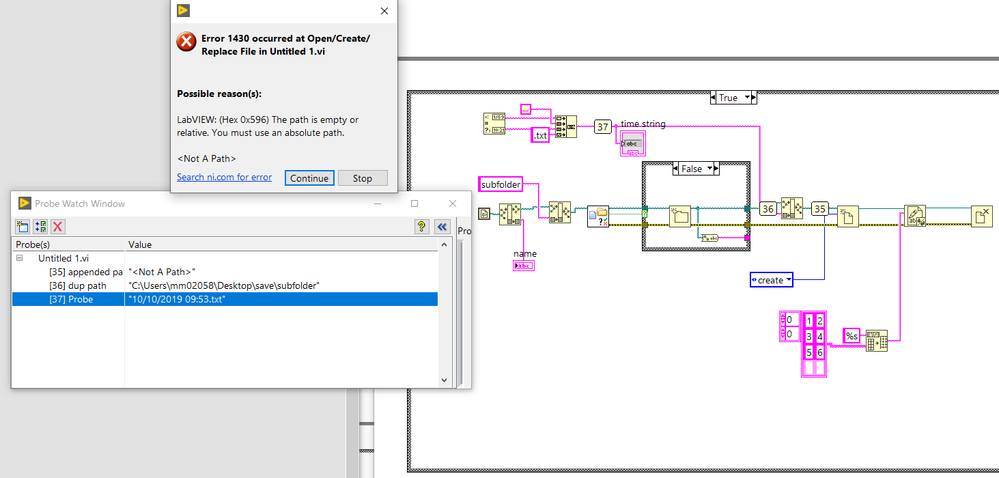
I tried that way, but problem is obviously when I append file name (date, time) to the path, then probe shows that this is not a path. Of course, because this file doesn't exist yet. Why cannot create file with specific file name?
GerdW
10-10-2019 03:01 AM
- Mark as New
- Bookmark
- Subscribe
- Mute
- Subscribe to RSS Feed
- Permalink
- Report to a Moderator
Hi Milan,
there are several forbidden characters in filenames. The colon (:) is one of them!
(This is basic knowledge for using computers and not related to LabVIEW.)
GerdW
using LV2016/2019/2021 on Win10/11+cRIO, TestStand2016/2019
