Running "LabVIEW 2010".exe as windows service
已解决!
 oenk
oenk

Hi all
years ago I wrote an application with LabVIEW 7.1 and turned it into an Windows NT Service according to this NI-tutorial.
Now I have a similar use case and I wanted to do the same thing with an application built in LabVIEW 2010.
Somehow it doesn't work and I've always get the error 62.
I've built a simple demo app once with LV7.1 and once with LV2010.
I was able to use the service when built with LV7.1 but not the LV2010 version (on the client side I've always used LV2010). So there is no problem with connecting to the server or using the port.
I'd rather not rebuilt the app with LV7.1 because it's not really small. I would only consider this if there is no workaround to this problem.
Anybody any ideas??
I really appreciate anybody's help
Cheers,
Christian
已解决! 转到解答。
 JohnCS
MS has changed the method for creating services. I haven't created a new service in Windows 7 but I believe it uses an app called sc.exe. Searching MSDN for the Windows 7 SDK and sc.exe should point you in the right direction.
Hi John
thanks for your reply.
Although the service should run on a Windows Server 2003 I will give it a try...
I'll report my results later
in the meantime,
have a nice day...
Just as information for the one running into the same problems:
sc.exe did the trick BUT not as described in this Tutorial. You need to create a wrapper service like described on this Homepage. Services created with sc.exe need a BeginService() and an EndService() method otherwise it won't let you install it.
This picture shows you how I did it. The CIN loads AnyService.dll which itself loads server.dll.
Kudos to Kuan Chen

Cheers,
\c


 MikeS81
Hi WayneS1324,
it should be better if you save it to your harddrive and load it from there. For me it was good enough.
Mike
Addendum:
as marked in the solution it won't work right away.
The service.exe's ini-file won't work like described in the Tutorial "Creating a Windows NT Service Using LabVIEW".
After some time with trial-and-error, some tears, a lot of new grey hair and several cups of coffee I found the solution.
If you add the following shown property node entries to your service.vi you're good to go...
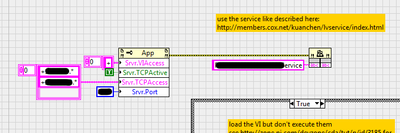
I don't know since when it was changed but it worked with LV2010 SP1...
Cheers,
\c

 Cyril_TSV
Hello,
this information is really interestive but the Kuanchen website is no more active ....
anyone can help me ?
Thanks

 Sam_Sharp

When I've wanted to run LabVIEW as a windows service I've used a third party command-line utility like SrvStart or SrvAny. Works great for me!
 Hooovahh
I've never used this technique, but according to ShaunR on LAVA, you can use the Windows Task Scheduler to have programs get ran on starup, before login. This is not making a service, but is is running a program before logging in, which is generally what people want when they make a service.
https://lavag.org/topic/17019-run-the-labview-program-windows-background/#entry104561
Unofficial Forum Rules and Guidelines
Get going with G! - LabVIEW Wiki.
17 Part Blog on Automotive CAN bus. - Hooovahh - LabVIEW Overlord
