- Subscribe to RSS Feed
- Mark Topic as New
- Mark Topic as Read
- Float this Topic for Current User
- Bookmark
- Subscribe
- Mute
- Printer Friendly Page
Run-Time Shortcut Menu
Solved!
 Chricolomba
02-07-2022 07:55 AM
- Mark as New
- Bookmark
- Subscribe
- Mute
- Subscribe to RSS Feed
- Permalink
- Report to a Moderator
Hello everyone,
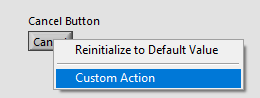
I have created the following menu which appears when right clicking.
I would now like to find a way to change the text of "Custom Action" to "Custom Action German" via programming.
The idea is to change the content of the Item Name and Item Tag according to the language in which the programme is set up.The problem is that I can't find the proprety node / invoke node to be able to access and modify the Run-Time menu via programming.
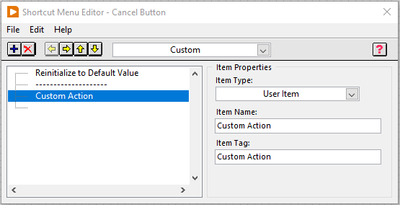
Does anyone know how to change the text displayed in the Run-Time Menu?
Thank you very much and have a nice day.
Christian
Solved! Go to Solution.

 GerdW
GerdW

02-07-2022 08:13 AM - edited 02-07-2022 08:14 AM
- Mark as New
- Bookmark
- Subscribe
- Mute
- Subscribe to RSS Feed
- Permalink
- Report to a Moderator
Hi Christian,
@Chricolomba wrote:
Does anyone know how to change the text displayed in the Run-Time Menu?
You can access the RuntimeMenu (and all its items) using the RuntimeMenu functions found in the UI functions palette!
Hint: you get the menu reference in the "menu selection (user)" event case…
GerdW
using LV2016/2019/2021 on Win10/11+cRIO, TestStand2016/2019
