- Subscribe to RSS Feed
- Mark Topic as New
- Mark Topic as Read
- Float this Topic for Current User
- Bookmark
- Subscribe
- Mute
- Printer Friendly Page
Resetting XY graph plot names in LABVIEW
Solved!
 cathborisova
11-03-2020 06:49 PM
- Mark as New
- Bookmark
- Subscribe
- Mute
- Subscribe to RSS Feed
- Permalink
- Report to a Moderator
Hello,
I have code that changes the plot names. I would like to add a "Clear All" button that resets the plot names to their original Plot 0, Plot 1 . . . names. "plots" is the number of plots that have been renamed so that the for loop can reset the names of those corresponding plots. My problem is that Plot 0 is not renaming plot 0, it is renaming the last plot whose name was changed, and then plot 0 is renamed to Plot 1, plot 1 becomes Plot 2 and so on.
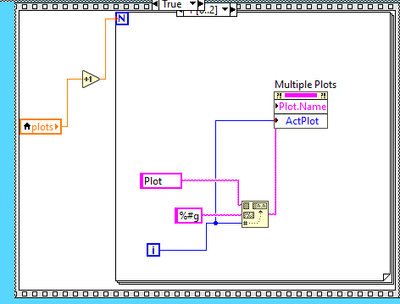
This is the relevant cases. Case 1 reinitializes the graph to default, Case 3 sets Clear All to false and resets the plot variable.
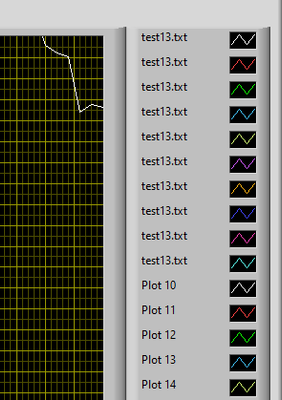
Here is an example of plots being renamed:
Here is what I get when I click "Clear All"
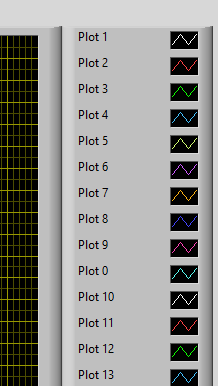
I have tried highlight execution and it looks like it should be renaming plot 0 when i=0 but for some reason that is not occurring. Thank you all in advance!
Solved! Go to Solution.

 Gregory
11-03-2020 07:03 PM - edited 11-03-2020 07:04 PM
- Mark as New
- Bookmark
- Subscribe
- Mute
- Subscribe to RSS Feed
- Permalink
- Report to a Moderator
Set the active plot before setting the plot name (move it higher up in the property node)
