ni.com is currently undergoing scheduled maintenance.
Some services may be unavailable at this time. Please contact us for help or try again later.
- Subscribe to RSS Feed
- Mark Topic as New
- Mark Topic as Read
- Float this Topic for Current User
- Bookmark
- Subscribe
- Mute
- Printer Friendly Page
Replace Array Elements using Replace array subset Function Causing higher CPU % Usage..
Solved!
 AtulS
AtulS
11-30-2017 10:20 AM
- Mark as New
- Bookmark
- Subscribe
- Mute
- Subscribe to RSS Feed
- Permalink
- Report to a Moderator
Hello Every one
I am trying to plot intensity graph using Predefined array size 2500*400 with Replace Array Subset function.
Replacing every elements in array one by one..
but as soon as i run my code my CPU usage goes to 95% some time 100 %
that causing delay \skipping plotting data in intensity graph.
is there any other option for Replace array subset function..i think that causing my CPU usage to 95%
2500*400=1000000 Element (Replacing every element in array one by one)
Solved! Go to Solution.
- Tags:
- array

 altenbach

11-30-2017 10:25 AM - edited 11-30-2017 10:38 AM
- Mark as New
- Bookmark
- Subscribe
- Mute
- Subscribe to RSS Feed
- Permalink
- Report to a Moderator
We are more interested in the block diagram than in the front panel. Can you attach the actual VI?
It also depends how you are replacing the elements in the existing array. Do you keep the array in a shift register (correct) or ping-pong it (read/write) it via local variables (bad!) or value property nodes (even worse!)
Why don't you replace all at once? The front panel runs in the UI thread, so it is normal that it does not visibly update with every point. There should be no "skipping", though. What do you mean by that?
I am sure you are aware that your intensity graph has fewer pixels than your array (at least horizontally), so not all values can be shown anyway.
Most likely, most of your CPU is used to for the UI, not the replace operation. What is your loop rate? Do you use any unusual priority settings? Do you use any unusual "advanced" settings for the graph indicator?

11-30-2017 10:49 AM
- Mark as New
- Bookmark
- Subscribe
- Mute
- Subscribe to RSS Feed
- Permalink
- Report to a Moderator
Thanks for Reply
Actual plotting is done by value change event of two counters
1=Scan Axis Counter
2=Index Axis Counter
its unable to post original code here but similar task vi snippet i can post here .
CPU is Intel Core 2 Duo 2.9 GHz
Ram 4 GB
Similar code works for small scale
e.g 1500*100 Array size CPU usage is normal for this condition 20-25 %
but not for 2500*400

 JÞB
JÞB
11-30-2017 10:52 AM
- Mark as New
- Bookmark
- Subscribe
- Mute
- Subscribe to RSS Feed
- Permalink
- Report to a Moderator
Use defer panel updates methods to stop updating the graph for every value added.
"Should be" isn't "Is" -Jay
altenbach
11-30-2017 10:53 AM - edited 11-30-2017 11:07 AM
- Mark as New
- Bookmark
- Subscribe
- Mute
- Subscribe to RSS Feed
- Permalink
- Report to a Moderator
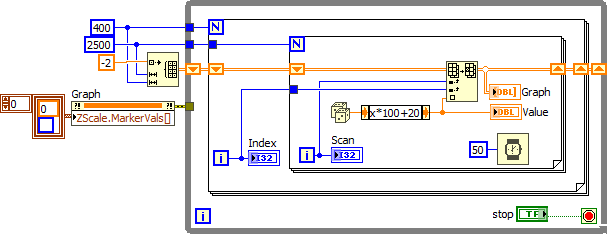
Get rid of all the local variables and the upper loop. Thread the initialized array across all loops via shift registers in the lower code and replace/display in the innermost loop.
altenbach
11-30-2017 11:04 AM - edited 11-30-2017 11:29 AM
- Mark as New
- Bookmark
- Subscribe
- Mute
- Subscribe to RSS Feed
- Permalink
- Report to a Moderator
You have classic race conditions, because there is no synchronization between your two loops. All you need is the following (no stacked sequences! no local variables!)


12-01-2017 08:57 AM
- Mark as New
- Bookmark
- Subscribe
- Mute
- Subscribe to RSS Feed
- Permalink
- Report to a Moderator
Thanks altenbach and Jeff·Þ·Bohrer
Both Technique help me to reduce CPU usage.
altenbach
12-01-2017 09:56 AM
- Mark as New
- Bookmark
- Subscribe
- Mute
- Subscribe to RSS Feed
- Permalink
- Report to a Moderator
I would strongly recommend against deferring panel updates. That is pointless here! You might still want to e.g. update the indicators showing the current coordinates, for example. Graph updates are already asynchronous by default.
If you only want to update the graph occasionally, place its terminal inside a case structure that only goes TRUE every n'th iteration (make sure it updates on the last iteration). If you only want to update whenever a row has been completed, place the graph terminal one loop out (after the innermost loop). If you only want to update the graph once the entire data is finished, place if after the two inner loops.
