- Subscribe to RSS Feed
- Mark Topic as New
- Mark Topic as Read
- Float this Topic for Current User
- Bookmark
- Subscribe
- Mute
- Printer Friendly Page
Reconstruct cluster from TDMS
Solved! nickb34
08-26-2013 03:37 PM
- Mark as New
- Bookmark
- Subscribe
- Mute
- Subscribe to RSS Feed
- Permalink
- Report to a Moderator
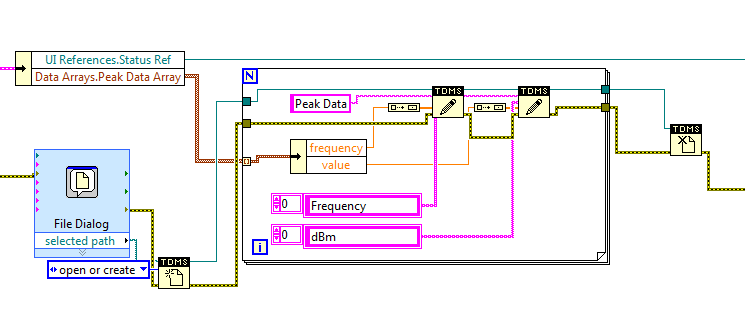
I've been able to successfully save my array of cluster data to a TDMS file using the following block diagram:
I've been trying to reconstruct my data using the following block diagram:
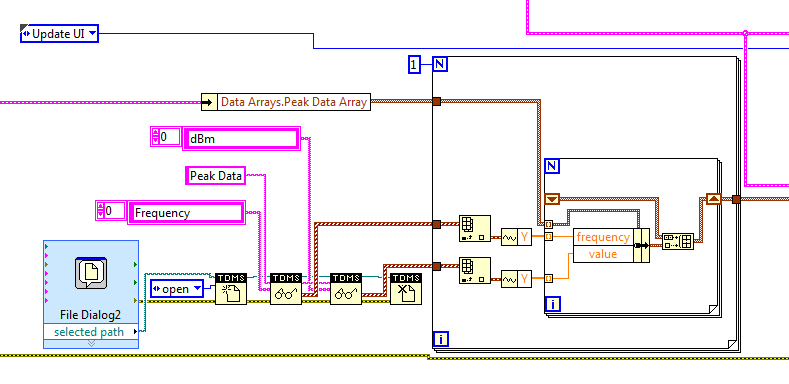
When the program gets to the nested FOR loop, it never enters. I placed a probe on the data going into that loop and there is certainly a large array going into it. Does anybody have any ideas for me? Furthermore, should I try a different method to save and restore data? (It seems like TDMS isn't very friendly unless you give it waveform data)
Thanks for any help!
Solved! Go to Solution.

08-26-2013 03:44 PM - edited 08-26-2013 03:49 PM
- Mark as New
- Bookmark
- Subscribe
- Mute
- Subscribe to RSS Feed
- Permalink
- Report to a Moderator
Hi Nick,
The number of iterations in the for loop is determined by the smallest array- in this case I would hazard a guess that your cluster definition array (DataArrays.PeakDataArray) is empty- the auto-index input is going to see zero elements and skip the loop.
You'll want to index that array one loop out to provide the cluster definition.
*edit*: By "one loop out", I mean you'll need to use an index array function, preferably outside the outer for loop- you don't want to auto-index just to get the cluster definition.
Regards,
08-26-2013 04:20 PM
- Mark as New
- Bookmark
- Subscribe
- Mute
- Subscribe to RSS Feed
- Permalink
- Report to a Moderator
Tom,
You sir are correct... I had done that previously for breaking out the waveform signals, but missed it on this one.
To my other question, is there a better method for saving and restoring clustered data?
08-26-2013
05:29 PM
- last edited on
03-28-2025
02:45 PM
by
 Content Cleaner
- Mark as New
- Bookmark
- Subscribe
- Mute
- Subscribe to RSS Feed
- Permalink
- Report to a Moderator
Hi Nick,
Datalog files might be what you're looking for. They are extremely convenient when storing small-to-moderate amounts of cluster data, but there are a few caveats:
1) You're essentially creating a custom binary file type that is only interpretable using your definition cluster and the datalog functions - this means data export to other environments/programs will be difficult and probably have to go through a datalog interpreter and you'll need that cluster definition to unpack the data. This makes most datalog solutions application-specific (It's hard to re-use the code elsewhere).
2) The file size is currently capped at 2 GB
3) See (1). You can't open a datalog in Excel.
There are a few decent examples of the functions being used, such as this one:
Example: Super Heroes vs Super Villains (an intro to Datalog Files)
XML is another good (and more portable) option, but will probably require more time up front to get going.
I've seen a few different cluster pack/unpack tools around, one called "Read Anything" is included in the free MGI library and saves cluster data in config (text) files.
Regards,

 Yamaeda
08-28-2013 01:49 AM
- Mark as New
- Bookmark
- Subscribe
- Mute
- Subscribe to RSS Feed
- Permalink
- Report to a Moderator
Modify the inner loop, let it build an array and place the build array outside and afterwards and add the two arrays together.
/Y

