- Subscribe to RSS Feed
- Mark Topic as New
- Mark Topic as Read
- Float this Topic for Current User
- Bookmark
- Subscribe
- Mute
- Printer Friendly Page
Reading access database : Grouped data

 Manreet
01-16-2019 11:44 AM
- Mark as New
- Bookmark
- Subscribe
- Mute
- Subscribe to RSS Feed
- Permalink
- Report to a Moderator
Hi ,
I am reading access database thru Database connectivity toolkit , My database has grouped data on every single row , but when I am reading data it , it is only giving me the parent of the group . Please see the attached for what I am trying to do.
if it possible to read the contents under it when we expand it , please let me know how to do it
Thanks for your help
Manreet

 aputman
01-16-2019 01:02 PM
- Mark as New
- Bookmark
- Subscribe
- Mute
- Subscribe to RSS Feed
- Permalink
- Report to a Moderator
Your query has a where statement of ID = 1. This doesn't match with the data that you want to see, since those records have an ID > 199. Obviously there is something within Access that is displaying this secondary data like this. The only way you'll be able to see that data is by writing a query that pulls it out, which is what Access is doing behind the scenes.
01-16-2019 01:12 PM
- Mark as New
- Bookmark
- Subscribe
- Mute
- Subscribe to RSS Feed
- Permalink
- Report to a Moderator
Hi ,
Thank you for your reply !
just for clarification , so under the ID=1 row , it has another table with a field called "ID" as well and group begins with 199 , so there is a table with a column called "ID" and inside each row of that table there is grouped data which also has a column called "ID" and these 2 ID columns have 2 different sets of data.
I am not sure how can I query something that labview can not even see. it does not know there is grouped data under each row.
aputman
01-16-2019 01:21 PM - edited 01-16-2019 01:23 PM
- Mark as New
- Bookmark
- Subscribe
- Mute
- Subscribe to RSS Feed
- Permalink
- Report to a Moderator
How are the tables linked? How does ID 1 in the first table know to display ID > 199 in the second table? There has to be a key that links them.
SELECT *
FROM table2
WHERE key = (SELECT key FROM table1 where ID = 1)
Edit: Maybe your ID is the key but I don't see any relationship in the data that you have posted.
01-16-2019 02:18 PM
- Mark as New
- Bookmark
- Subscribe
- Mute
- Subscribe to RSS Feed
- Permalink
- Report to a Moderator
Attached is the database , you will see 2 tables , one called step result and another called trans result.
The way the 2 tables are linked is ID field of the trans result is equal to the Trans result field of the step result table
I looked up the query behind the table and it is
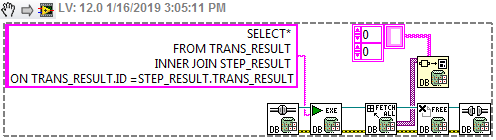
SELECT*
FROM TRANS_RESULT INNER JOIN STEP_RESULT ON TRANS_RESULT.ID =STEP_RESULT.TRANS_RESULT
I am not sure how to open connection to this database and select both the tables at the same time so I can execute this query to join them

 Mancho00
01-16-2019 02:33 PM
- Mark as New
- Bookmark
- Subscribe
- Mute
- Subscribe to RSS Feed
- Permalink
- Report to a Moderator
Getting data from a linked table is not the same as getting the linked data. If you want to get the grouped data, you have to create the query, either as a query table in the database, or using the 'DB Tools Execure Query' VI
aputman
01-16-2019 03:07 PM
- Mark as New
- Bookmark
- Subscribe
- Mute
- Subscribe to RSS Feed
- Permalink
- Report to a Moderator
You'll definitely need to use the Execute Query VI and then convert the dataset to an array of strings.
01-16-2019 03:19 PM
- Mark as New
- Bookmark
- Subscribe
- Mute
- Subscribe to RSS Feed
- Permalink
- Report to a Moderator
Thank you so much for being so clear , I will try this out and let you know if it was a success,
Much appreciated !
01-17-2019 01:22 PM
- Mark as New
- Bookmark
- Subscribe
- Mute
- Subscribe to RSS Feed
- Permalink
- Report to a Moderator
so I tried it , this is what happened refer attached , any thoughts ?
aputman
01-17-2019 01:48 PM
- Mark as New
- Bookmark
- Subscribe
- Mute
- Subscribe to RSS Feed
- Permalink
- Report to a Moderator
That's how a join works. It's trying to combine every single row in one table with every single row in the the other table where the two ID's are equal. When you run this in Access, it is able to display it in a grouped view so that the duplicate data is filtered, rather than showing all of the data as you are seeing in LabVIEW.
