- Subscribe to RSS Feed
- Mark Topic as New
- Mark Topic as Read
- Float this Topic for Current User
- Bookmark
- Subscribe
- Mute
- Printer Friendly Page
Read a data from excel - report generation

 Mrtechie
09-22-2017 05:21 AM
- Mark as New
- Bookmark
- Subscribe
- Mute
- Subscribe to RSS Feed
- Permalink
- Report to a Moderator
Hello all ,
i have an attached a VI . which Consists of several rows and several columns. Particularly in a 3rd column ( Test time ) is not reading properly in LabVIEW indicator. i was tried in many ways ( extract a column and adding a colon ). what was the reason ?? how to crack this ?

 GerdW
GerdW

09-22-2017 05:43 AM
- Mark as New
- Bookmark
- Subscribe
- Mute
- Subscribe to RSS Feed
- Permalink
- Report to a Moderator
Hi bhuvanesh,
change the column for this "Test Time" column from "time" to "scientific with 5 significant numbers" and you will notice you see the very same numbers as are shown in LabVIEW!
GerdW
using LV2016/2019/2021 on Win10/11+cRIO, TestStand2016/2019
09-22-2017 05:54 AM
- Mark as New
- Bookmark
- Subscribe
- Mute
- Subscribe to RSS Feed
- Permalink
- Report to a Moderator
Hello Gerdw ,
i cant get you . shall we need to choose the whole column and change properties >??
in properties time editing option was not there . i am a beginner in this . plz post a screen shot of that and guide me
GerdW
09-22-2017 06:09 AM - edited 09-22-2017 06:11 AM
- Mark as New
- Bookmark
- Subscribe
- Mute
- Subscribe to RSS Feed
- Permalink
- Report to a Moderator
Hi bhuvanesh,
i cant get you .
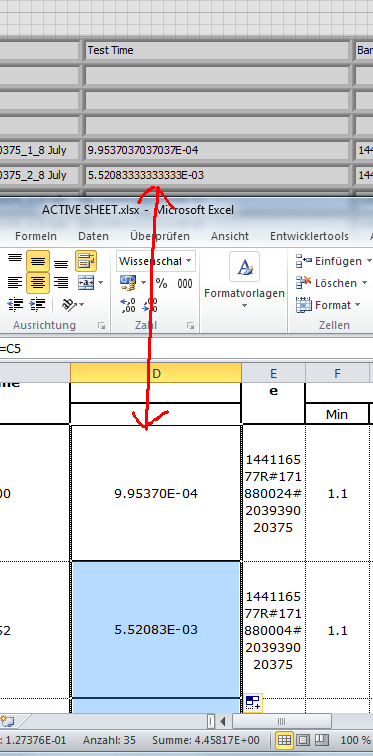
I wanted to explain the LabVIEW readings: they are infact the very same numbers as in Excel!
shall we need to choose the whole column and change properties >??
Open your Sheet with Excel.
Select the Time column.
Change its format to scientific (with 5 sign. digits).
-> You will see the very same numbers as are shown in LabVIEW:
GerdW
using LV2016/2019/2021 on Win10/11+cRIO, TestStand2016/2019
09-22-2017 06:26 AM
- Mark as New
- Bookmark
- Subscribe
- Mute
- Subscribe to RSS Feed
- Permalink
- Report to a Moderator
Hi gerdw ,
I don't want to change the format in excel sheet . how I read programmatically in LabVIEW correctly. ??
GerdW
09-22-2017 06:34 AM
- Mark as New
- Bookmark
- Subscribe
- Mute
- Subscribe to RSS Feed
- Permalink
- Report to a Moderator
Hi bhuvanesh,
just apply a different formatting to this column - as is done in Excel…
GerdW
using LV2016/2019/2021 on Win10/11+cRIO, TestStand2016/2019
09-22-2017 06:52 AM
- Mark as New
- Bookmark
- Subscribe
- Mute
- Subscribe to RSS Feed
- Permalink
- Report to a Moderator
Hello gerdw ,
different formatting means ?? i need a time as it like in excel . guide me with screenshot
GerdW
09-22-2017 08:32 AM
- Mark as New
- Bookmark
- Subscribe
- Mute
- Subscribe to RSS Feed
- Permalink
- Report to a Moderator
Hi bhuvanesh,
Excel stores time values as fraction of days: "1e-3" equals 0.001d = 86.4s = 1m26.4s.
So all you need to do is to multiply the read time value by 86400 (seconds per day) and format the result using "%H:%M:%S"…
GerdW
using LV2016/2019/2021 on Win10/11+cRIO, TestStand2016/2019

 Bob_Schor
09-23-2017 01:24 PM
- Mark as New
- Bookmark
- Subscribe
- Mute
- Subscribe to RSS Feed
- Permalink
- Report to a Moderator
LabVIEW Date/Time (a.k.a. TimeStamps) are stored according to one algorithm, whereas Excel's "Serial Date" uses a different algorithm. It can make handling dates and times between the two systems a little tricky.
Bob Schor
