- Subscribe to RSS Feed
- Mark Topic as New
- Mark Topic as Read
- Float this Topic for Current User
- Bookmark
- Subscribe
- Mute
- Printer Friendly Page
RT System Time change not working
Solved! niNickC
11-10-2020 09:10 AM
- Mark as New
- Bookmark
- Subscribe
- Mute
- Subscribe to RSS Feed
- Permalink
- Report to a Moderator
Hello,
I have an NI Linux RT target running LabVIEW 2020.
I can successfully update the system time to the current client time using the Set Time.vi in the System Config Libarary.
However, after 10 or so seconds (I am reading the current time in a loop), the time skips about a minute forward and is no longer correct.
I have never set up network time synchronization on this target. I see no settings anywhere in MAX or in the web configuration. The KB explains how setting up NTP is a non-trivial task and I have certainly not done it.
What is going wrong?
Thanks
Solved! Go to Solution.

 Bob_Schor

11-10-2020 10:52 AM
- Mark as New
- Bookmark
- Subscribe
- Mute
- Subscribe to RSS Feed
- Permalink
- Report to a Moderator
Once it jumps forward a minute, does it stay "out of synch" by the same amount? It sounds like there may be a problem with comparing two clocks that are synchronized "to the nearest minute", but one is, say, 30 seconds ahead of the other. If you are looking at time in H:M format, one will "jump ahead" by one minute when its minute "rolls over" at a different time from the other clock. For example, I've got a RIO running as an NI Linux RT Target. It says the time is 11:49, but my PC says 11:50, though I set it to the same time earlier. But when the RIO rolls over to the next minute, it "catches up" and they are the same for the next 8-9 seconds (and then the Host "jumps ahead" again) ...
Bob Schor
11-10-2020 10:58 AM
- Mark as New
- Bookmark
- Subscribe
- Mute
- Subscribe to RSS Feed
- Permalink
- Report to a Moderator
Good idea but I am definitely viewing seconds as well.
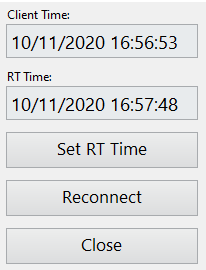
It does jump the same amount every time, regardless of what I set the clock to either. By that I mean that I can set the RT clock to whatever, and after a few seconds it jumps to 53 seconds ahead of 'real' time.
If I was an outside observer I would swear that it was synchronizing with some dodgy time server.
Bob_Schor
11-11-2020 02:03 PM
- Mark as New
- Bookmark
- Subscribe
- Mute
- Subscribe to RSS Feed
- Permalink
- Report to a Moderator
Quick, patent it -- you've discovered Time Travel (by 5 seconds, but may you could iterate it ...).
Seriously, you may be correct that there may be a "hidden synchronizer" somewhere ...
Bob Schor
11-11-2020 03:52 PM
- Mark as New
- Bookmark
- Subscribe
- Mute
- Subscribe to RSS Feed
- Permalink
- Report to a Moderator
Ha!
It is super suspicious... I might see if the problem persists if I connect over the USB network adapter.
I might see if support has anything to add...
Bob_Schor
11-11-2020 08:52 PM
- Mark as New
- Bookmark
- Subscribe
- Mute
- Subscribe to RSS Feed
- Permalink
- Report to a Moderator
When you figure it out, post your Solution (you're allowed to give yourself credit if you post it first). A very curious situation ...
Bob Schor
11-18-2020 10:23 AM
- Mark as New
- Bookmark
- Subscribe
- Mute
- Subscribe to RSS Feed
- Permalink
- Report to a Moderator
So the solution was to uninstall NI-Sync (which is included in the latest base image).
I don't really know anything about NI-Sync or these synchronisation protocols in general but it turns out that NI-Sync will set the OS clock to some arbitrary 'network time'.
There is a KB to disable this:
However, following the steps didn't work (the configgen tool errored with 'unrecognised arguments'). When I tried to query the parameter you are instructed to set (--getTKPluginConfig phc2sysEnable), I received the response ‘Command not supported for non-pxi devices’. So it seems that there may be some compatibility issue.
Anyway, uninstalling the driver completely allowed me to set the time.
I would argue that this is kind of a bug. If you install the standard image, you cannot set your OS clock.
Bob_Schor
11-18-2020 09:05 PM
- Mark as New
- Bookmark
- Subscribe
- Mute
- Subscribe to RSS Feed
- Permalink
- Report to a Moderator
Aha! I was never entirely clear what those "Sync" functions were for, so I'm not sure I ever installed them! Many thanks for persisting and figuring this out!
Bob Schor
