- Subscribe to RSS Feed
- Mark Topic as New
- Mark Topic as Read
- Float this Topic for Current User
- Bookmark
- Subscribe
- Mute
- Printer Friendly Page
Quick Drop and Class Name

 _carl
_carl
02-06-2023 12:33 PM
- Mark as New
- Bookmark
- Subscribe
- Mute
- Subscribe to RSS Feed
- Permalink
- Report to a Moderator
Let's say I have some API VIs in a palette, they all belong to the same class ("Demo Class.lvclass"):

I'd like to access them in Quick Drop, ideally by typing in the name of the palette/class that they're in:
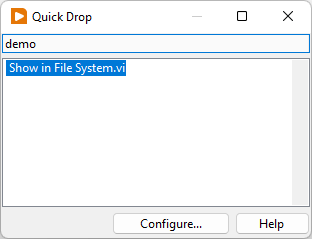
But....they don't show up. Worse yet, typing "Initialize" or "Close" won't get be there either because these names are too generic.
Is there a way to get these VIs to show up when searching for the class/library/palette that they're in?
I'd love to have a list that shows:
- "Demo Class.lvclass:Initialize.vi"
- "Demo Class.lvclass:Do Stuff.vi", etc.
(or "Do Stuff [Demo Class.lvclass]")
The only thing I can think of is to change the actual name in the palette to match the format above, but...that seems like a) a lot of hard-to-maintain work and b) less than ideal given that now they'll have uglier names in the palette.

 FireFist-Redhaw
02-06-2023 01:46 PM
- Mark as New
- Bookmark
- Subscribe
- Mute
- Subscribe to RSS Feed
- Permalink
- Report to a Moderator
One option would be to press Configure... on the Quick Drop popup and add custom block diagram shortcuts for each of those:

Saying "Thanks that fixed it" or "Thanks that answers my question" and not giving a Kudo or Marked Solution, is like telling your waiter they did a great job and not leaving a tip. Please, tip your waiters.

 Darren
02-06-2023 02:48 PM
- Mark as New
- Bookmark
- Subscribe
- Mute
- Subscribe to RSS Feed
- Permalink
- Report to a Moderator
If the VIs in your palette are members of a library or class, the library/class name will appear in brackets after the VI name in Quick Drop:
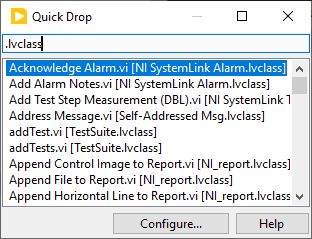
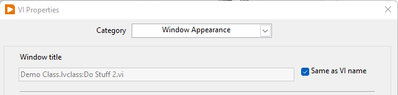
This assumes you have not modified the VI window titles and/or palette item short names in the .mnu file that defines the palette.
02-06-2023 03:49 PM
- Mark as New
- Bookmark
- Subscribe
- Mute
- Subscribe to RSS Feed
- Permalink
- Report to a Moderator
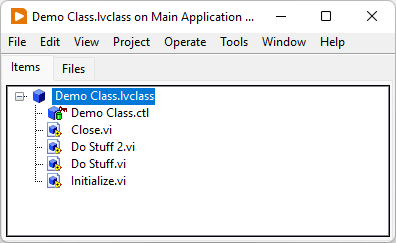
So that's what I would have expected/hoped for, but it doesn't seem to work that way. In this case, this was a new class I created to demonstrate the behavior, and I haven't changed the auto-generated palette (.mnu) for it, or the VI name.

Darren
02-06-2023 04:04 PM
- Mark as New
- Bookmark
- Subscribe
- Mute
- Subscribe to RSS Feed
- Permalink
- Report to a Moderator
Can you describe the procedure you used to generate the palette for the class?
02-06-2023 04:45 PM
- Mark as New
- Bookmark
- Subscribe
- Mute
- Subscribe to RSS Feed
- Permalink
- Report to a Moderator
@Darren wrote:
Can you describe the procedure you used to generate the palette for the class?
Sure.
1. Create new class directly in its own folder in instr.lib:
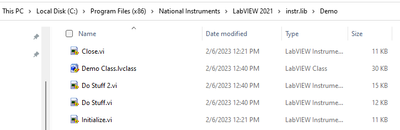
2. Restart LabVIEW.
3. Palette automatically shows up in "Instrument I/O"->"Instr Drivers"->"Demo" (the folder I created).
Looks like it didn't create a .mnu file.
Darren
02-06-2023 04:56 PM
- Mark as New
- Bookmark
- Subscribe
- Mute
- Subscribe to RSS Feed
- Permalink
- Report to a Moderator
It looks like auto-populated palettes (i.e. those that aren't defined by a .mnu file) don't grab the namespace for the VIs like all other palettes do. For example, the Agilent 34401 palette (also in instr.lib) does use a .mnu file, and as a result, it appears to get the namespaces in Quick Drop.
I'd say the workaround here would be for you to define the palette for your class in a simple .mnu file.
02-06-2023 06:05 PM
- Mark as New
- Bookmark
- Subscribe
- Mute
- Subscribe to RSS Feed
- Permalink
- Report to a Moderator
That doesn't seem to make a difference. I created a menu file by editing the palette through the palette editor (it auto-generates a .mnu file in the folder if you save your changes), and...after restart, still behaving the same.
Darren
02-06-2023 06:28 PM
- Mark as New
- Bookmark
- Subscribe
- Mute
- Subscribe to RSS Feed
- Permalink
- Report to a Moderator
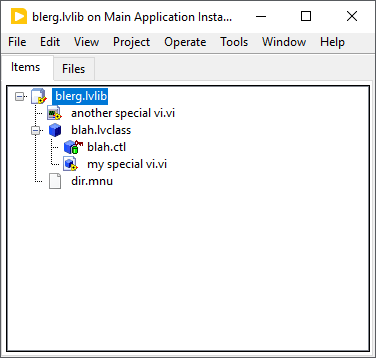
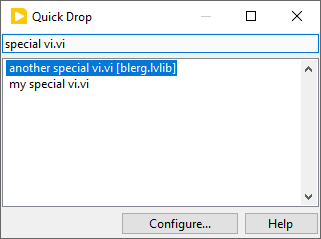
Ugh, what a mess. So it looks like a bug with auto-populating palettes conflicting with using a .mnu file. I managed to get Quick Drop to display the owning library name for a VI that is in an .lvlib in instr.lib, but not a VI that is in an .lvclass:
02-07-2023 11:11 AM - edited 02-07-2023 11:16 AM
- Mark as New
- Bookmark
- Subscribe
- Mute
- Subscribe to RSS Feed
- Permalink
- Report to a Moderator
Interestingly, I can't even reproduce that:

Edit: Also tried creating and adding the dir.mnu to the .lvlib, and selecting that as the default palette, saving, restarting LabVIEW. Same result: just has the VI name in Quick Drop.
